
Maker of close-up knitting tutorials
You film hands and stitches close up, so consider the camera angle and how the light falls while you’re actually knitting. Benel Europe and DROPS Design provide context for this type of use.


If you mainly film your hands, choose a light you can point at your knitting and check in a test recording that your moving hands don’t cast shadows over the stitches. Dimming, adjustable colour temperature and a stable mount help you tailor the setup to your worktable, but won’t automatically make yarn colours or details easier to see. A separate, adjustable video light can help brighten a darker area beside your hands.
You film hands and stitches close up, so consider the camera angle and how the light falls while you’re actually knitting. Benel Europe and DROPS Design provide context for this type of use.
You want colours to look consistent across different yarns or recordings. Match the light settings and camera white balance deliberately; Benel Europe and Adobe explain the factors involved.
You need to fit your camera, light and knitting into a limited space. Check in advance that the mount and power supply will work with your table and recording setup. NEEWER and Falcon Eyes product information shows examples of different setups.
A good fit if: you have space around your worktable and want to point the light at your knitting, using the phone holder.
Keep in mind: the tripod legs and shadows cast by your hands; check that they stay out of shot. According to NEEWER, the NEEWER RL-18 set has a 45 cm ring and filters for 3200 K or 5600 K, rather than continuously adjustable colour temperature.
A good fit if: you want to match the light’s colour to changing ambient light and have a suitable stand, or are happy to choose one separately.
Keep in mind: according to the Dutch distributor, the Falcon Eyes DVR-300DVC has dimming control and a range of 3000–7000 K, but the stand and optional battery pack are sold separately.
A good fit if: part of your work surface stays dark and you want to brighten that specific area beside your hands.
Keep in mind: a small video light won’t illuminate as much as a large ring light. Ulanzi lists a fixed colour temperature of 5500 K for the standard VL49; check how it lights your own work surface.
| Buying concern | What to look for | Who is this most relevant to? |
|---|---|---|
| Stitch visibility | Make a test recording while knitting. Check that the stitches remain visible as your hands move and that the light fits outside the frame. | When I film close-ups, I want to make sure my hands don’t obscure the stitches. Consumers who prioritise clearly visible stitch details make up around 36% of people with these buying concerns. |
| True-to-life yarn colours | Check the adjustment range of the exact model and match the camera’s white balance to the lighting you use. | When I compare different yarns or recordings, I want to match the colour of the light and the white balance. Consumers who prioritise true-to-life yarn colours make up around 29% of this group. |
| Mounting around the worktable | Check what’s included in the set, the mounting point and the space around your table and camera. | With a small table, I want to keep my work surface clear and position the camera and light to fit. Consumers who prioritise unobstructed mounting make up around 21% of this group. |
| Complete set and accessories | Read the contents list and check separately whether a stand, phone holder, mains power supply and any battery are included. | When I want to get set up quickly, I want to know in advance which parts I still need. Consumers who prioritise a simple, complete set make up around 14% of this group. |
Light that illuminates a face evenly doesn’t guarantee that your moving hands will leave the stitches unobstructed.
Test the camera angle and light position while moving your hands. If an area stays dark, consider adding a separate light that you can point where needed.
Sets vary in the mounting equipment and power supply they include. According to the Dutch distributor, the stand and optional battery pack for the Falcon Eyes DVR-300DVC are sold separately.
Compare the contents list for the exact model with the equipment you already have for your worktable.
Power and lighting controls can vary between versions, even when part of the model name is the same.
Check the full model name and its specifications before comparing models or accessories.
The RL-18 is an example of a larger ring light set with a floor stand and phone holder for smartphone recording.
The DVR-300DVC is a reference point if you want adjustable light colour and have your own stand or want to choose one.
The LR150 Air is an example of a portable, inflatable ring light as an alternative to a permanent home studio setup.
The standard VL49 is a small video light for brightening part of your knitting, rather than a large ring light.
The Ring Light is a reference point for an adjustable ring light with a desk clamp, although Elgato says this product has been discontinued.
This selection includes ring lights for smartphone recording and small video lights that you can point separately at your work surface. Compare the mounting options, lighting controls and included accessories with your own camera setup.
 Image unavailable
A ring light set for smartphone recording. The product description lists a tripod and phone holder.
10-inch ring; 63-inch tripod; phone holder; 10 brightness levels and 3 colour settings.
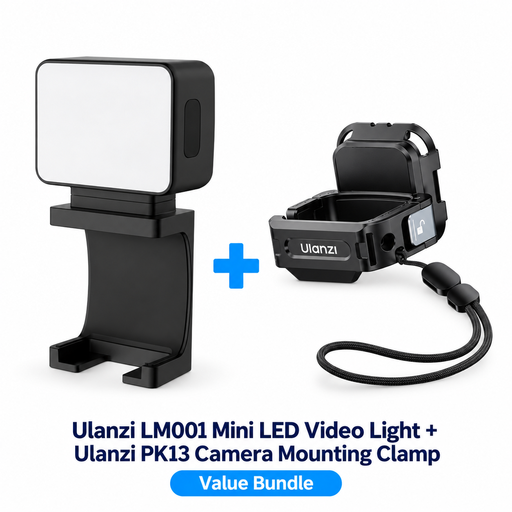 Image unavailable
A separate mini video light for anyone looking for an extra light source for the camera setup mentioned.
The product information lists a built-in battery, a magnetic light and a 1/4-inch thread on the mounting clamp. The bundle name specifies DJI Osmo Pocket 3.
 Image unavailable
A compact video light that can be positioned separately, for adjusting the light colour when filming a work surface.
Range of 2500 K–9500 K; rear magnet; 2000 mAh battery. The product description recommends using a standard 5V adapter. Avoid fast chargers with a higher voltage and use in damp conditions.
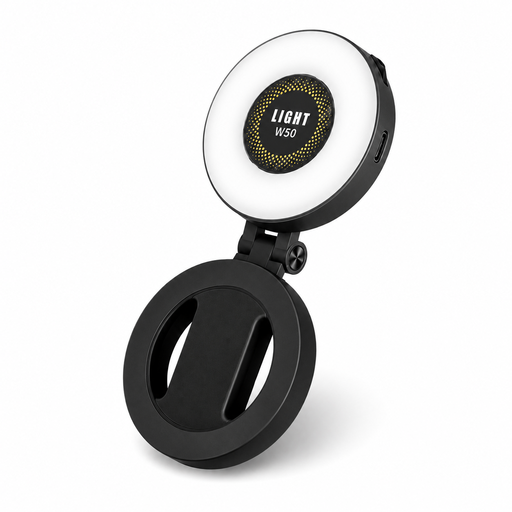 Image unavailable
A magnetic fill light for smartphone videos. The product title states that it’s compatible with iPhone and Android.
The title lists CRI95+, a 360° LED strip and a mirror.
 Image unavailable
A small ring light that, according to the product description, attaches directly to a smartphone.
4-inch ring; 3000 K–7000 K; 5 brightness levels and 3 colour settings.
No. Position the light and camera so you can see the stitches while your hands move. Placing the camera in the centre is one possible ring light setup for someone speaking directly to camera, but it isn’t essential when filming a work surface.
Keep your lighting setup as consistent as possible and match your camera’s white balance to the light you’re using. Check the result in your recording: adjustable colour temperature lets you make changes, but it won’t automatically correct an inaccurate white balance. Adobe explains how white balance affects the colours shown.
Check the contents list for the exact version and make sure a stand, phone holder and power supply are included. The NEEWER RL-18 set lists a stand and phone holder among its accessories. According to the Dutch distributor, the stand and optional battery pack for the Falcon Eyes DVR-300DVC are sold separately.
A CE mark means the manufacturer declares that the product meets the relevant EU requirements for which the mark is required; the requirements that apply also depend on the specific version. Business.gov.nl points out that CE is not a quality mark, so it doesn’t prove that a light will illuminate your knitting well.
For a standard online purchase by a consumer, you generally have a statutory cooling-off period of up to 14 days after delivery, with some exceptions. A product must also meet the standard you could reasonably expect when used normally. ACM ConsuWijzer explains that your statutory rights exist alongside any manufacturer’s guarantee.