
PC player who enjoys key-based rhythm games
For example, you play osu!mania and want to choose a suitable keyboard layout for your desk. The osu! wiki lists keyboard controls as a play style.


First, match your choice to the input options supported by your rhythm game on your platform: a keyboard suits key-based PC games, a gamepad is suitable only if the game supports it, and a drum may work with Taiko on Switch. Then consider the button layout, connection, desk space and the noise of repeated inputs. A specialist controller won’t necessarily be more accurate for your game.
For example, you play osu!mania and want to choose a suitable keyboard layout for your desk. The osu! wiki lists keyboard controls as a play style.
You want to use one handheld controller, as long as your rhythm game and platform actually support that input. Microsoft describes support for Windows and Xbox for the Xbox Wireless Controller.
You want to play Taiko on Switch using physical drum strikes, and check whether the controller and playing noise are suitable for your workspace. HORI describes a drum controller for Taiko no Tatsujin: Rhythm Festival on Switch.
Start with the game, platform and input method you want to use. Then choose a model that suits your desk and the space where you play.
Choose this if: you play a key-based PC rhythm game and want to set up the keys yourself.
Trade-off: a compact layout takes up less space, but gives you fewer keys for other tasks.
Choose this if: your game supports gamepad input and you want to use the controller for other games too.
Trade-off: a controller working with a device doesn’t automatically mean that every rhythm game supports all its functions.
Choose this if: you want a dedicated button layout and the game accepts input from your chosen controller.
Trade-off: check its placement and dimensions on your desk; a general platform mode doesn’t prove that it works with a specific game.
Choose this if: you want to play Taiko no Tatsujin: Rhythm Festival on Nintendo Switch using physical strikes.
Trade-off: a drum needs space and involves physical strikes; don’t assume the Switch model will work on other platforms.
| Concern | What should you check? | Who does this matter most to? |
|---|---|---|
| Game and platform compatibility | Make a note of your game, platform and preferred input method, then check whether that specific combination is supported. | I want to be sure the controller works with my game before choosing. Around 29% of consumers put game and platform compatibility first. |
| Predictable timing | Check the available connection and test your full setup, including audio. | If inputs don’t seem to register when expected, I want to find out why. Around 23% of consumers give timing and input testing top priority. |
| Desk space and hand position | Compare the dimensions and button layout with your available space and usual hand position. | I need my workspace to have room for both work and play. Around 18% of consumers choose mainly based on desk comfort and hand position. |
| Noise in a shared home office | Check the switch type or try a drum in a similar space. | If other people are in or near my workspace, the noise of repeated inputs is a consideration. Around 18% of consumers give greater weight to workspace noise. |
| Specialist play style | Choose a model suited to your game and platform, and check which accessories are included. | I specifically want an arcade- or drum-style controller and accept that it may be designed for a more specialised play style. Around 12% of consumers prioritise this specialist gaming experience. |
A device may connect to a PC while an individual game only partially supports controller input.
Check both support for your device and the input options in your version of the game. If support is partial, make sure the controls you need are available.
The model described by HORI is designed for Taiko no Tatsujin: Rhythm Festival on Switch. Seeing the same game title on another platform doesn’t confirm that this drum will work with it.
Check the full model name and the platform it’s designed for. You may need a different controller for another platform version.
Perceived delay may also be related to audio or other parts of your setup.
Test your full gaming setup and find out where the delay is coming from before replacing a controller based solely on a speed claim.
Logitech G describes clicky switches as audible, which may matter if you share your workspace.
Assess the noise of the exact model in a similar space. Don’t assume a noise level without a suitable measurement.
Gamepads for Xbox and Windows PC, among other platforms; worth considering if your rhythm game supports gamepad input.
DualSense gamepads for PS5 and supported PC applications.
Arcade controllers for anyone looking for a dedicated button layout.
Game-specific drum controllers, including a model for Taiko no Tatsujin: Rhythm Festival on Switch.
Compact keyboards for players who want to configure key activation and repeated input.
This selection includes compact keyboards for key-based PC rhythm games and gamepads for game and platform combinations that support gamepad input.
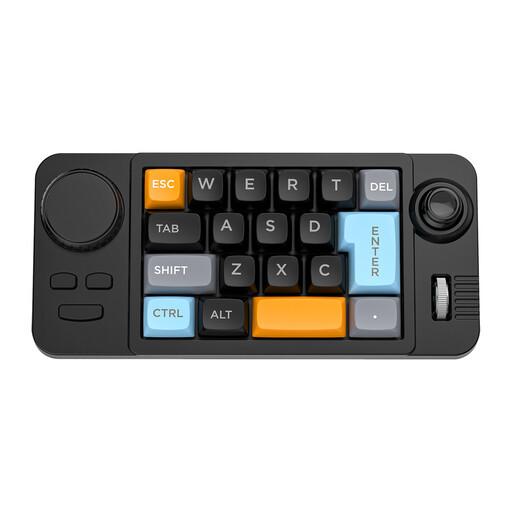 No image available
For key-based PC rhythm games; check whether 19 keys and programmable controls suit the layout you need in the game.
The title lists a joystick, rotary knob, macro programming, RGB lighting and hot-swappable keys. Dimensions: 202 × 94 × 38 mm; connects via USB-C cable.
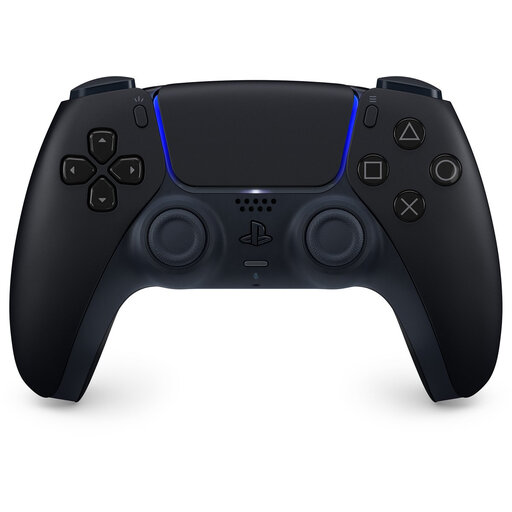 No image available
An option if your rhythm game supports gamepad input and you’re looking for a controller for PS5 or a supported PC setup.
The description lists Bluetooth or USB-C connectivity and controls with buttons and sticks. Haptic feedback and adaptive triggers depend on game support.
 No image available
A good fit for a gamepad setup if your rhythm game supports the controller on Xbox or Windows PC.
The description lists Bluetooth and USB-C, a hybrid D-pad and remappable buttons.
 No image available
A gamepad option if your rhythm game supports its input on your chosen device.
The product name lists PC, NS, NS2, iOS and Android. The description lists wired and wireless connectivity, six programmable buttons and adjustable joystick resistance.
 No image available
An option for key-based PC games if the QWERTY US layout suits your key bindings and you’re looking for a compact design.
The description lists 61 keys, RGB lighting and a membrane design with a mechanical feel. Dimensions: 29.2 × 10.1 × 3.8 cm.
No. As well as checking the PC connection, make sure your version of the game supports the controller input you want to use. Some rhythm games only partially support controllers, so check which inputs are available during play.
First, check whether the delay is related to input, audio or stuttering during play. The osu! wiki describes latency in a gaming setup; simply buying another controller won’t identify the cause.
For the Taiko drum controllers mentioned, HORI recommends checking the drumhead and rim, among other things, and tapping them gently with the supplied sticks. HORI warns that using too much force may cause damage or injury; follow the instructions for the exact model.
According to ACM ConsuWijzer, ordinary online product purchases usually come with a statutory cooling-off period of up to 14 days after delivery; check whether an exception applies. You’re also entitled to a statutory guarantee: if a product used normally breaks down sooner than you could reasonably expect, the seller must offer an appropriate solution.