
Player on short bus journeys
Wants to use a small handheld with little preparation and play games straight away while travelling, perhaps with headphones.


For short bus journeys with minimal setup, a Super Pocket with built-in games is a good fit. If you want to use cartridges you already own, make sure you choose the exact format. Nintendo Classics requires the right app and membership in advance. Evercade lists a 4.3-inch screen for the EXP-R, compared with 2.8 inches for the TAITO edition, according to HyperMegaTech! The Anbernic option requires extra care over game files and where they come from.
Wants to use a small handheld with little preparation and play games straight away while travelling, perhaps with headphones.
Wants to check in advance whether their existing Game Boy cartridges will fit, or deliberately chooses separate Evercade cartridges.
Is looking for specific Nintendo collections and wants to check which apps and membership are needed before setting off.
Best for: short journeys when you want to pick a game straight from the selection included with one edition.
Trade-off: according to HyperMegaTech!, the TAITO edition includes 18 games and has a 2.8-inch screen; expanding your collection may require separate Evercade cartridges.
Best for: anyone who wants to use the Evercade cartridge library and have more screen space.
Trade-off: Evercade lists a 4.3-inch screen and four to five hours of play time; the EXP-R has no TV output, and the contents of the bundle vary by version.
Best for: anyone who specifically wants to play the classic Nintendo games available.
Trade-off: Nintendo says access depends on the app and membership; GameCube Classics is only available for Switch 2.
Best for: anyone looking for flexibility and microSD storage who is happy to manage files and settings themselves.
Trade-off: Anbernic lists a stated battery life of eight hours; file support does not prove that games are included or have been obtained legally.
Best for: anyone who wants to keep using their own Game Boy, Game Boy Color or Game Boy Advance cartridges.
Trade-off: Analogue lists direct support for those three cartridge families; adapters are needed for the other systems mentioned.
| What to consider | What should you check? | Who does this matter most to? |
|---|---|---|
| Games with no setup | Check the exact edition and its built-in games; expanding your collection may require a separately sold cartridge. | If I want to start playing straight away on a short journey without relying on a new download while travelling, I want to know in advance which games are already available. Around 30% of consumers give immediate access top priority. |
| Offline access and game rights | Check whether a game is built in, on a compatible cartridge or available through an app; don't use files from an illegal source. | Anyone who wants to know in advance how their chosen games are available and whether they were obtained legally will benefit from checking before setting off. Around 30% of consumers prioritise access to games and where they come from. |
| Size and play time | Compare the screen size, dimensions, headphone socket and charging options with your journey. | If I'm carrying a handheld in a small bag but also want to know whether its stated play time will suit my journey, size and charging matter. Around 20% of consumers choose mainly on portability, screen and play time. |
| Cartridges you already own | Note the exact cartridge format and check whether you need an adapter. | Anyone who already owns physical games will want to make sure the specific cartridges fit the handheld before buying. Around 10% of consumers prioritise reusing their existing cartridges. |
| Nintendo Classics | Check the collection you want, the required app and the right membership for your chosen system. | If I'm choosing a particular classic Nintendo collection, I want to know in advance which system and membership it is available on. Around 10% of consumers give specific Nintendo games priority. |
A supported file format or cartridge slot doesn't tell you which games come with the handheld or what rights you have to game files.
Compare the exact games included with the ones you want to play, and check the source and rights for any files you own.
You may need to buy additional games on separate cartridges.
The TAITO edition lists 18 specific arcade games; according to HyperMegaTech!, the Rare edition has a different selection of 14 games.
Check the full edition name and the built-in games, not just the name Super Pocket.
A different edition or an additional cartridge may require a separate purchase.
Nintendo says GameCube Classics is only available for Switch 2. Access to other Nintendo Classics depends on the collection, app and membership terms.
Check the game you want, the required membership and the compatible system before buying.
Access to some collections may require a suitable paid membership.
A product description alone does not automatically confirm the exact version, specifications or product safety of an offer.
Compare important specifications with the manufacturer's information, and check with the seller which version and safety information apply to the offer.
Makes Super Pocket editions with their own selections of built-in retro games and support for Evercade cartridges.
Offers handhelds for anyone who wants to use physical Evercade games.
Nintendo Classics is relevant for travellers looking for the classic Nintendo collections available.
The RG35XX H is a Linux handheld with microSD storage for your own compatible game files.
The Pocket is designed for owners of original Game Boy, Game Boy Color and Game Boy Advance cartridges.
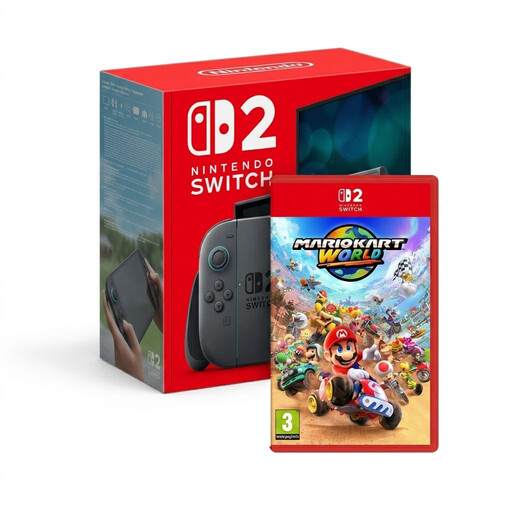
This product selection is relevant if you want to use a Switch 2 in handheld mode while travelling and are also considering Nintendo Classics. For Classics, check which app you need and the required membership.
 No image available
Suited to anyone who wants to use the Switch 2 in handheld mode and check in advance which Nintendo Classics collection they can access.
The product name lists a Switch 2 console and Mario Kart World. Nintendo says GameCube Classics is only available for Switch 2; access to Nintendo Classics depends on the relevant app and membership.
If the built-in TAITO games are right for you, choose the corresponding Super Pocket edition. To expand your collection, check which Evercade cartridge you're buying; for Nintendo Classics, arrange the right app and membership in advance.
According to their manufacturers, the TAITO Super Pocket and Evercade EXP-R have a 3.5mm headphone socket and charge via USB-C. Treat the stated battery life as a point of comparison, not a guaranteed play time, and check which charging cable or accessories you'll need.
The seller is responsible under Dutch statutory warranty law for a faulty product. ACM ConsuWijzer says the seller must resolve problems that arise during normal use; the appropriate solution depends on what you could reasonably expect from the product.
No. The Dutch government says that downloading from an illegal source is prohibited and that you may only make a backup copy of computer programs and games. Support for an emulator does not in itself give you any rights to games.
The Dutch government points out that electronic devices sold in the EU must meet safety requirements and carry a CE marking. Also check who the seller is for the specific offer; a website being in Dutch does not tell you where the seller is based.