
Players with a specific system
You’re looking for a controller that works with your console or PC and your game. Models for Switch, Xbox and PlayStation aren’t automatically interchangeable, so check the platform list for the exact version.


First, choose a controller that works with your system and game. Then decide whether you’d prefer a joystick, separate buttons or a compact six-button pad. In a dark room, lighting effects aren’t the same as illuminated button labels: 8BitDo describes the Arcade Controller for Xbox as having an RGB light ring, but this doesn’t confirm that the buttons themselves light up.
You’re looking for a controller that works with your console or PC and your game. Models for Switch, Xbox and PlayStation aren’t automatically interchangeable, so check the platform list for the exact version.
You want to be able to find the controls, but a lighting effect doesn’t necessarily mean the button labels are illuminated. 8BitDo describes one Xbox model as having an RGB light ring.
You can choose between a joystick with arcade buttons, a six-button pad or separate buttons. Retro-Bit describes BIG6 versions with different connections.
Choose this if: you’re looking for a physical joystick and arcade buttons. 8BitDo lists Switch and Windows compatibility for the Arcade Stick; HORI lists PS5, PS4 and Windows 11/10 for version SPF-038U.
Trade-off: a stick takes up more space than a compact pad; the models mentioned don’t confirm that the arcade buttons are illuminated.
Choose this if: you play on Xbox Series X|S, Xbox One or Windows and would prefer not to use a physical joystick. 8BitDo describes the Arcade Controller for Xbox as having an RGB light ring.
Trade-off: the light ring doesn’t confirm that the button labels light up, so check exactly what is illuminated.
Choose this if: you prefer a six-button layout and D-pad to a large joystick. Retro-Bit describes BIG6 versions with connections including USB and the original Mega Drive connector.
Trade-off: connections vary by version; a status LED doesn’t mean the arcade buttons are illuminated.
| Consideration | What to look for | Who is this for? |
|---|---|---|
| Compatibility | Check the full model name, supported systems and connection or input mode. | I want to know whether the controller works with my console or PC and game; around 29% of consumers prioritise compatibility. |
| Visibility in the dark | Check which part lights up and whether the brightness is adjustable; don’t rely on ‘RGB’ alone. | When I play in a dark room, I want to be able to find the controls without relying on a lighting effect; around 24% of consumers prioritise visibility. |
| Control layout | Compare the joystick, D-pad and separate buttons with the controls used in your games. | I choose based on how I want to move and press buttons; around 23% of consumers focus mainly on the control layout. |
| Space and connection | Measure the available space and decide whether you want to play wired or wirelessly. | With limited room to play, I want a controller that fits my space and has a practical cable route; around 12% of consumers prioritise this consideration. |
| Parts and settings | Check what’s included in the box and whether your specific setup needs an adapter; also check which settings affect how it works. | I want to know in advance what I need to use my setup; around 12% of consumers prioritise parts and settings. |
For the 8BitDo Arcade Controller for Xbox, the manufacturer describes an RGB light ring. That doesn’t, on its own, mean the buttons light up clearly.
Check the product information for the exact version to see which part lights up and whether the setting suits your preferences.
Arcade controllers can vary by version in their platform support, connection and input mode. A similar brand or model name doesn’t guarantee that the controller will work with your system.
Before buying, compare the full version details with the official platform list and the connections available on your setup.
If you choose the wrong version, you may need a different controller. Only use an adapter if it’s supported for your particular combination.
8BitDo describes different controller ranges for different systems: a joystick model for Switch and Windows, and a separate Xbox controller with buttons only.
The BIG6 range is designed for those who prefer a compact six-button arcade pad with a D-pad.
According to HORI, the Fighting Stick Mini SPF-038U has a compact joystick and an eight-button layout for PS5, PS4 and Windows 11/10.
The F500 V2 is a larger, wired arcade stick for those who want to compare supported platforms and input modes.
According to SNK, the NEOGEO Arcade Stick Pro is for those looking for a joystick and built-in NEOGEO fighting games.
These Joybuy products are gamepads for the systems listed for each version. Check that their button layouts suit the retro games you play.
 Image unavailable
An option if you’re looking for a wireless gamepad for one of the listed systems.
The product name mentions Bluetooth 5.2, 2.4G wireless, dual vibration and a phone holder, with compatibility for Android, iOS, PC, Smart TV, PS3 and Switch.
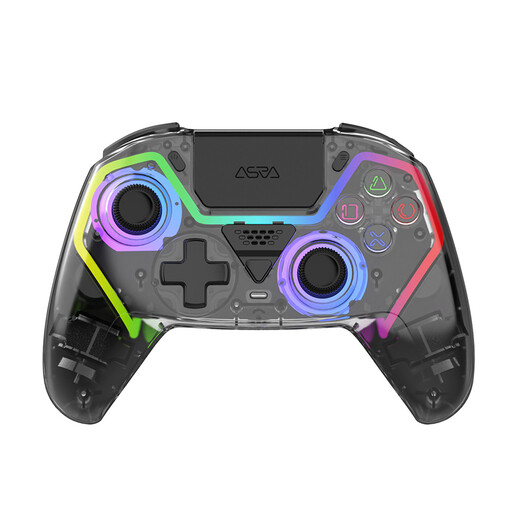 Image unavailable
An option if you’re looking for a wireless controller for PS5 with programmable buttons.
The product name mentions Hall Effect joysticks, RGB lighting, programmable buttons and a 1000mAh battery.
 Image unavailable
An option if you’re looking for a controller for Switch or PC and want to use the motion sensor mentioned.
The product information lists Bluetooth 4.0, turbo, dual vibration, a 6-axis gyroscope and an included USB-C charging cable.
 Image unavailable
An option if you want to customise the controls for one of the listed systems.
The product name mentions interchangeable joysticks, buttons and D-pads. The product description lists wired, wireless and Bluetooth connectivity, and mentions PC, Nintendo Switch, Switch 2, Steam and Android.
No, unless the product information confirms this separately. 8BitDo describes the Arcade Controller for Xbox as having an RGB light ring; check the exact version before expecting illuminated button labels.
According to 8BitDo’s instructions, set the connection switch to BT and the mode switch to S, start pairing, then select ‘Controllers’ on the Switch followed by ‘Change Grip/Order’. These steps apply to the Arcade Stick and don’t automatically apply to other 8BitDo models.
Check the mode and receiver for the exact version. The manual for the Retro-Bit BIG6 2.4GHz version describes different input modes and LED colours; those instructions don’t automatically apply to the wired BIG6.