Choose a monitor based on what you do every day: view code and browser windows side by side, assess images and interface colours, or connect and charge a laptop with a single cable. A higher resolution can give you more room for windows, but it doesn’t prove that your auction website works well on mobile. Test responsive layouts at different viewport sizes and on real devices too. Then compare the resolution, colour specifications, adjustability and USB-C features of the exact model with your computer and workspace.
Who is this monitor comparison for?
Developer who works with multiple windows
While building your auction website, you switch between code, the browser and design assets, and want to assess the layout at different screen widths. MDN Web Docs explains how CSS media queries can adapt layouts to viewport characteristics; Chrome for Developers describes device simulation as a first approximation of how a page appears on a mobile device.
Auction page designer
You assess images, text and interface colours, and want to know which colour space and calibration the manufacturer specifies for the exact monitor model. BenQ and ASUS publish model-specific colour and calibration specifications; treat these as manufacturer information, not independent measurements.
Laptop user with a dedicated workspace
You regularly connect a laptop and peripherals, so you’re comparing video over USB-C, charging power and monitor adjustability. Check the specifications for the exact model, as well as your laptop’s video and charging capabilities.
Which monitor features matter?
27-inch 4K work monitor
A good fit if: you often view code, design details and a browser side by side, and your computer can output 3840 × 2160.
Bear in mind: check that text scaling is comfortable and that 65 W USB-C Power Delivery is suitable for your laptop. BenQ specifies these figures for the PD2705U.
27-inch QHD design monitor
A good fit if: 2560 × 1440 suits your preferred screen layout and you value the colour specifications ASUS lists for the ProArt PA278CV.
Bear in mind: QHD has fewer pixels than the 4K models mentioned; check whether text and windows are comfortable to read in your workspace.
4K monitor that doubles as a laptop dock
A good fit if: you often connect a laptop and need more than 65 W of USB-C power. ASUS specifies 96 W for the ProArt PA279CRV.
Bear in mind: extra ports and charging features are only useful if you’ll use them; check your laptop’s requirements.
| What to consider |
What should you check? |
Who is this important for? |
| Workspace and responsive testing |
Compare the screen size and native resolution with your usual layout. Also test the auction page at different viewport sizes and on real devices. |
I want to use code, the browser and design assets neatly side by side, and check the mobile layout separately; around 36% of consumers give workspace and layout checks top priority. |
| Colour assessment |
Compare the stated sRGB coverage and any factory calibration for the exact model. Check which colour mode is selected. |
When I assess images and interface colours, I want to know what the manufacturer specifies for the particular screen; around 29% of consumers put colour assessment first. |
| Connecting and charging a laptop |
Check whether the laptop can output video through the relevant USB-C port, and compare its charging requirements with the monitor’s specifications. |
I want to connect my laptop at a dedicated workspace and get enough power at the same time; around 21% of consumers name laptop connectivity as their top priority. |
| Workspace and running costs |
Check the stand’s adjustment options and look at the energy label for the exact model. |
For my workspace, positioning and costs over the product’s lifetime matter more than features I won’t use; around 14% of consumers give workspace and costs top priority. |
What to consider when choosing
-
Assuming a 4K desktop monitor checks your mobile website
A desktop monitor can help you build and compare layouts, but device simulation is still only an approximation of how a page appears on a real mobile device. Issues that only show up on real devices may mean extra testing and remedial work.
Use responsive development tools as you build, and check key auction pages and bidding steps on real devices too.
-
Assuming USB-C guarantees video and suitable charging
A USB-C port doesn’t guarantee that your laptop can output video through it or receive enough charging power. The models reviewed specify different Power Delivery outputs.
Before buying, compare your laptop’s video output and charging requirements with the specifications of the exact monitor model.
Depending on your laptop’s ports, you may need a separate power supply, cable or connection.
-
Treating colour claims as independent measurements
BenQ states an average Delta E of no more than 3 for the BenQ PD2705U, while the Joybuy product copy reviewed uses the wording ‘2-10’. These are not independent measurements of a purchased unit.
Use BenQ’s model specifications as a starting point, assess colour-critical work in the appropriate colour mode, and don’t treat conflicting product copy as proven performance.
Brands and models to compare
BenQ
The PD2705U is a 27-inch 4K monitor worth comparing if colour settings and USB-C are part of your workflow.
- For the PD2705U, BenQ specifies 99% sRGB, a factory calibration report included in the box, and 65 W USB-C Power Delivery.
- Check that 65 W and video output over USB-C are suitable for your laptop. These specifications don’t automatically apply to other BenQ models.
ASUS
Within the ProArt range, the PA278CV and PA279CRV differ in areas including resolution and USB-C charging power.
- ASUS specifies QHD and 65 W USB-C Power Delivery for the 27-inch PA278CV; for the 27-inch PA279CRV, ASUS lists 4K and 96 W.
- The stated colour values come from the manufacturer. Choose based on the exact model and check that its resolution and charging features suit your laptop.
Dell
The UltraSharp U2725QE is a 27-inch 4K hub monitor worth comparing for a workspace with several connectivity needs.
- Dell lists a 120 Hz refresh rate and a Thunderbolt hub for the U2725QE.
- These features don’t automatically make the model better for responsive website development; consider whether you need them in your workspace.
Philips
The Philips 27E1N1800AE/00 is a 27-inch 4K option worth comparing for a dedicated workspace.
- Philips lists an IPS panel and a height-adjustable stand for this model.
- These features alone don’t determine whether it’s a better fit than a monitor with colour specifications or USB-C power suited to your workflow.
LG
The UltraFine 27UP850K-W is a 27-inch 4K monitor worth comparing if you’re looking for USB-C and an adjustable stand.
- LG lists 95% DCI-P3 as a typical value, USB-C charging up to 96 W and a height-adjustable stand.
- DCI-P3 coverage isn’t the same as an sRGB calibration measurement. Check the colour mode and whether the charging features suit your laptop.
Monitors at Joybuy
The Joybuy picks below are intended for a workspace used for coding, browser windows and design checks. Compare screen size and resolution with your preferred layout. If you’re using a laptop, check its video and charging requirements too.
 Image unavailable
Philips 27E1N1800AE/00 27-inch 4K UHD IPS monitor
An option for viewing code and browser windows on a 27-inch screen.
4K UHD, 3840 × 2160, IPS panel, 60 Hz and 4 ms. The product name lists HDMI, DisplayPort and a height-adjustable stand.
View at Joybuy
 Image unavailable
MSI Modern MD272UPHG 27-inch 4K UHD monitor
A 27-inch 4K option for viewing code, the browser and design side by side.
The product information lists 3840 × 2160, USB-C with 98 W Power Delivery, an adjustable stand and KVM. Check that video over USB-C and the charging power are suitable for your laptop.
View at Joybuy
 Image unavailable
Dell UltraSharp U2725QE 27-inch 4K monitor
An option for assessing multiple windows on a 27-inch 4K screen.
Dell lists 3840 × 2160, a 120 Hz refresh rate and a Thunderbolt hub for the U2725QE. Check which connections your workspace needs.
View at Joybuy
 Image unavailable
ASUS ProArt PA278CV 27-inch QHD monitor
A QHD option for coding and browser work if 2560 × 1440 suits your preferred screen layout.
ASUS lists 100% sRGB, factory calibration and 65 W USB-C Power Delivery. QHD has fewer pixels than 4K; also check your laptop’s video output and charging needs.
View at Joybuy
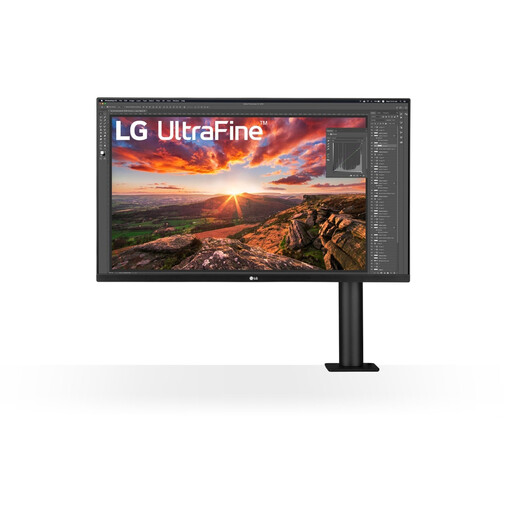 Image unavailable
LG 32UN880K 32-inch 4K monitor
A larger 4K screen for viewing code and browser windows in a dedicated workspace.
The product information lists 3840 × 2160, USB-C with 60 W Power Delivery and an adjustable monitor arm. Check that the charging power is suitable for your laptop.
View at Joybuy
Frequently asked questions
Can I check the mobile auction page using only a large monitor?
No. You can simulate browser widths and mobile viewports, but Chrome for Developers describes device simulation as a first approximation. Check important pages and bidding steps on real devices too.
What should I set up after connecting the monitor?
Set the native resolution and choose a text size that’s comfortable to read. For colour assessment, check which colour mode is selected. For USB-C, make sure your laptop supports video through the relevant port and that the charging power is sufficient.
Is a manufacturer’s warranty the same as your statutory rights?
No. According to the Dutch Government, when a consumer buys goods in the Netherlands, their statutory right to goods that conform to the contract is separate from a manufacturer’s or extended warranty; if there’s a problem, the seller is your point of contact. If you’re buying on behalf of an organisation, check which contractual and statutory terms apply to that buyer.
Do energy labelling rules for monitors apply in the Netherlands?
Yes. According to EUR-Lex, EU energy labelling rules for electronic displays also cover computer monitors, subject to the exceptions set out in the regulation. Compare the energy label and product information sheet for the exact model; the rules don’t require you to choose a particular energy class.
What can I do with an old monitor when I replace it?
According to the Dutch Government, you can return an old electrical appliance to a retailer when you buy a new, similar appliance, among other options. You can also take it to a designated collection point or your local council recycling centre.


