Who is this choice relevant to?

Creator of repeat product photos

You often photograph the same type of tin and want to be able to reproduce the background and framing. A fixed camera set-up is a practical place to start. Canon Europe explains how a tripod can help you frame product photos consistently.

Photographer of shiny tins

You want the decoration to remain clear without distracting hotspots on the tin. So consider the lighting set-up alongside the camera; broncolor discusses how light placement affects reflections on shiny objects.

Collector of decorative details

You want to capture small motifs as well as an overall view. Check the magnification of the specific lens you’ll be using, and allow for the space you need to light the tin. Adobe explains how product photos can show details such as shape and colour.

Which buying concerns matter?

Buying concern What to look for Who considers this more important?
Reproducing the same framing Check that the camera and lens give you the framing you want with your tripod set-up. Keep the tin and backdrop in fixed positions. When I take a series of photos, I want the tin, backdrop and camera position to stay the same; around 36% of consumers prioritise repeatable compositions.
Controlling reflections Allow room for diffused lighting, reflectors or flags. Review test shots of your own tin before settling on the set-up. I want the decoration on a shiny tin to be clearly visible, so I pay attention to the lighting set-up; around 29% of consumers prioritise controllable reflections.
Capturing small motifs Compare the maximum magnification of the exact lens and test the framing from the distance you want to shoot at. Lens specifications don’t automatically apply to other models. If small decorations need to be clearly visible, I want to know what the chosen lens can capture from my shooting distance; around 21% of consumers prioritise detail.
Choosing a complete kit Check which lens is actually included and whether the chosen set-up suits your preferred framing and way of working. I want to know in advance whether I can get started with the camera and accessories included; around 14% of consumers focus mainly on finding a complete kit they can use straight away.

Common buying mistakes

  • Choosing a more expensive body to keep compositions consistent

    A different body won’t automatically keep the tin, backdrop and camera position in the same place. For repeat product photos, a fixed camera set-up helps you reproduce the framing.

    Try using a tripod first and mark the positions of the camera, tin and backdrop. Check the framing before taking a series of photos.

  • Assuming every kit lens offers enough magnification

    Maximum magnification depends on the specific lens and may also vary with the focusing mode. The camera body’s name alone won’t tell you whether a small motif will appear large enough in the frame.

    Read the specifications for the exact lens included or selected, then compare them with the framing you need.

  • Using more lights to make reflections disappear

    On a shiny surface, the position of the lights and flags affects which reflections are visible. Adding more light sources won’t automatically remove distracting reflections.

    First move or soften one light source and see where it reflects on the tin. Test the adjustment with the actual tin.

Camera brands to consider

Canon

The EOS R50 is a mirrorless camera with an interchangeable lens. The kit reviewed includes an RF-S 18-45mm lens.

  • Canon lists an RF mount for the EOS R50.
  • The magnification figures for the RF-S 18-45mm apply to that lens, not to all Canon lenses or to the body on its own.

Panasonic

The LUMIX DC-FZ82D is a compact camera with a fixed lens, for those who don’t want to choose a separate lens.

  • Panasonic describes features such as Post Focus and Focus Stacking for this model.
  • Check whether the fixed lens frames the whole tin and the details you want in your workspace. These features won’t remove distracting reflections.

Sony

The α6400 is a mirrorless camera with an E-mount, for those who want to choose a lens for each shot.

  • Sony specifies an E-mount and RAW shooting for the ILCE-6400.
  • How well you can capture small decorative details also depends on the lens you choose; the camera specifications alone don’t tell you the magnification available for close-ups.

Nikon

According to Nikon, the Dutch Z50II kit reviewed includes a NIKKOR Z DX 16-50mm lens.

  • The listed kit contents make it clear which lens you’ll start with.
  • Assess the lens separately for capturing small details on the tin. Autofocus claims for moving subjects don’t automatically make that feature a deciding factor for a stationary tin.

Fujifilm

The X-S20 is a mirrorless camera for those who want to use manual shooting settings and RAW files.

  • Fujifilm specifies M exposure mode and RAW for the X-S20.
  • In-body stabilisation is no substitute for a tripod if you want to reproduce the exact same camera position. Assess the lens and kit contents separately.

Cameras at Joybuy

This selection includes compact cameras and mirrorless cameras with zoom lenses. Check each model to make sure its lens and features suit the framing and set-up you want.
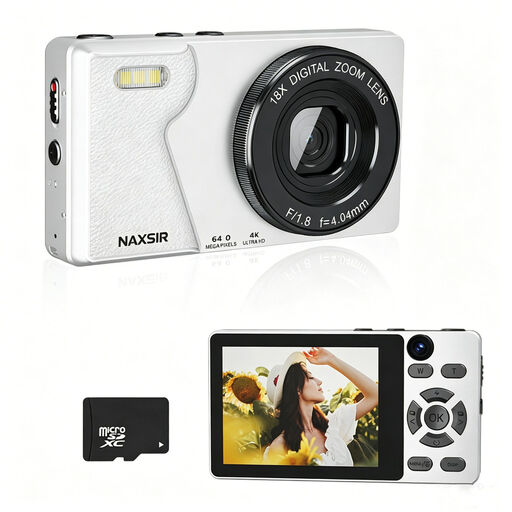
NAXSIR Digital Camera 4K Ultra HD, 64 MP, 18x digital zoom

NAXSIR Digital Camera 4K Ultra HD, 64 MP, 18x digital zoom

The listed autofocus and digital zoom may be useful if you’re looking for a compact camera. Check whether you can achieve the framing you want with your set-up.

The product name lists 4K Ultra HD, 64 MP, 18x digital zoom, autofocus and an included 32 GB memory card.

Joybuy

Sony ZV-E10 with 16-50mm zoom lens, black

Sony ZV-E10 + 16-50mm Zoom Black

The included zoom lens offers a choice of focal lengths, so you can adjust the framing from a fixed set-up.

The product description mentions Product Showcase Setting, which switches focus from your face to your subject. It also states that the adapter and charger are not included.

Joybuy

Sony Alpha A6100 with 16-50mm f/3.5-5.6 OSS II lens

Sony Alpha A6100 + 16-50mm f/3.5-5.6 OSS II

This kit includes a zoom lens, so you can adjust the framing without moving the camera set-up.

The product name lists a 16-50mm f/3.5-5.6 OSS II lens; the product description mentions E-mount.

Joybuy

Sony ZV-1 compact camera

Sony ZV-1 compact camera

A compact camera with a fixed lens may suit you if you’d rather not choose a separate lens. Check that the lens frames the tin and the details you want.

The product description lists 24–70mm and 2.7× optical zoom.

Joybuy

Frequently asked questions

How can I keep the framing the same in every photo?

Put the camera on a tripod and keep the tripod, tin and backdrop in fixed positions. Canon Europe explains that a tripod can help you frame product photos consistently; still, check the framing before taking a series.

Do I need to buy a different camera to photograph a shiny cookie tin?

Not just because it’s shiny. The position of light shapers, reflectors and flags also affects which reflections are visible. First, test a set-up with your own tin.

How can I avoid changes in brightness between shots?

Keep the lighting consistent and check that the aperture, shutter speed and ISO are fixed. Sony notes that on some cameras, ISO can also be set automatically in M mode.

Does every kit lens offer enough magnification for small decorations?

No. Compare the specifications of the exact lens with the framing you want. For the RF-S 18-45mm at 45 mm, Canon lists different maximum magnifications for autofocus and manual focus.

What about warranty rights and the online cooling-off period in the Netherlands?

When you buy as a consumer, you’re entitled to a product that is fit for purpose; the Dutch government does not specify a fixed statutory warranty period. For an online consumer purchase, ACM ConsuWijzer says you generally have up to 14 days after delivery to change your mind, with some exceptions. Check whether you’re buying as a consumer or a business, and who the seller is.
