What should you look for when choosing one?
First, decide whether you’ll be using a dedicated camera or a smartphone. If you’re using a camera, check model compatibility before choosing between a cable, wireless control or an app.
| What to consider |
What to look for when buying |
Who is this important for? |
| Camera compatibility |
Check your camera’s full model name and the official compatibility information. If you’re choosing a cable, check the connector and whether you’ll need an adapter. |
I want to use my own camera without buying an accessory that doesn’t fit my camera body. Around 33% of consumers in this situation prioritise compatibility above all else. |
| Taking a shot without touching a fixed setup |
Compare a compatible cable with control via a camera app. If you choose a cable, check that it’s long enough for your workspace. |
With a fixed tripod setup, I want to take a picture without moving the camera. Around 27% of consumers prioritise keeping their setup undisturbed. |
| Freedom to move while arranging your subject |
Check whether your camera supports wireless control and test the connection where you’ll be taking photos. A stated range isn’t guaranteed in every workspace. |
If I move the toy or background between shots, I want to be able to take a picture from somewhere else. Around 20% of consumers prioritise this freedom to move around. |
| Smartphone control |
Check that the button works with your phone. If you’re choosing a tripod, check that your phone fits in the holder, including with its case on if necessary. |
I take photos with my phone and want to set it up hands-free and control it remotely. Around 20% of consumers prioritise smartphone control above all else. |
Joybuy products for remote control and smartphone photography
This selection includes smartphone setups with remote controls and a Bluetooth remote control for the Osmo cameras listed. If you have a different camera body, check separately whether the remote control works with it.
 No image available
KINSI selfie stick with tripod, 170 cm
The Bluetooth remote control and built-in tripod are designed for hands-free smartphone photography.
According to the product title, the phone holder is suitable for smartphones measuring 4.7 to 6.0 inches and can rotate 360°.
Joybuy
 No image available
KINSI foldable smartphone tripod with Bluetooth remote control
The product description mentions remote control of your phone’s camera and a tripod for smartphone photography.
The tripod folds up and is height-adjustable.
Joybuy
 No image available
Osmo Action GPS Bluetooth remote control
The product information lists remote control for the Osmo models shown.
The title states that it’s compatible with Osmo Action 4, Osmo Action 5 Pro, Osmo 360 and Osmo Action 6.
Joybuy
 No image available
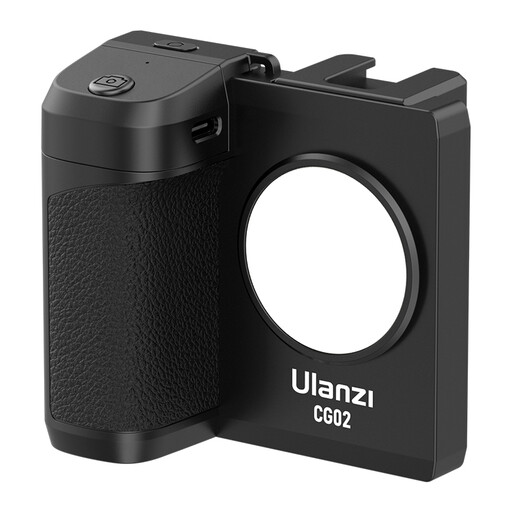
Ulanzi CG02 smartphone holder with remote control
According to the product description, the remote control is designed for taking photos and starting or stopping video recording.
The product title mentions a three-level dimmable light and compatibility with iPhone and Android phones.
Joybuy
 No image available
Ulanzi JJ02 Bluetooth selfie stick with mini tripod
According to the product description, the detachable Bluetooth button lets you take photos remotely with a smartphone.
The title mentions a telescopic mini tripod and two accessory mounts. The product description lists compatibility with iPhone and Android.
Joybuy
Frequently asked questions
Do you also need a tripod?
A remote shutter release means you don’t have to touch the camera to take a picture, but it doesn’t replace a stable setup. Canon recommends using a tripod when even small camera movements may be noticeable.
How do you connect a wired shutter release?
First, find your camera’s full model name and the connection designed for it. Canon distinguishes between E3 and N3 connections, among others; Fujifilm lists a 2.5 mm plug for the RR-100 and says that some models require an adapter. In a shared workspace, keep the cable out of walkways.
What should you check if a wireless button doesn’t work?
First, check whether your exact camera model supports the button, then follow the manufacturer’s pairing instructions. Test the connection where you’ll be taking photos; Sony notes that the communication range of the RMT-P1BT can vary depending on local conditions.
What if a shutter release bought online is faulty or doesn’t fit?
For consumer purchases in the Netherlands, a product must meet the legal requirements. According to the Dutch Government, there’s no fixed statutory guarantee period, and the seller is your point of contact if there’s a fault. For online purchases from a business, you’ll usually have 14 days to change your mind, subject to conditions and exceptions. Check which rules apply to your purchase.
Can I take identifiable photos of colleagues and publish them?
If an employer takes identifiable photos of employees and publishes them, the Dutch Data Protection Authority says there must be a lawful basis for doing so; in most cases, this is consent. Using a remote control doesn’t change this requirement. If you’re organising or publishing the photos in a different context, the applicable lawful basis must be assessed separately.


