What should you look for when choosing one?
First decide whether you’re taking photos with a camera or a phone. Then check the socket or wireless support, and only after that decide which type of control you want.
Wired camera shutter release
Choose this option: if your camera has a compatible remote socket and you’ll be staying by the tripod.
Bear in mind: the plug type must be right, and the cable needs to reach your working position.
Wireless camera shutter release
Choose this option: if you want to arrange the toys between shots and your camera model supports that specific release.
Bear in mind: pairing, battery life and range; a manufacturer’s stated range doesn’t guarantee the same performance in every set-up.
Camera app on your phone
Choose this option: if your camera offers remote control through a supported app and you don’t want to use a separate release.
Bear in mind: the available features depend on the combination of camera model, app and connection.
Bluetooth shutter release for smartphones
Choose this option: if you’re taking photos with a phone and want to operate the shutter remotely.
Bear in mind: phone support, clamp width and stability; phone compatibility doesn’t mean it can control an interchangeable-lens camera.
| What to consider |
What should you check? |
Who should bear this in mind? |
| Camera compatibility |
Look up your full camera model in the compatibility information. If you’re buying a cable, check the socket type too. |
When I use an interchangeable-lens camera, I want to be sure the release operates the shutter, rather than simply sharing the same brand name. Around 36% of consumers prioritise camera compatibility. |
| Avoiding contact with the camera |
Check whether your camera app can already trigger the shutter remotely, and make sure the tripod is stable. |
For close-ups taken on a tripod, I don’t want to touch the camera while taking the photo. Around 29% of consumers prioritise avoiding camera shake above all else. |
| Moving freely during a series |
Check wireless support and range for your workspace; treat any stated range as a guide. |
When I’m arranging several toys in a row, I want to stay by the subject rather than keep walking back to the tripod. Around 21% of consumers prioritise freedom of movement. |
| Smartphone control |
Check support for your phone, the clamp width and the stability of the holder. |
When I’m taking photos with a smartphone, I’m looking for a release for my phone, not for an interchangeable-lens camera. Around 14% of consumers consider smartphone control their top priority. |
Joybuy products for smartphone photography
These Joybuy products are phone tripods or phone holders with remote controls for smartphone photography; they aren’t general recommendations for controlling an interchangeable-lens camera.
 No image available
KINSI selfie stick with tripod, 170 cm
An option for mounting a compatible smartphone on a tripod and operating the shutter remotely.
Bluetooth remote control; extendable design; 360° rotating phone holder for smartphones from 4.7 to 6.0 inches.
View at Joybuy
 No image available
KINSI phone tripod with Bluetooth remote control
Ideal for smartphone photography when you want to mount your phone hands-free and operate the shutter remotely.
Foldable and height-adjustable; suitable for tabletop and outdoor use according to the product title.
View at Joybuy
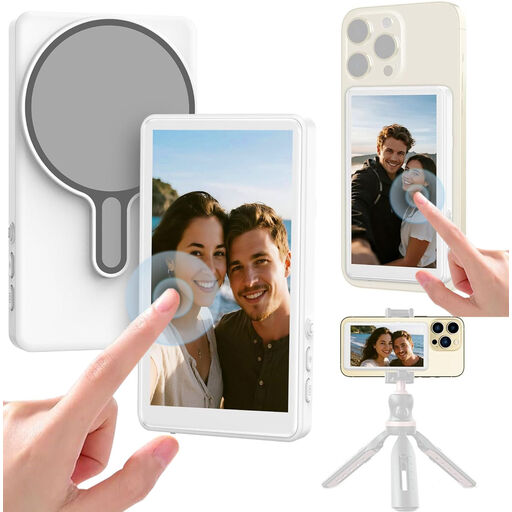 No image available
Selfie stick with 1080P monitor and Bluetooth shutter
A phone option for anyone looking for a built-in monitor for mobile video as well as remote control.
The product title lists a 1080P monitor and a Bluetooth shutter for selfies and livestreaming.
View at Joybuy
 No image available
Osmo Action GPS Bluetooth Remote Controller
This is a model-specific option for remotely controlling the named Osmo cameras, not a general shutter release for interchangeable-lens cameras.
The product title lists Osmo Action 4, Osmo Action 5 Pro, Osmo 360 and Osmo Action 6 as compatible models.
View at Joybuy
 No image available
Ulanzi JJ02 Bluetooth phone tripod
A good fit if you take photos with a supported smartphone and want a phone holder with a detachable shutter release.
Ulanzi lists support for iOS and Android, a clamp width of 60–85 mm, a load capacity of 500 g and a CR1225 battery.
View at Joybuy
Frequently asked questions
Can I start taking photos without a separate remote shutter release?
Yes, if your camera model offers remote control through a supported app. Canon Connect, Nikon SnapBridge and Sony Imaging Edge Mobile are possible options; check whether your camera and the feature you want are supported by each app.
How can I avoid choosing the wrong cable or having trouble pairing?
First check your full camera model and the compatibility information. For a cable, the remote socket must match; for Bluetooth, the camera must support that particular remote and function. Canon specifies that the RS-80E3 requires a compatible E3 socket.
Will a remote shutter release automatically make a white background look white?
No. A remote shutter release operates the shutter without you having to touch the camera; lighting and white balance need to be considered separately.
Which battery should I check?
Check the battery type for the exact model, as batteries aren’t necessarily interchangeable between shutter releases. JJC lists an included CR2032 for the BTR-C1; Ulanzi lists a CR1225 for the JJ02.
Can I return a shutter release bought online if it doesn’t fit?
According to ACM ConsuWijzer, consumers who buy online in the Netherlands generally have a statutory 14-day cooling-off period after delivery, subject to applicable conditions and exceptions. Business purchases aren’t automatically covered by these consumer rules.
What warranty applies if the shutter release breaks too soon during normal use?
ACM ConsuWijzer distinguishes between a manufacturer’s or seller’s warranty and statutory consumer rights. If a consumer product doesn’t do what you could reasonably expect during normal use, the seller must resolve the issue in line with the applicable conditions; there isn’t one fixed statutory warranty period for every shutter release.


