For a fixed setup, a wired remote shutter release may be a good fit, while Bluetooth gives you more room to move around the table. In either case, your exact camera model must support the control. If you simply want to avoid touching the camera when taking a shot, try the self-timer or a supported camera app first. A remote shutter release won’t, on its own, prevent unwanted reflections in glass.
Who can benefit from a remote shutter release?
Photographers with a fixed tabletop setup
You want to photograph ornaments with the same composition every time, without touching the camera for each shot. Canon Europe describes a tripod as a way to keep the framing consistent in product photography.
Photographers working around glass
You move ornaments or lighting around a small table and don’t want a cable getting in your way. A wireless control may suit you, provided it works with your exact camera model.
Photographers who want to try existing features first
You want to avoid movement caused by touching the camera, so you first check whether the self-timer or an app supported by your camera will do the job.
What should you look for when choosing one?
Wired shutter release
A good fit if: you’re taking photos from a fixed position and your exact camera supports the connection in question.
Bear in mind: the cable and any adapter must be compatible and shouldn’t get in the way of your tabletop setup.
Bluetooth remote control
A good fit if: you want to move around the table and the manufacturer lists your camera model as compatible.
Bear in mind: check support and pairing in advance. A stated range doesn’t guarantee it will work in every setup.
Self-timer or camera app
A good fit if: avoiding contact with the camera matters more to you than choosing the exact moment the shutter fires.
Bear in mind: a self-timer introduces a delay, and an app is only an option if your camera supports that control.
Canon Netherlands, Fujifilm, Nikon and Sony describe controls for specific camera models. So check more than just the camera brand: confirm the full model name and the supported connection or wireless feature.
| What to consider |
What should you check? |
Who is this important for? |
| Camera compatibility |
Check your full camera model against the manufacturer’s compatibility information. For a cable, also check the connection and whether you need an adapter. |
If I want to be sure the control works with my camera, I check the model and connection before buying. Around 36% of consumers would make compatibility their first requirement. |
| Timing without touching the camera |
Decide whether you want to trigger the shutter immediately or can work with the self-timer delay. Also check whether your camera supports app control. |
If I want to choose the moment myself without touching the camera, I look for direct control. Around 29% of consumers would make this their top priority. |
| Space around the table |
Consider where the camera, table and control will be positioned. Check whether a cable could get in the way and whether your camera supports wireless control. |
If I’m moving ornaments or lighting, I don’t want a cable in the way. Around 21% of consumers would prioritise room to move around the table. |
| Existing camera features |
Try the self-timer and, if your camera model supports it, the camera app before choosing a separate shutter release. |
If a delayed shot or an existing app is enough for me, I want to try those features first. Around 14% of consumers would make avoiding an extra purchase their top priority. |
Common buying mistakes
-
Choosing by camera brand alone
The brand name alone won’t tell you whether a connection, adapter or wireless feature is compatible with your camera model. For example, Fujifilm specifies a separate adapter for some RR-100 combinations. Wireless control is also model-specific.
Before ordering, compare your full camera model and the required connection or wireless feature with the manufacturer’s compatibility information.
-
Expecting a remote shutter release to solve reflections
Not touching the camera when taking a shot can help avoid movement caused by pressing the shutter button, but composition and lighting are separate parts of your setup.
Assess a test shot for sharpness, composition and reflections separately, so you can tell which part of your setup needs attention.
-
Buying a wireless control when an existing feature will do
A self-timer or supported camera app may already let you take photos without touching the camera.
Try your camera’s features first, and only choose a separate control if you need direct timing or another specific feature.
Camera brands and remote controls to consider
Fujifilm
The RR-100 is a wired option for compatible Fujifilm X and GFX camera models.
- Fujifilm specifies a 2.5mm connection and an L-shaped plug extension cable included in the box.
- For models including the X-S10 and X-T200, Fujifilm specifies a separate 2.5mm-to-3.5mm adapter. Check compatibility with your exact model.
Canon
The BR-E1 is a Bluetooth option for the camera models on Canon’s compatibility list.
- Canon describes the BR-E1 as allowing control without touching the camera and specifies a range of up to 5 m.
- These are Canon’s specifications, not a guarantee for every camera or setup. A camera app may be an alternative for supported models.
Nikon
Nikon offers, among other options, the wireless ML-L7 and wired MC-DC3. These are different options for specific cameras.
- Nikon specifies separate photo and video control buttons for the ML-L7 and lists it as an accessory for the Z fc.
- For the MC-DC3, Nikon specifies a half-press function and a lock for long exposures. Don’t assume these features mean it’s compatible with other Nikon cameras.
Sony
The RMT-P1BT is a Bluetooth option for Sony cameras that support Bluetooth remote control.
- Sony says the RMT-P1BT uses the camera’s built-in Bluetooth receiver and doesn’t need an additional receiver.
- Sony specifies a communication range of around 5 m and notes that this can vary. Check your camera model’s remote-control function.
Joybuy products
The selection below consists mainly of smartphone tripods and remote controls, plus a remote control for specific Osmo Action models. These aren’t universal shutter releases for mirrorless cameras, so check the stated phone or camera compatibility.
 Image unavailable
KINSI selfie stick with tripod and Bluetooth remote control
Designed to control a compatible smartphone camera remotely; the product information doesn’t confirm compatibility with a separate camera.
Extends to 170 cm, with a rotating phone holder for smartphones measuring 4.7 to 6.0 inches.
Joybuy
 Image unavailable
KINSI smartphone tripod with Bluetooth remote control
An option for anyone who wants to control a compatible smartphone camera remotely and mount their phone on a tripod. Check that it’s suitable for your phone.
The product name specifies a folding tripod and a height-adjustable phone holder for smartphones measuring 4.7 to 6.0 inches.
Joybuy
 Image unavailable
Osmo Action GPS Bluetooth remote control
Designed for the compatible Osmo Action cameras listed, not as a universal shutter release for other cameras.
The product name lists Osmo Action 4, Osmo Action 5 Pro, Osmo 360 and Osmo Action 6.
Joybuy
 Image unavailable
Ulanzi JJ02 Bluetooth selfie stick with mini tripod
A smartphone-focused option for a compact setup; the product information specifies control of a compatible smartphone camera.
The product name lists an extendable mini tripod, two cold shoe mounts and support for iPhone and Android smartphones.
Joybuy
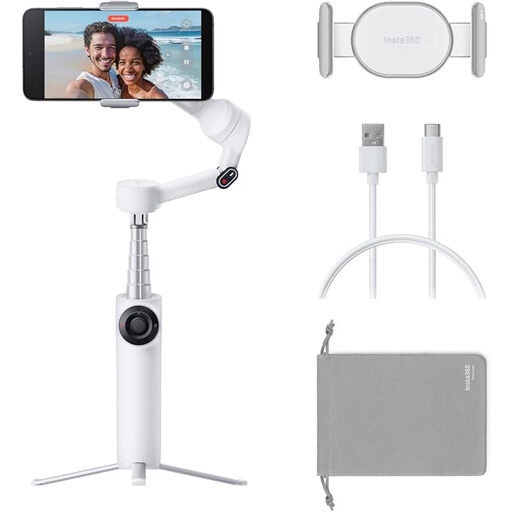 Image unavailable
Insta360 Flow 2 White
A smartphone gimbal for anyone who wants support for their phone while taking photos; the product information specifies control from a second phone.
The product name lists an integrated tripod and support for iPhone and Android smartphones. Check that the described control suits the way you plan to use it.
Joybuy
Frequently asked questions
Do I need a separate remote shutter release if my camera has a self-timer?
Not always. If a delayed shot works for you, using the self-timer can help you avoid touching the camera when taking a photo. If you want to choose the exact moment yourself, check whether your camera supports a suitable remote control or app.
How do I use a remote shutter release with a fixed product setup?
Set up your camera and composition securely, check that the control works with your camera model, then take a test shot without touching the camera when you release the shutter. A tripod can help keep the framing consistent across product photos.
Will any Bluetooth remote control work with any Bluetooth camera?
No. Check whether your exact camera model supports control from that remote. Sony specifically advises checking whether the camera supports Bluetooth remote control.
Will a remote shutter release prevent reflections in glass ornaments?
No. A remote shutter release lets you control the camera from a distance, but it won’t resolve reflections by itself. Take a test shot and assess reflections separately from sharpness and composition.


