What should you look for when choosing?
First decide whether the remote participant mainly needs to follow class discussions, the teacher and the board, or a straightforward computer set-up. Then assess the picture and sound from the places where people will actually speak during the lesson.
| What to consider |
What to look for when buying |
Who is this important for? |
| Audio clarity |
Compare where people will speak with the stated microphone range, and test quiet and normal speaking voices through the meeting app. |
If I want remote participants to hear their classmates too, I check the sound from different seats. Around 28% of consumers say audio clarity is their main concern. |
| View of the group |
Check who appears in the frame from the intended camera position and review the outgoing video stream. |
When classmates speak from different parts of the room, I want to know whether they will stay in shot. Around 22% of consumers prioritise a view of the group. |
| Teacher and lesson materials |
Test the board position and text size in your chosen meeting app; a wide shot does not guarantee that text will be readable. |
If I move between the board and the class while teaching, the remote participant needs to be able to follow the relevant views. Around 22% of consumers give the teacher and board top priority. |
| Connection and positioning |
Check the ports, cable route, power supply and mounting options for the classroom computer and chosen location. |
If a lesson runs through the computer already in the room, I want to know in advance whether connecting and positioning the camera will be practical. Around 17% of consumers prioritise an easy set-up. |
| Privacy controls |
Decide who will be on camera, how participants will be informed and whether recording is needed; assess the process for the specific provider. |
If not everyone needs to be on camera for the lesson, I want to be able to adjust the framing accordingly. Around 11% of consumers name privacy controls as their main concern. |
Webcams for a computer set-up
These Joybuy products are webcams for a computer set-up in the classroom. For each model, check that the picture and microphone suit the seating positions involved in the lesson.
 No image available
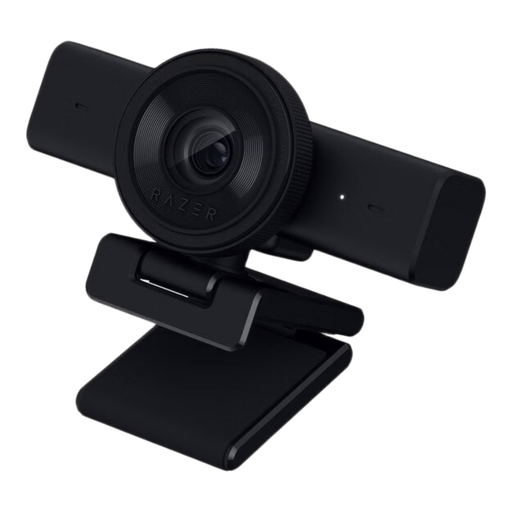
Razer Kiyo V2 X webcam, 1440p, USB, black
A USB webcam with a built-in microphone for a computer set-up; check whether the microphone can pick up the required seating positions.
The title lists 1440p and 1080p at 60 FPS. The product information mentions autofocus, a physical privacy shutter, USB 2.0, an omnidirectional stereo microphone and an 80° field of view.
Listed compatibility includes Windows 10 and Windows 11.
Joybuy
 No image available
AOC webcam for PC with microphone, 4K, 99° field of view
A webcam for a computer set-up where a wider field of view is preferred; check how much of the room will actually be in shot.
The product information lists 4K video, a 99° field of view, a built-in noise-cancelling microphone and a privacy cover.
According to the product information, the webcam can be mounted on a monitor, desk or tripod and is designed for laptops and desktops.
Joybuy
 No image available
Philips 4000 Series 4K UHD Webcam, EU Version, Black, SPL6408BT/00
A webcam with built-in microphones for a computer set-up; test whether voices from the intended seating positions come through clearly.
The product information lists 4K, autofocus, two built-in noise-cancelling microphones and a privacy shutter.
It connects via USB-A and, according to the product information, is designed to be mounted on laptops, desktops and monitors.
Joybuy
 No image available
Insta360 Link 2C Standard Bundle, Graphite Black
A webcam with automatic framing for a computer set-up; check that the selected picture mode suits the teacher and other participants.
The product information lists 4K, HDR, autofocus, a whiteboard mode, automatic framing and a physical privacy switch.
According to the product information, the microphone has AI noise cancellation. Listed compatibility excludes ARM-based Windows systems.
Joybuy
 No image available
Insta360 Link 2 Standard Bundle, 4K webcam
A webcam with tracking and automatic framing for a teacher on the move; this does not automatically provide audio coverage for the whole class.
The product information lists a 1/2-inch sensor, 4K, HDR, autofocus, AI tracking and a microphone with AI noise cancellation.
Listed compatibility includes PC/Mac and Zoom.
Joybuy
Frequently asked questions
Do you need 4K to take part in a remote language lesson?
No, 4K is not the only factor to consider. Above all, test whether participants can be heard clearly and whether the relevant view of the board is readable in the outgoing video stream; a stated resolution does not guarantee this.
How can you check the set-up before the first lesson?
Check the computer port, power supply, mounting position and cable route, then make a test call using your chosen meeting app from the usual speaking positions. Logitech lists USB for MeetUp; HP lists USB and an external power adapter for the Studio R30.
What if the camera breaks after the manufacturer’s warranty has expired?
For a consumer purchase, your statutory rights may still apply if the product does not meet reasonable expectations under normal use. According to ACM ConsuWijzer, the seller is responsible; a shorter manufacturer’s warranty does not take away those rights. If an organisation makes the purchase, the applicable contract terms should be assessed separately.
Can a language provider show pupils on camera or record the lesson?
It is not automatically allowed or prohibited. Identifiable images and voices are personal data, and the organisation responsible must identify an applicable GDPR lawful basis before processing them. The Dutch Data Protection Authority advises schools and universities to be cautious about recording lessons in which pupils or students are visible. The assessment depends on the provider and the specific way the lesson is run.


