Who is this for?

Teacher taking answers from around the room

Wants remote participants to hear not only the teacher, but also pupils giving answers. The distance to the furthest speaking position determines whether one centrally placed device is suitable. Jabra and HP specify microphone range for certain models.

Quiz host with quick-fire turns

Needs two-way audio when an answer and a remote response overlap. Check whether the exact model supports full duplex and test a call using the application you plan to use. Jabra and HP list full duplex for certain models.

Manager of shared classroom computers

Wants the speakerphone to work with the computers available and the room’s audio settings. Don’t assume every classroom has the same connections or settings; TU Delft’s guidance shows that lecture rooms may have their own audio equipment.

What should you look for?

One portable speakerphone

Choose this when: the teacher and pupils answering are within the stated range of one centrally placed device.

Trade-off: easy to move, but distant seats and background noise mean you’ll need to test it in the classroom.

Two linked devices or wider audio coverage

Choose this when: pupils will be answering from different places and one device may not pick them up clearly. Jabra describes using two linked Speak2 75 devices in medium-sized meeting rooms.

Trade-off: additional equipment and setup; the meeting-room configuration described doesn’t guarantee coverage in a classroom.

Existing classroom audio or a separate microphone

Choose this when: the main priority is making a teacher who moves around the room easy to hear, or the classroom already has a managed audio system. TU Delft describes a lecture room with its own audio equipment and an available handheld microphone.

Trade-off: connections and controls can vary between rooms; check which audio devices the meeting application uses.

What to consider What should you check? Who should pay particular attention?
Range from where people answer Compare the distance from the device to the furthest pupil with the stated microphone range. Test it there with a remote participant asking a quiz question. If I answer from further away, I want to know whether the remote participant can hear me. Around 36% of consumers prioritise range from multiple speaking positions.
Taking turns Check whether the exact model supports full duplex and try a conversation where the class and remote participant briefly interrupt one another. If responses might overlap during the quiz, I want both sides to be able to hear each other. Around 29% of consumers prioritise smooth two-way interaction.
Connecting to the classroom computer Check the computer ports, cable and the microphone and speaker selected in the quiz or calling application. With shared classroom computers, I want to know in advance whether the speakerphone will work with the available equipment. Around 21% of consumers prioritise a reliable connection.
Moving between classrooms Check the stated talk time, charging options and whether the new seating layout is still within the microphone’s range. If I organise the quiz in different places, I want to be able to carry and position the device easily. Around 14% of consumers prioritise portability.

Pitfalls to avoid

  • Assuming meeting-table range covers the whole classroom

    The stated microphone ranges for specific Jabra and HP models aren’t measurements taken from every seat in a classroom.

    Before deciding whether one device is enough, test it from the furthest point where a pupil will answer aloud.

  • Assuming Bluetooth on a phone is also the right connection for a computer

    Jabra says that a standard Bluetooth connection to a computer isn’t certified for the Speak2 55 and may not deliver the same audio quality as USB.

    Check the classroom computer, cable and audio settings before the quiz starts.

  • Assuming a test ranking translates directly to a full classroom

    DXOMARK tested nine speakerphones with the same Windows laptop, including for video calls. The test doesn’t assess how clearly people can be heard from every position in your classroom.

    Use the test as a point of comparison, but also try a call with your own seating layout.

  • Confusing an extended warranty product with your statutory rights

    According to the Dutch government, there’s no fixed statutory warranty period in the Netherlands. What you can expect from a product depends on factors including the product itself and the information provided at the point of sale.

    Compare what an additional cover plan includes, and check which purchase terms apply when buying on behalf of a school.

Brands to compare

Jabra

The Speak2 range includes speakerphones for conversations around a central point. Jabra also describes a setup using two linked devices for the Speak2 75.

  • Jabra lists four microphones, full duplex and a microphone range of up to 2.3 m for the Speak2 55.
  • DXOMARK ranked the Speak2 75 first in a test of nine speakerphones. That result doesn’t automatically apply to the Speak2 55 or to a classroom; check the specific model and test your seating layout.

HP Poly

The Sync range includes portable models and larger meeting-room options. The Sync 20 series can be a useful comparison for a small group answering questions.

  • HP lists full duplex and a microphone range of up to 2 m for the Sync 20 series.
  • DXOMARK ranked the tested Poly Sync20 fourth; this doesn’t show whether it will pick up pupils at the back of a classroom. Also check the connections on the specific version.

EPOS

The EXPAND 40 is a portable speakerphone to compare if several people will be taking part close to the device.

  • EPOS specifies three beamforming microphones for the EXPAND 40. DXOMARK ranked the tested model second.
  • The manufacturer’s description and tests under meeting-room conditions don’t guarantee that pupils spread around a classroom will be heard clearly.

AnkerWork

The PowerConf S3 is worth comparing for a portable small-group setup with a USB-C connection to a computer.

  • For model A3302, AnkerWork lists six microphones, USB-C connectivity to a computer and up to 24 hours of talk time.
  • The manufacturer describes voice enhancement and coverage, but this information doesn’t provide an independently measured microphone range for a classroom.

Joybuy product picks

These picks include portable speakerphones for small groups answering questions and a model described for a wider audio setup. Check the connections, quiz application and positioning in the classroom for each product.

Insta360 Wave AI Conference Speakerphone, White

Insta360 Wave AI Conference Speakerphone, White

Could be useful if you need to accommodate several speaking positions or link devices; the product information lists support for up to three linked devices.

The description lists eight microphones and a stated pickup range of 16.4 ft.

The description lists storage for audio recordings. Consider in advance how the school will handle pupils’ voices if they are recorded.

View on Joybuy
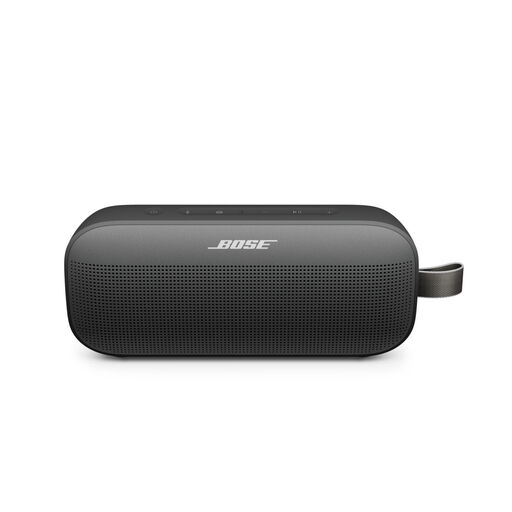
Bose SoundLink Flex Portable Speaker (2nd Gen), Black

Bose SoundLink Flex Portable Speaker (2nd Gen), Black

A portable speaker with a built-in microphone for speakerphone calls; check whether the classroom computer and quiz application recognise it as a microphone and speaker.

The product description lists Bluetooth, IP67 and up to 12 hours of playback time.

View on Joybuy

Jabra SPEAK 510 MS, USB-A (USB 2.0), Black

Jabra SPEAK 510 MS, USB-A (USB 2.0), Black

A portable speakerphone for calls; check that the computer and quiz application use the selected microphone and speaker settings.

The product information lists USB and Bluetooth connectivity, and battery life of up to 15 hours.

View on Joybuy

Frequently asked questions

Where should you place the speakerphone during the quiz?

Position the device so that pupils answering aloud are within the range specified for the exact model, and test it from the furthest speaking position. For one Speak2 75, Jabra recommends a central position, 0.5–2.3 m from each participant; don’t automatically apply these distances to other models.

Why can’t the remote participant hear anything when the speakerphone is connected?

Check which microphone and speaker are selected on the classroom computer and in the meeting application. Jabra lists these settings for the Speak2 55; TU Delft’s guidance shows that a room may also use its own audio equipment.

Do you need to record the quiz?

No, using a speakerphone doesn’t in itself require a recording. If the school records voices or video, it must assess the relevant privacy obligations. According to the Dutch Data Protection Authority, a DPIA is required when processing carries a high privacy risk, not automatically with every speakerphone purchase.

Who can help if a device bought as a consumer doesn’t work properly?

According to the Dutch government, the seller is the point of contact for statutory guarantees on consumer purchases. The Netherlands doesn’t have a fixed two-year statutory warranty period; what you can expect from a product depends on factors including the product itself and the information provided at the point of sale. If buying on behalf of a school, check the applicable purchase terms separately.
