What should you look for?
Start with your audio source and the space available on your desk. Then decide whether bass, two separate stereo channels or wireless control matters most to you.
| What to consider |
What should you check? |
Who is this most relevant to? |
| Bass and desk space |
Measure the space for the speaker cabinets and check whether there’s a subwoofer output. |
If bass is my priority when listening to reggae, I want to consider placement and the option to add a subwoofer. Around 36% of consumers say bass performance is their main concern when buying. |
| Stereo on your desk |
Measure the space for both speakers, and check how they connect to each other and to your computer. |
I want two channels at my computer, but I need to make sure they’ll fit on my desk. Around 29% of consumers give stereo placement on a desk top priority. |
| Connecting a CD player or turntable |
Check the output and input, the cable you’ll need and, for vinyl, whether phono pre-amplification is required. |
If I want to play albums from CD or vinyl, the whole connection between the player and speaker needs to work. Around 21% of consumers put a physical audio source first. |
| Wireless control |
Check that the speaker supports the connection method and streaming service you want to use. |
I want to start playing albums without connecting an audio cable each time, so I look for Wi-Fi or Bluetooth. Around 14% of consumers say wireless control is their main concern when buying. |
Brands to consider
These brands offer a range of set-ups, from a compact stereo pair to a single Wi-Fi speaker. The right choice depends on your audio source, available space and connection needs.
Edifier
Worth considering if you want an active stereo pair with analogue inputs and a subwoofer output, or a more compact desktop set-up.
- Edifier says the R1700BTs has two RCA inputs and a subwoofer output.
- The specifications don’t prove how deep the bass will sound in your room. The smaller G1500 has different specifications and isn’t a version of the R1700BTs.
Audioengine
The A2+ Gen 3 is a compact active stereo pair designed for use right next to your computer.
- Audioengine says this model supports USB-C audio, Bluetooth, analogue inputs and a variable RCA output.
- A compact cabinet doesn’t guarantee the bass performance you’re looking for. Adding a subwoofer will require extra space.
Sonos
The Era 100 is a good fit if you mainly want to stream over Wi-Fi or Bluetooth from one compact speaker.
- Sonos lists Wi-Fi, Bluetooth and a line input as available options.
- Sonos says the line input requires a separate adapter and a suitable cable. If your turntable doesn’t have a built-in phono preamp, you’ll also need a preamp.
KEF
The LSX II LT is an active stereo system with network features and a computer connection.
- KEF says this model includes USB-C and HDMI ARC, among other connections.
- The two LSX II LT speakers are connected by a cable. Don’t confuse this version with the LSX II.
Joybuy products
This selection ranges from a vinyl player with built-in speakers to speakers for computer use and wireless streaming. Check which audio source and any additional amplification will suit your set-up for each model.
 No image available
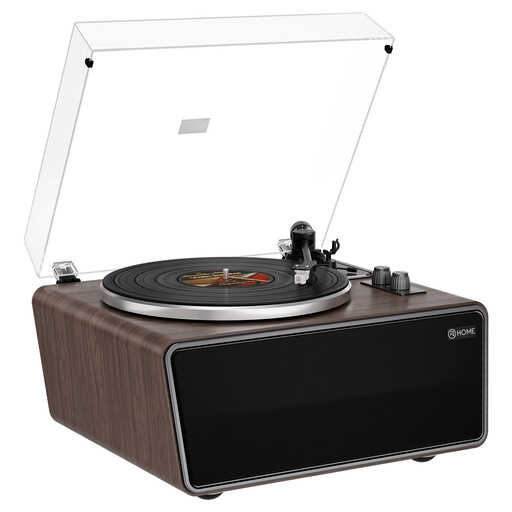
XJ-HOME XJ-H01 vintage turntable
An option for vinyl albums if you’re looking for a single player set-up with built-in speakers.
Four built-in speakers and a phono preamp. The cartridge is an AT-3600L (MM).
Joybuy
 No image available
HiVi-Swans D3.1MKII passive bookshelf speakers, pair
A stereo pair to consider if you already have a suitable amplifier.
Passive bookshelf speakers with 6.5-inch drivers. A separate amplifier is required.
Joybuy
 No image available
Mlove BV800 Bluetooth speaker
Suitable for playback from a device using Bluetooth or AUX, or from USB or TF card storage.
Listed options include Bluetooth, AUX, USB drive and TF card.
Joybuy
 No image available
Edifier ES300 Wi-Fi and Bluetooth speaker
An option if you want to stream wirelessly or connect a wired audio source.
Listed options include Wi-Fi, Bluetooth, USB, AUX and AirPlay 2. The product name specifies 60 W.
Joybuy
 No image available
Edifier G1500 Hecate gaming speakers
An option for computer use if you want to connect via USB audio, AUX or Bluetooth.
Listed connection options are USB, 3.5 mm AUX and Bluetooth 5.3.
Joybuy
Frequently asked questions
Can you connect a turntable directly to any active speaker?
No. First check the turntable’s audio output and whether it has a phono preamp. Sonos says that the Era 100’s line input needs a separate adapter and cable. A turntable without a built-in preamp will also need an external phono preamp.
Do you need Wi-Fi to play music from your computer?
No, not if you choose a suitable direct input. Audioengine lists USB-C audio for the A2+ Gen 3, and KEF does the same for the LSX II LT. Check that the connection matches the one on your computer and the exact model.
What should you check when placing speakers on your desk?
For a stereo pair, measure the space for both cabinets and plan where the cables will run. The KEF LSX II LT speakers are connected by a cable. For a Wi-Fi speaker, the Dutch Consumers’ Association says a stable home network and suitable app support are important.
What if a speaker bought in the Netherlands develops a fault too soon during normal use?
If a product is faulty, ACM ConsuWijzer says the seller must provide a suitable solution free of charge under the terms of the statutory guarantee, such as a repair or replacement. The Netherlands doesn’t have a fixed statutory guarantee period of exactly two years; what you can reasonably expect from the product also matters.
What product rules apply to a wireless speaker sold in the Netherlands?
Radio equipment is covered by the European radio equipment framework, which sets requirements including safety and electromagnetic compatibility. The European Commission outlines this framework. Your Europe says the manufacturer is responsible for the conformity assessment and the required CE marking. A listing on a sales website does not, on its own, prove that a specific item complies with the applicable rules.


