What should you look for in a camera for reflective art cards?
First decide whether you mainly want to show the print or its gloss. Then choose a camera and lens that can capture the framing you want from your working distance.
| What to consider |
What to look for when buying |
Who should consider this? |
| Reflections and finish |
Take test shots with the light in different positions. For an evenly lit image, the Canadian Conservation Institute describes using light on both sides at a 45-degree angle; assess the result on your own card. If you’re using a filter, check that it fits the lens. |
If you want to keep the print legible without losing its intended gloss, consider the combined effect of the lighting and filter. Around 33% of consumers prioritise reflection control. |
| Consistent reproductions |
Check that you can position the camera securely and keep the framing and lighting consistent across a series. Compare your test shots with the physical cards. |
For a series of catalogue photos, you’ll want repeatable framing and consistent colours. Around 27% of consumers prioritise consistent reproductions. |
| Fine print details |
Test the smallest detail you need to capture from your preferred shooting distance. With an interchangeable-lens camera, the lens and mount matter; with a compact camera, the focusing distance can vary depending on the zoom setting. |
If you want to inspect small lines or lettering, check that they appear large enough in the frame with your chosen setup. Around 20% of consumers prioritise print details. |
| Complete kit |
Compare what’s included with the camera. For an interchangeable-lens camera, check the lens mount and the supplied lens; also consider whether you’ll need a compatible filter. |
If you want to keep extra parts and buying decisions to a minimum, check whether the kit on offer suits your card size and shooting distance straight away. Around 20% of consumers prioritise a simple, complete kit. |
Cameras on Joybuy for this purpose
This Joybuy selection includes a range of cameras and kits with specified lenses. Compare the listed version with your card size, shooting distance and preferred way of showing the finish.
 Image unavailable
KINSI Mini Vlog Camera 4K
Compare the listed version with the framing you want; the product name alone doesn’t tell you whether fine print details will appear sharply at your shooting distance.
The product name lists Wi-Fi, 64 MP, a 330° rotating lens and a 1.72-inch touchscreen.
View on Joybuy
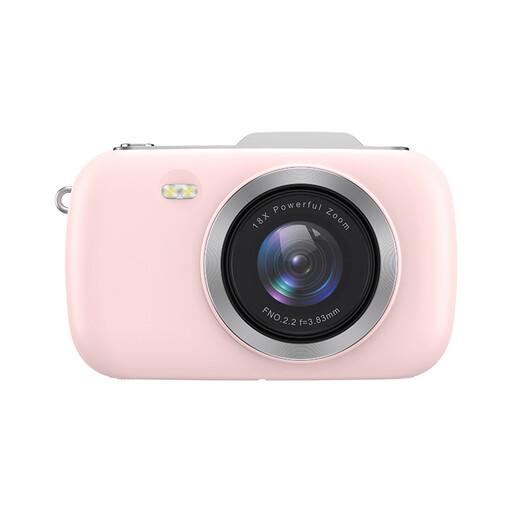 Image unavailable
KOMERY G7-A 4K
The product name describes this as a point-and-shoot camera; take a test shot to check whether your card and its fine details appear clearly from your preferred distance.
The product name lists 80 MP, 18× zoom and the pink version.
View on Joybuy
 Image unavailable
Songdian Pocket Camera 4K
The product name describes this as a pocket camera; assess the framing and sharpness at the working distance you use for your cards.
The product name lists 44 MP and the pink version.
View on Joybuy
 Image unavailable
Sony ZV-E10 with 16–50 mm zoom lens
The product name describes a camera with a zoom lens; compare the supplied lens with your card size and preferred shooting distance.
The product name lists a 16–50 mm zoom lens and the black version.
View on Joybuy
 Image unavailable
Sony ZV-1 compact camera
The product name identifies this model as a compact camera. Take a test shot to check whether the built-in lens frames your card as you want from your preferred distance.
View on Joybuy
Frequently asked questions
Is a polarising filter enough to remove all reflections?
No. A polarising filter isn’t guaranteed to remove every reflection from every card finish. Canon says its circular filter reduces reflections from non-metallic surfaces. Try different lighting positions first, then compare shots with and without a suitable filter, especially if you want to keep metallic gloss visible.
How can you make a series of card photos look consistent?
Position the camera securely and keep the framing and background the same. For an evenly lit overall image, the Canadian Conservation Institute describes using light on both sides at a 45-degree angle. Check each card to make sure the print and finish remain clearly visible with this setup.
Do you need a macro lens straight away for fine print details?
Not just because you’re photographing art cards. First, check whether the smallest details appear large enough and sharp at your shooting distance. The closest focusing distance specified for the Canon PowerShot G7 X Mark III varies depending on the zoom setting; with an interchangeable-lens camera, the lens you choose also matters.
What about the warranty on a camera bought in the Netherlands?
The Dutch government describes the legal guarantee as your right to a product that works properly and states that there is no fixed statutory guarantee period in the Netherlands. If a product is faulty, the seller is your point of contact; assess the terms of any manufacturer’s or additional guarantee separately.
Can I publish or sell photos of someone else’s art cards?
Not automatically: you may need permission to use copyright-protected work. The Dutch government distinguishes between making a copy for personal use and distributing or publishing it. Before publishing or selling, check what rights and permissions apply to the card shown.


