What should you look for when buying?
Start with a short test recording and listen to how much of the room you can hear. For a single percussion source, try a close position first; add an overhead or extra microphones only if you need more room ambience or individual control for your recording.
| What to consider |
What should you look for? |
Who is this important for? |
| Room sound when recording a single source |
Check the polar pattern and compare close positions. Shure gives example distances of 2.5–7.5 cm for the SM57 on snare or tom; this isn’t a universal distance. |
If I’m recording a single snare or tom, I want to capture the source clearly without bringing the room sound too far forward. Around 36% of consumers prioritise reducing room sound when recording a single source. |
| Detail in hand percussion |
Compare recordings from different distances and angles; a greater distance can also capture more room sound. |
With a shaker or similar instrument, I want the attack and nuances to sit well in the mix. Around 29% of consumers prioritise detail in hand percussion. |
| Control over a drum kit |
Decide which drums need individual microphones and check the number of inputs and how the microphones will be positioned relative to one another. |
If I want to adjust parts of a drum kit separately, I weigh that control against the extra setup and connections. Around 21% of consumers prioritise control over individual kit components. |
| Connections and complete setup |
Check the XLR connection, any power requirements, cable, mounting options and the number of inputs needed at the same time. |
If my existing recording equipment determines what I can use, I want to know in advance what I can connect to the microphone I choose. Around 14% of consumers give the most weight to setup compatibility. |
Joybuy products
The products below are wireless clip-on lavalier microphones; the product information lists musical instruments as one of their applications. Check that the clip-on positioning and connection suit your percussion setup.
 Image unavailable
Verbex K31Pro-Black wireless dual clip-on lavalier microphone
The product information lists musical instruments as one of its applications; check that this clip-on microphone suits your percussion setup.
Dual microphone; compatible with iOS and Type-C interfaces according to the product name.
View at Joybuy
 Image unavailable
Verbex K9-Black wireless single clip-on lavalier microphone
The product information lists musical instruments as one of its applications; check whether the clip-on positioning is suitable for your recording.
Single microphone; the product name specifies an iOS interface.
View at Joybuy
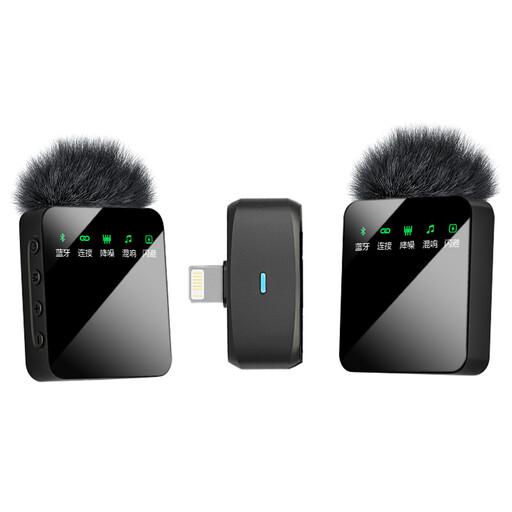 Image unavailable
Verbex ST5 wireless dual clip-on lavalier microphone
The product information lists musical instruments as one of its applications; compare the clip-on positioning with what you need for percussion.
Dual microphone; the product name specifies an iOS interface.
View at Joybuy
 Image unavailable
Verbex ST5 wireless single clip-on lavalier microphone
The product information lists musical instruments as one of its applications; check that this clip-on microphone and interface suit your recording equipment.
Single microphone; the product name specifies a universal interface.
View at Joybuy
Frequently asked questions
Will a different microphone help if my room is echoey?
A directional microphone placed close to the source, or a change in position, can alter the balance between direct sound and ambient sound. Listen to the room and the source first: the microphone itself won’t change the acoustics.
Does a condenser microphone need phantom power?
Check the power requirements for the exact model. AKG specifies a power supply of 44–52 V for the P170. Shure says that correctly applied phantom power won’t damage a professional balanced SM57; that doesn’t mean the SM57 needs phantom power.
How should I start positioning a microphone for snare or tom?
Point the microphone at the source you want to capture and compare practical close-up positions. For the SM57 on snare and tom, Shure gives example distances of 2.5–7.5 cm; listen to the recording again after each adjustment.
What should I check besides the microphone itself?
Check the connection, any power requirements, cable and mounting, as well as the number of inputs if you’re using multiple microphones. The AKG P170 has a specified power requirement of 44–52 V; check that your recording equipment is compatible.
What cooling-off period and guarantee apply to a microphone bought online in the Netherlands?
ACM ConsuWijzer states that online purchases generally come with a statutory 14-day cooling-off period from delivery, with some exceptions. This cooling-off period is separate from the statutory guarantee: according to ACM ConsuWijzer, if a product breaks sooner than expected under normal use, the seller must put it right at no cost.


