Start with a headset whose microphone you can position close to your mouth and whose connection is compatible with your laptop. Then make a test recording of softly spoken words and crisp consonants, with your laptop in its usual position. A wired USB headset may suit short recordings and offer a straightforward connection, while a recording-focused headset gives you more control over microphone placement and playback. Manufacturer specifications can’t predict exactly how your voice and laptop will sound together.
Who is this for?
Anyone making clear word samples
You record individual Dutch words and short sentences, and want to be able to hear soft sounds and consonants on playback. An adjustable microphone boom and a test recording matter more than a promise about call quality.
Anyone recording beside an audible laptop
Your laptop is close by while you record, and you want to know how much fan or other background noise the microphone picks up. Assess this in your own setup, rather than relying solely on a noise-cancellation claim.
Anyone recording with different laptop ports
You may use different laptops and want to check in advance whether you need USB-A, USB-C or a suitable 3.5 mm microphone input.
What should you look for in a headset for recording words?
First, check that the microphone works with your laptop’s ports, then make a test recording where you plan to speak. This lets you assess both how clearly you can be heard and the sound of the laptop itself.
| What to consider |
What to look for when buying |
Who is this important for? |
| Clarity |
Record sample words at both low and high volumes, listen back and check the recording level. |
If I’m recording short words, I want to be able to hear soft sounds and consonants on playback; around 36% of consumers prioritise clarity. |
| Laptop and background noise |
Test with the laptop in its usual position, and listen for noise during silences and softly spoken syllables too. |
When my laptop is nearby, I want to hear how much of its noise makes it into the recording; around 29% of consumers give reducing laptop and background noise their highest priority. |
| Connection and microphone input |
Check the exact headset version against your laptop’s ports, then select the right microphone in your system and recording software. |
If I want to use my headset with different laptops, I want to know in advance whether the microphone will work with the available port; around 21% of consumers prioritise compatibility. |
| Comfort and playback |
Check the fit of the exact version and listen back after a short series of recordings. |
When making several recordings, I want the headset to be comfortable to wear and to be able to assess my samples properly; around 14% of consumers give comfort and playback their highest priority. |
Common mistakes when choosing a headset for recording
-
Assuming noise cancellation guarantees clear word recordings
A claim about call quality doesn’t tell you how natural your voice will sound in your recording space. A recording quality test in a quiet environment also won’t necessarily tell you how laptop noise is handled.
Make a test recording where you plan to work and check soft sounds and silences before recording a longer series.
Words affected by background noise or processing may need to be recorded again.
-
Assuming every 3.5 mm connection is a microphone input
A headphone output on its own doesn’t confirm that the microphone will work. For the RØDE NTH-100M, RØDE specifies the supplied TRRS cable; if your computer has separate microphone and headphone ports, use the supplied splitter.
Check your laptop’s ports against the connection instructions for the exact headset, then test which microphone your recording software is using.
-
Choosing a headset range without checking the exact version
Connections can vary between models and versions. The name of a headset range alone doesn’t tell you which connection or components come with the version you choose.
Check the full model name, plug and included components in the product description before making your choice.
Brands to consider
Logitech
Logitech describes the H390 and H340 as wired USB headsets for computer use and calls. They may be worth considering if a straightforward laptop connection is your priority.
- For the H390, Logitech lists an adjustable microphone boom and in-line controls; for the H340, the brand specifies USB-A and an adjustable microphone.
- Claims about clear calls aren’t independent measurements of Dutch word recordings or noise from a nearby laptop.
Audio-Technica
Audio-Technica describes the ATH-M20xSTS as a headset for creators, with a microphone boom and, according to the EU product information, supplied USB-A and USB-C adapters.
- The manufacturer lists a cardioid microphone and a detachable TRRS cable.
- Check what’s included with the exact listing. Claims about vocal clarity and background noise reduction aren’t an independent test of performance next to your laptop.
RØDE
The NTH-100M is an over-ear headset with a detachable microphone, for use with a compatible analogue laptop connection.
- RØDE specifies the supplied TRRS cable for the microphone to work and describes a splitter for separate 3.5 mm ports.
- Check that your laptop has a suitable microphone input. A manufacturer claim about speech clarity isn’t a comparative measurement of recording performance.
HP Poly
According to HP Netherlands, the Blackwire 3200 series includes wired business headsets available in mono and stereo styles.
- The series offers a choice of wearing styles; HP lists different connection options.
- Features of one version don’t automatically apply to every Blackwire 3200. The product information doesn’t include measurements for word recordings.
EPOS
EPOS describes the IMPACT SC 60 USB ML as a wired, dual-sided USB headset for computer use and calls.
- EPOS lists in-line controls and a noise-cancelling microphone.
- These are product specifications and claims for calls, not an independent assessment of recordings made beside a laptop.
Joybuy products for recording with a laptop
These Joybuy product picks are intended for recording short words with a laptop. For each model, check that the connection and microphone suit your laptop and recording software.
 No image available
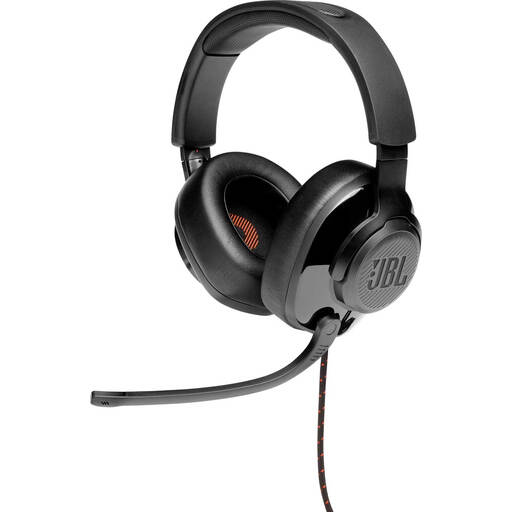
JBL Quantum 300 Hybrid Wired over-ear gaming headset, black
A wired over-ear headset with a flip-up microphone, for anyone looking for this style of microphone for short recordings. Check which connection option is right for your laptop.
View at Joybuy
 No image available
Logitech PC 960 USB headset
An option if you’re looking for a wired USB headset for computer use. Check that the USB connection is compatible with the port you plan to use for recording.
View at Joybuy
 No image available
Logitech H340 USB headset, black
A good fit if you want to record on a computer via USB. Check in advance that this version is compatible with your laptop’s ports.
View at Joybuy
 No image available
Edifier G2II wired USB gaming headset for PC
A wired USB headset for anyone looking for a gaming headset with a microphone for computer use. Check the exact connection and microphone version for your recordings.
View at Joybuy
 No image available
Logitech H150, white, 981-000350
A wired headset with an adjustable microphone, which you can position close to your mouth. Check whether your laptop has a suitable combined 3.5 mm connection. If it has separate ports, you’ll need a splitter, which isn’t included.
View at Joybuy
Frequently asked questions
How can I check that my headset microphone is recording, rather than my laptop microphone?
Select the headset as your input device and use your operating system’s microphone test. Also choose the intended input in your recording software and listen back to a short recorded word. Microsoft explains these steps for Windows.
Do I always need an extra splitter for a RØDE NTH-100M?
No, not always. RØDE specifies the supplied TRRS cable; the supplied splitter is for computers with separate 3.5 mm microphone and headphone ports. Check which inputs your laptop has first.
How should I set the level for quiet and loud samples?
Record both types of sample as a test and check the recording meter. Audacity suggests a maximum peak of around −6 dB as a guide for its recording workflow; this isn’t a required setting or a guaranteed result for every app.
What are my rights if a headset bought online doesn’t work properly?
According to ACM ConsuWijzer, you have a legal guarantee as well as any manufacturer’s warranty if the product doesn’t do what you could reasonably expect during normal use; the seller is then responsible for providing an appropriate solution. Online purchases generally also come with a 14-day cooling-off period after delivery, subject to legal exceptions.
Can I publish recorded word samples that use someone else’s text or voice?
That depends on what you record and how you use it. The Dutch government distinguishes between making a copy for personal use and sharing copyright-protected work. The Dutch Data Protection Authority outlines separate rules for publishing other people’s personal data online, as well as a limited exception for exclusively personal or household use. Owning a headset does not, in itself, give you the right to publish.


