
Guide who wants a clear voice above all
Spoken instructions are the priority. A microphone close to the guide can help reduce the distance from their voice; Shure explains why microphone placement matters.


If keeping the guide’s voice clear is your main priority, choose a setup that lets you position the microphone close to the speaker; Shure explains that greater distance can reduce speech intelligibility in recordings. Built-in stereo microphones are simpler if you also want to capture the sound of the hall, while separate inputs are useful for recording multiple sources independently. A higher bit depth is no substitute for good microphone placement: test the recording, power supply and storage in advance, and carefully consider how identifiable voices of participants will be handled.
Spoken instructions are the priority. A microphone close to the guide can help reduce the distance from their voice; Shure explains why microphone placement matters.
For example, you want to connect the guide and a second source and record them separately. In that case, the available inputs and the connections on your sources are important factors to consider.
You want to record and play back a session without a complicated setup. Check the placement, power supply and storage in advance, and make a full test recording.
Choose this if: you want to set down a single device and capture some of the sound of the hall too.
Bear in mind: the distance from the guide can affect how clearly they are heard, so make a test recording from where they will speak.
Choose this if: the guide moves around or their voice matters more than capturing the whole hall. The Zoom F2 is an example of a recorder with a lavalier microphone.
Bear in mind: test how it attaches to clothing and how it operates; this setup will not give the rest of the hall the same prominence.
Choose this if: you want to connect the guide and, for example, a second source separately. Zoom lists two XLR/TRS inputs for the H4essential.
Bear in mind: check the connections on your sources and which microphones or cables your setup requires.
Choose this if: you need wireless transmission as well as a recording made at the speaker. RØDE lists recording on the Wireless PRO transmitters.
Bear in mind: check in advance how to start and export recordings from the transmitter; the receiver and wireless features may involve extra steps.
| Consideration | What should you check? | Who is this important for? |
|---|---|---|
| Clarity in an echoey hall | Microphone distance and how clearly the speaker can be heard. | If I want to hear the guide clearly, I pay attention to the distance between their voice and the microphone, and test the echo in the hall. Around 42% of consumers prioritise clarity. |
| Recording multiple sources separately | The inputs required and how each source connects. | I want to record the guide and, for example, a second source separately, so I check how each will be connected. Around 25% of consumers give separate sources top priority. |
| Easy recording and playback | Being able to start and stop a short recording and play it back. | If I want to get started with minimal setup and listen back afterwards, I look for a straightforward process. Around 17% of consumers prioritise ease of use. |
| Recording the entire session | Enough storage, power and remaining recording time. | To record a session without interruption, I want to check in advance that the storage and power supply will last for the planned duration. Around 16% of consumers give uninterrupted recording top priority. |
A recording format does not change the distance between the microphone and the speaker. Shure explains that distance can affect the speech picked up by the microphone.
First compare microphone setups, then make a test recording from the place where the guide will speak.
The distance between a recorder placed in one spot and a moving speaker changes during the recording.
Consider a microphone worn by the guide if their voice is the priority, and decide separately how much of the hall you want to record.
A suitable portable microphone setup may require extra preparation; test the attachment and connections before the session.
Storage, power and external inputs are separate parts of a recording setup. Check the manual and the contents supplied with the exact version.
Run a full recording and playback test in advance.
You may need a memory card, power supply, microphone or cable. Check in advance which components are suitable for your setup and what comes with the version you choose.
The H1essential is an option with built-in microphones, the F2 combines a recorder with a lavalier microphone, and the H4essential also offers separate inputs.
The DR-05XP has built-in stereo microphones; Tascam lists adjustable stereo microphones for the DR-07XP.
The Wireless PRO is a wireless microphone system for anyone who wants wireless transmission as well as a recording made at the speaker.
These Joybuy products are designed for voice recording or are devices with a voice recording feature. Before using one in a community hall, check the microphone placement, connections, and how to record and play back audio.
 No image available
Could suit anyone who wants to record spoken sessions and use note-taking and summary features; test in advance whether the process works for your session.
The product name lists the Silver version and AI note-taking and summary features.
 No image available
Could suit anyone who wants to record spoken audio and use a transcription feature; check that the controls and output work for your session.
The product name lists 64 GB of storage and a transcription feature.
 No image available
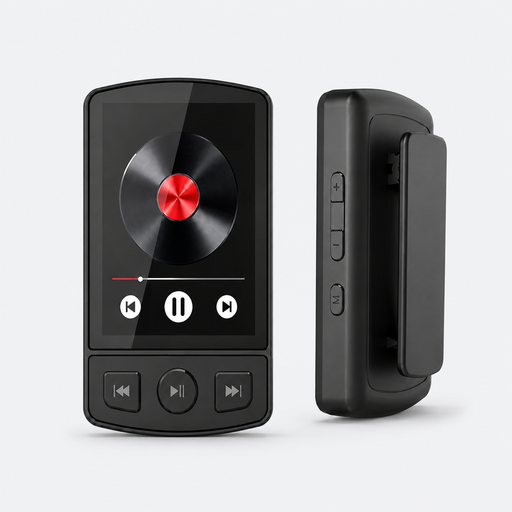
Could be worth considering if you are looking for a device with a voice recording feature; check how it can be positioned and operated as part of your setup.
The product name lists Bluetooth 5.2, a clip and 64 GB of storage.
 No image available
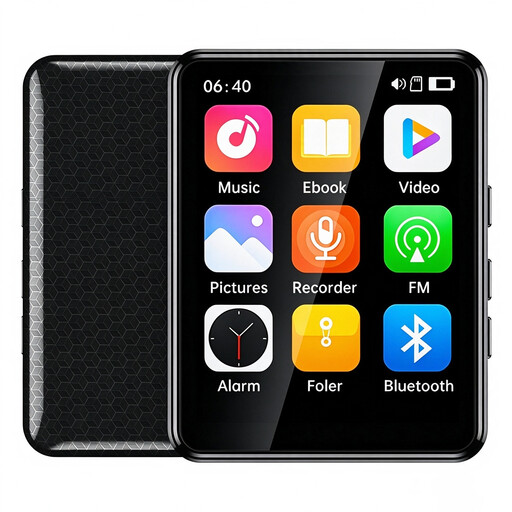
Could suit anyone looking for a device with voice recording who also wants to assess how easy it is to use the screen controls.
The product name lists a 2.4-inch colour touchscreen and 64 GB of storage.
 No image available
Could suit anyone who wants to record spoken audio and use transcription and summary features; check in advance that the processing is appropriate for the purpose of the recording.
The product name lists 64 GB of storage, plus transcription and summaries in 118 languages.
No, it does not remove the echo already picked up by the microphone. Shure explains that greater distance between the speaker and microphone can reduce speech intelligibility. So test the microphone position in the hall first.
Make a short test recording from the intended speaking position and play it back. Then check that storage and power are ready for your chosen model and that it is actually recording.
According to ACM ConsuWijzer, under the statutory guarantee the seller must put a faulty product right at no cost, for example by repairing or replacing it. Check separately what terms apply to any additional commercial guarantee.
That depends on the purpose, who makes the recording and with whom it is shared. The Dutch Data Protection Authority considers identifiable people in audio recordings to be personal data; if the GDPR applies, processing requires a valid legal basis. The Authority also describes an exception for exclusively personal or household use. So decide in advance what the recording is for and how it will be shared, and inform the people concerned appropriately.