
Vandaag of morgen in huis

Kwaliteit gegarandeerd

Welkomstaanbiedingen ontgrendelen: GRATIS bezorging | Tot 80% korting | Gratis 30 dagen JoyPlus-proefperiode
Download de app
There's nothing more disruptive than a mouse dying in the middle of an important task. Dead batteries, no spares at home, and a deadline looming. A rechargeable wireless mouse solves this problem. No more fussing with disposable batteries and no more tangled cables cluttering your desk.
But which mouse is right for you? The market is flooded with options, each with its own specifications. In this guide, we'll help you make a choice based on practical features. We'll look at what really matters for daily use, whether you're working at the office, at home, or on the go.
Before we dive into specific models, here are a few key points to consider that will help you choose.
The way a mouse connects is crucial for its ease of use.
A mouse is more than just a pointer. Features like silent clicks and programmable buttons can significantly boost your productivity.
The whole point of a rechargeable mouse is convenience. A long battery life means you can go for weeks or even months without recharging. Most modern mice use a USB-C port, the same standard as many phones and laptops. Some models even offer wireless charging via Qi.
Based on specifications and functionality, we've highlighted a few interesting models for you.
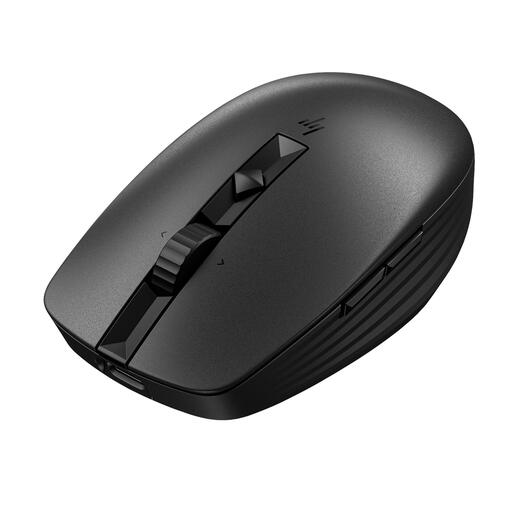
Why It Stands Out This mouse is designed for flexibility. It works on virtually any surface, even glass, and you can seamlessly switch between three different devices. The combination of long battery life and extensive customisation options makes it a solid choice for a dynamic workspace.
Key Features
Who Is It For? For the professional or student who works with multiple devices and needs a reliable, versatile office mouse that performs anywhere.
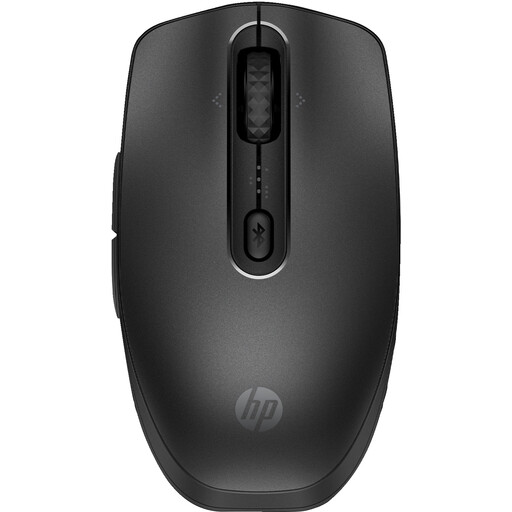
Why It Stands Out The HP 695 focuses on silence and charging convenience. With silent clicks and the option for wireless charging via Qi, this is a modern laptop mouse and desktop companion. Its long battery life and high sensitivity make it suitable for a wide range of tasks.
Key Features
Who Is It For? For users who value a quiet work environment and the convenience of wireless charging. A great match for remote workers and people in open-plan offices.
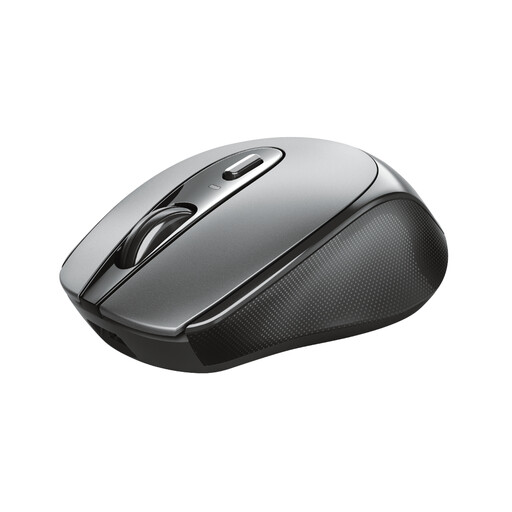
Why It Stands Out The Trust Zaya is a straightforward wireless mouse that does what it's supposed to do. It's compact, rechargeable, and easy to use. With no complex features, this is a reliable and affordable choice for everyday computing tasks.
Key Features
Who Is It For? For students, home users, or as a simple laptop mouse for on the go. A great choice if you're looking for a functional, rechargeable mouse without the extra frills.
A good mouse is half the battle, but a matching keyboard completes your workspace. If you're also tired of dealing with batteries for your keyboard, a rechargeable model is the next logical step.
→ Check out our selection of Rechargeable Keyboards and complete your wireless desk.
Battery life varies significantly by model and usage, ranging from several weeks to multiple months. Manufacturers often provide an estimate, such as the 90 days for the HP 715 or even 4 months for the HP 695. In practice, it depends on how intensively you use the mouse.
Yes, you can. Look for a multi-device mouse. These models often have a button on the bottom that lets you switch between different paired devices, such as your laptop, tablet, and PC. The HP 715 and HP 695 are examples of this.
A Bluetooth mouse connects directly to your device's built-in Bluetooth. This is convenient because it doesn't occupy a USB port. An RF (Radio Frequency) mouse uses a small USB dongle for the connection. This is often considered a very stable and direct connection, but it does cost you a USB port. Some mice, like the HP 715, offer both options.
