What should you look for when choosing?
First check that the charging output is suitable for your fan. Then decide how many extra connections you need and whether you need a longer cable.
Compact USB charger
Choose this if: you mainly want to charge your fan and don’t need extra mains sockets.
Consider: it takes up little space, but its output and any usage restrictions must match your fan’s manual.
Multi-port USB charger
Choose this if: you want to connect other devices to the same charger as your compatible fan.
Consider: the stated total power doesn’t tell you how much power each port provides when you connect several devices. Check how the power is distributed for the combination you plan to use.
USB extension lead or charging hub
Choose this if: you need both USB ports and standard mains sockets in one accessible spot.
Consider: a cable can bring sockets closer to your desk, but it takes up space and must be positioned safely.
| What to consider |
What to look for |
Who is this most relevant to? |
| Compatibility |
Check which cable and charging output your fan requires, then compare them with the port you’ve chosen. |
If I only want to charge my fan, I first need to know which connection the manual specifies. Around 31% of consumers put compatibility at the top of their purchase priorities. |
| Safe charging |
Check the manual, the condition of the cable and charger, that the charger can be positioned in a clear space, and the CE mark on any mains-powered product. The NVWA says CE marking is compulsory for electrical products; it is not proof of independent testing. |
I want to be able to position the charger in a clear space away from bedding and avoid damaged cables. Around 31% of consumers put safe use first. |
| Several devices |
Compare the number of USB-A and USB-C ports and the power available from each port for the combination you want to use. |
If I want to connect my fan at the same time as other devices, the power distribution needs to suit that combination. Around 23% of consumers give simultaneous charging their highest priority. |
| Space and reach |
Measure the available space and check the cable length and distance to the mains socket. |
I want sockets by my desk without a cable getting in the way. Around 15% of consumers mainly consider reach and limited space. |
Brands to consider
The features listed apply to the specific models and versions described, not necessarily to every product from the same brand.
Belkin
Multi-port wall chargers for connecting several USB devices in one place.
- Belkin Netherlands lists three USB-C ports, one USB-A port and up to 140 W total for the BoostCharge Pro WCH014btWH.
- The total power doesn’t mean each port delivers that much power at the same time, or that the charger is suitable for every fan.
Brennenstuhl
Extension leads and charging hubs for setups that need standard mains sockets as well as USB ports.
- For the hugo! ONE version reviewed, Brennenstuhl lists two USB-C ports, two 230 V mains sockets and a 2 m cable.
- Check that the exact version, plug and USB outputs suit your needs.
Anker
Compact multi-port USB chargers, including the European Anker Prime A2688, with two USB-C ports and one USB-A port.
- Anker specifies the output power for the A2688 when different numbers of ports are in use.
- The A2688 manual says the product is intended for IT equipment only, so don’t assume it’s suitable for a fan without confirmation.
UGREEN
Compact USB-C wall chargers for those who don’t need extra mains sockets.
- The European product information describes a 65 W Nexode Air version.
- Check that the output, plug version and use with your fan are suitable; 65 W is not a general requirement for fans.
Joybuy products for charging in your student room
These products offer USB charging ports, sometimes alongside standard mains sockets, for setting up a charging space in or near your student room. Always check your fan’s manual and the charging output of the port you choose.
 No image available
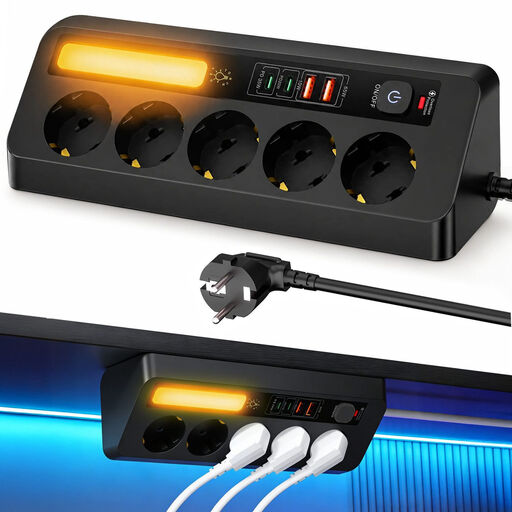
Corner Power Strip 9-in-1, 5 sockets and 4 USB ports
May suit you if you want to connect USB devices and standard plugs in one place; check that the USB output is suitable for your fan.
Lists PD 35 W and a 2 m cable.
Joybuy
 No image available
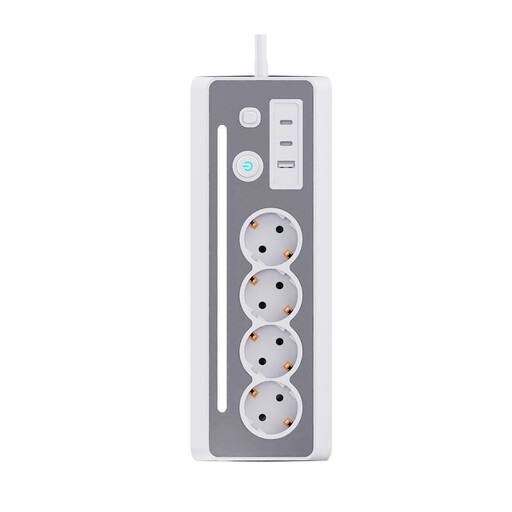
7-in-1 Desk Power Strip, white and grey
May suit a desk setup where you want to connect USB devices and standard mains-powered equipment; check your fan’s manual for the right charging output.
The product name lists three Schuko sockets and three USB charging ports.
Joybuy
 No image available
Apple USB-C power adapter, 20 W, white
May suit you if one USB-C connection is enough and its charging output matches your fan’s manual.
Power: 20 W. The charging cable is sold separately.
Joybuy
 No image available
Neomounts DS22-840BL6 desk socket with clamp
May suit you if you want USB ports and standard mains sockets directly on your desk; check that your desk is suitable for the clamp.
The product name lists USB-C and USB-A ports.
Joybuy
 No image available
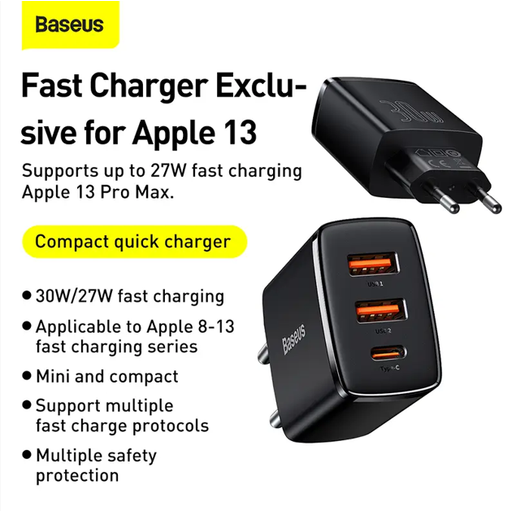
Baseus Compact Quick Charger, black
May suit you if you want to connect other USB-C and USB-A devices as well as your fan; check the power distribution for the combination you’ll be using.
The product information lists a combined output of 15 W when all three ports are in use.
Joybuy
Frequently asked questions
Can any USB-C charger charge my fan?
No. The plug shape alone doesn’t confirm compatibility. Check your fan’s manual to find out which cable and charging output it needs. For example, Xiaomi recommends using the cable supplied with its Rechargeable Mini Fan and an output of 5 V/2 A or higher; this isn’t a general requirement for other models.
Where should you put the fan while it’s charging?
Follow the manufacturer’s instructions and place the charger in a clear space so heat can escape. The Fire Service recommends charging devices during the day where possible, and warns against charging under a pillow or duvet. Don’t use damaged cables either.
Is a charging station with a high total wattage useful?
A higher total power doesn’t automatically offer any benefit if you’re only charging your fan. It may matter if you’re also connecting other compatible devices; if so, compare the power available from each port for the combination you’ll actually use.
What if the charging station breaks too soon during normal use?
In the Netherlands, you have a legal guarantee as well as any manufacturer’s or seller’s guarantee. ACM ConsuWijzer explains that, under the applicable conditions, the seller must put right a product that doesn’t meet what you could reasonably expect, at no cost to you. There isn’t one fixed guarantee period for all products.
Is CE marking compulsory for a mains-powered charging station?
According to the Netherlands Food and Consumer Product Safety Authority, CE marking is compulsory for electrical products. It is not proof of independent testing. Check the mark and product identification on the version you intend to buy.


