First, check your fan’s manual to see which cable, connection and power supply are permitted. A compact USB wall charger may be suitable if USB charging is supported and you don’t need any extra standard mains sockets. A power strip is more useful if you also want to plug in other devices. Keep the fan, cable and charger clear of bedding while charging, and leave room for heat to escape, as recommended by the Fire Service.
Who is this guide for?
Charging safely beside your bed
You want to know whether the fan, cable and charger can be charged safely where you plan to put them. The Fire Service advises placing chargers in a clear space, avoiding damaged cables and following the device’s instructions.
Plugging in your fan and other devices
You may also want to plug in a phone or lamp, for example, and are weighing up USB ports against standard mains sockets. Which connection is suitable depends on your devices and their charging instructions.
A tidy charging spot on your bedside table
You’re short on space and want an accessible connection without putting the cable or charger under the bedding. Both the location and the cable length matter.
What should you look for when buying?
Compact USB wall charger
Choose this option if: your fan’s manual allows USB charging with the connection and power supply in question, and you don’t need any extra standard mains sockets.
Bear in mind: a wall charger won’t provide extra standard mains sockets. A stated PD output doesn’t prove that an unknown fan will charge faster or be compatible.
Power strip with USB ports
Choose this option if: you need standard mains sockets as well as a suitable USB connection, for example for a lamp.
Bear in mind: a power strip adds another cable and more connected equipment. Check your fan’s charging requirements and make sure you can place the power strip somewhere clear.
Standard power strip with a separate charger
Choose this option if: the manual specifies a particular separate charger and you also need several standard mains sockets.
Bear in mind: the separate adapter will also take up space. Keep the power strip clear and don’t connect more devices than is safe.
| What to consider |
What should you check? |
Who is this for? |
| Charging safely beside bedding |
Choose a clear spot, follow the manual and don’t use a damaged cable. |
I want to position the fan and charger so they stay clear of pillows and duvets. Around 36% of consumers put safe charging beside the bed first. |
| Connections for several devices |
Check the fan’s manual and count the USB-A, USB-C and standard mains connections you need separately. |
I want to plug in the fan and, for example, a lamp or phone at the same time, without choosing the wrong charging port. Around 29% of consumers give simultaneous connections the highest priority. |
| Space and cable length |
Measure the route from the socket and check the cable length and dimensions of the exact model. |
If my bedside table has limited space, I want an accessible spot without a power strip getting in the way. Around 21% of consumers prioritise space and a suitable cable route. |
| Charging equipment needed |
Check whether an existing or supplied charger is suitable according to the fan’s manual. |
I want to check whether my existing charging equipment will do the job before buying anything else. Around 14% of consumers prioritise avoiding unnecessary purchases. |
Common buying mistakes
-
Assuming USB-C or a high PD output proves compatibility
The connection type or stated output alone won’t tell you which power supply your fan accepts.
Check the manual first, then compare the permitted connection, cable and power supply.
-
Placing the charging spot so close to the bed that it ends up under the bedding
The Fire Service recommends keeping chargers clear so heat can escape, and not charging devices under a pillow or duvet.
Choose a clear, stable spot first, then work out which cable or lead length you need.
-
Confusing a standard power strip with a USB charger
According to Nedis, the ESOC315F1WT has three standard mains sockets and no built-in USB charger. You’ll need a separate suitable adapter for USB charging.
Count the USB ports and standard mains sockets you need separately, and choose the specified separate fan charger if the manual requires one.
Brands to consider
Belkin
Belkin offers models with USB-C ports, as well as models that combine USB-C with standard mains sockets.
- According to the official model specifications, the WCB006vfWH delivers up to 20 W per USB-C port. The SRB004vf2M has eight sockets, two USB-C ports and a 2 m cable.
- This information doesn’t confirm that the models are suitable for an unidentified fan. Eight sockets may also offer more connections than you need beside one bed.
Nedis
Nedis offers standard earthed power strips for use with a separate charger.
- The official product information for the ESOC315F1WT lists three sockets and a 1.5 m cable.
- This model doesn’t have a built-in USB charger. You’ll need a separate suitable adapter for USB charging.
Hama
Hama offers power strips that combine standard mains sockets with USB ports.
- Hama lists three sockets, three USB ports, a switch and a 1.4 m cable for model 00223192.
- The stated 100 W PD output doesn’t automatically make this model more suitable for a small fan; the fan’s charging requirements are what matter.
Products on Joybuy
This selection includes power strips with USB ports and a USB-C wall charger. Before buying, check that the connection and power supply are suitable for your fan according to its manual.
 No image available
10-in-1 power strip with digital clock and 3 m cable
Could be suitable if you need standard mains sockets as well as USB connections; check that your fan supports the connection provided.
Lists 4 AC sockets, 3 USB-A ports, 2 Type-C ports, a digital clock and a 3 m cable. Stated maximum: 2500W MAX.
Joybuy
 No image available
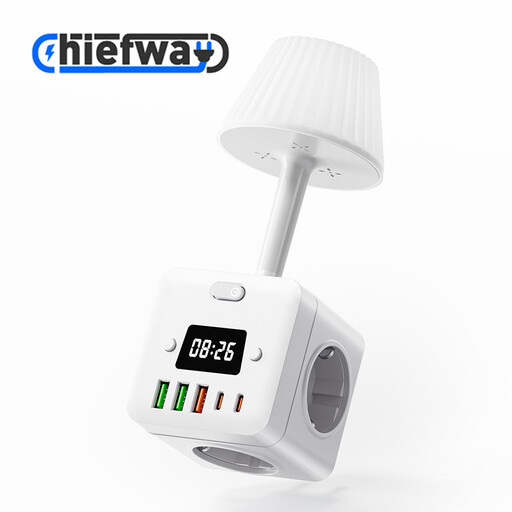
10-in-1 cube power strip with night light and clock
Could be suitable if you want to combine USB and standard plug connections in one place; check your fan’s charging requirements.
The product name lists USB-A and Type-C ports, several AC sockets, a night light and a digital clock. Stated maximum: 2500W MAX.
Joybuy
 No image available
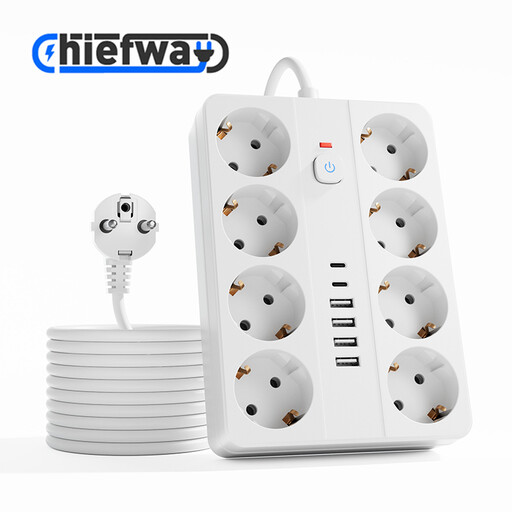
14-in-1 power strip with 8 AC sockets and 3 m cable
Could be suitable if you want to connect several devices via USB and standard mains sockets; consider whether the number of connections is practical beside your bed.
Lists 8 AC sockets, 4 USB-A ports, 2 Type-C ports and a 3 m cable. Stated maximum: 2500W MAX.
Joybuy
 No image available
7-in-1 cube power strip with switch
Could be suitable if you need USB and standard connections in one place; check whether your fan can charge using one of the listed USB connections.
Lists 3 AC sockets, USB-A and USB-C ports, a switch and a 1.5 m cable. Stated maximum: 2500W MAX.
Joybuy
 No image available
65W USB-C wall charger with retractable cable
Could be suitable if your fan’s manual permits this connection and power supply, and you don’t need any extra standard mains sockets.
Lists two USB-C ports, a 70 cm retractable USB-C cable and a stated output of 65W. These figures alone don’t confirm compatibility with your fan.
Joybuy
Frequently asked questions
Can I use any USB-C port to charge my rechargeable fan?
No, you can’t tell just from the port type. Check your fan’s manual to see which cable, connection and power supply are permitted. The European Commission’s list of devices with harmonised USB-C charging requirements does not include fans.
Can I leave the fan on my bed while it’s charging?
Don’t put a device that’s charging under a pillow or duvet. The Fire Service recommends placing the charger in a clear space so heat can escape. Don’t use a damaged cable, and follow the fan manufacturer’s instructions.
How can I set up a safe charging spot?
Place the fan and charger in a clear spot where heat can escape, and check the cable and device for damage. Follow the instructions for use. The Fire Service also advises against connecting extension leads to one another or plugging too many devices into a single power strip.
What can I do if a charger or power strip I bought online doesn’t work properly?
If a consumer product is faulty, the seller is responsible under the Dutch statutory guarantee. The ACM says this may mean free repair or replacement, and sometimes a refund. Online purchases also generally come with a cooling-off period of up to 14 days after delivery, subject to legal exceptions.
Does a mains-powered charger or power strip need a CE mark in the Netherlands?
According to the Netherlands Food and Consumer Product Safety Authority, CE marking is mandatory for electrical products. The mark is the manufacturer’s declaration that the product meets the applicable EU requirements; it is not, by itself, proof of independent testing. Also check the instructions for use and the stated electrical specifications of the specific product.


