First, check your fan’s manual to find out which charging method, cable and power supply are approved. If USB charging is permitted, a multi-port charger lets you connect several USB devices to one socket. Check how many ports are available and how the power is shared when they’re used at the same time. If the manual specifies a dedicated mains adapter, look for extra mains sockets rather than assuming a USB port will do the job.
Who is this relevant to?
Fan owners with one spare socket
If you want to charge your fan alongside other USB devices, first check whether its manual permits charging from a suitable USB power supply. For example, Duux lists a USB-C charging cable for the Icy hand-held fan. Always follow the instructions for your specific model.
People using a shared desk
If you share a charging spot, it helps to have connections that suit the cables you have, with ports within easy reach. Product information from UGREEN, Belkin and Anker shows that port combinations and charger placement vary by model.
People with a fan that has its own adapter
If your fan’s manual specifies a dedicated mains adapter, extra mains sockets may be more useful than extra USB ports. The Netherlands Fire Service advises following the manufacturer’s instructions.
What should you look for?
Choose a charging solution that suits the power supply specified for your fan. Then work out how many connections you need and where you’ll use them.
Multi-port USB desktop charger
Suitable when: the manual permits USB charging and you want to connect other USB devices as well as your fan.
Keep in mind: the total power isn’t automatically available to every port. Check how it’s shared when ports are used at the same time.
Compact multi-port wall charger
Suitable when: you have limited desk space and your cables can reach the socket.
Keep in mind: the ports are next to the socket, so how easy they are to reach also depends on cable length.
Power strip for a dedicated mains adapter
Suitable when: your fan’s manual specifies a dedicated adapter or another mains power supply.
Keep in mind: this adds mains sockets, not USB ports that automatically replace the specified adapter.
| What to consider |
What should you check? |
Who is this important for? |
| Connection and charging method |
Check the manual for the approved connection, cable and power supply. Use the specified adapter if required. |
If I’m not sure whether my fan can be charged via USB, I want to check the correct connection first. Around 33% of consumers mainly want to check compatibility. |
| Charging multiple devices at once |
Count the USB-A and USB-C ports you need, and check the power available for the combination of ports you’ll use at the same time. |
If I want to charge my fan and other USB devices from one socket, I need enough suitable connections. Around 27% of consumers mainly want to charge several devices at once. |
| Accessibility |
Check where the socket is and consider the cable length and where you’ll place the fan. |
If I want a tidy charging spot on or near my desk, I consider the distance between the socket, ports and devices. Around 20% of consumers mainly prioritise accessibility. |
| Safe use |
Follow the instructions, check the product markings and don’t use damaged cables. |
If I want to charge the fan according to the instructions, I also check the condition and positioning of the charger. Around 20% of consumers put safety and product information first. |
CE marking is mandatory on the Dutch market for electrical products covered by the requirement, according to the Netherlands Food and Consumer Product Safety Authority. A CE mark on its own doesn’t mean that a specific item has been independently tested. So check the product information for the version you’re considering.
Common mistakes when choosing
-
Assuming the highest wattage applies to each port
The stated maximum may change when several devices are connected at once.
Compare the specifications for the exact combination of ports you plan to use.
-
Assuming a USB-C connection means every charging method is permitted
The connection alone doesn’t confirm that the fan can be charged from that power supply according to its manual.
Check the instructions for your exact fan model and the cable supplied with it.
-
Choosing a USB charging station when a dedicated mains adapter is required
Extra USB ports don’t automatically replace the mains adapter specified by the manufacturer.
Choose between USB ports and extra mains sockets based on the charging method in the manual.
Brands to consider
UGREEN
UGREEN describes its 65 W Nexode Desktop GaN Charger as a desktop charger with four USB-C ports and one USB-A port.
- UGREEN says the charger has a 2 m mains cable and a maximum total output of 65 W.
- The total power isn’t the same as 65 W for every connected device. Check how the power is shared and the fan’s charging requirements.
Belkin
Belkin describes the BoostCharge Pro WCH010 as a desktop charger with two USB-C ports and two USB-A ports.
- Belkin states a maximum total output of 108 W and a 2 m power cable.
- The stated total output doesn’t prove that a particular fan will charge faster.
Anker
Anker describes the Prime 67W as a compact charger with two USB-C ports and one USB-A port.
- The manufacturer lists different maximum outputs depending on how many ports are in use at once.
- Before connecting several devices, check how the power is shared across the combination of ports you want to use.
4smarts
The product information describes the Office 60 W as a charging station with six USB-A ports and one USB-C port.
- This combination of ports offers several connections for use at the same time.
- The 60 W applies to the station as a whole, and there is one USB-C port.
Products for this charging set-up
These product options combine mains sockets and USB ports for fans that, according to their manuals, use a dedicated adapter or can be charged via USB. Check the specified charging method for your fan model and make sure each charger has the connections you need to use at the same time.
 No image available
7-in-1 cube power strip with cable, white
An option if you want to connect a dedicated mains adapter and USB devices at the same charging spot.
Three AC sockets and four USB ports: three USB-A and one USB-C. The cable is 1.5 m long. The stated maximum load is 2500 W; don’t connect this power strip to another power strip.
View at Joybuy
 No image available
6-in-1 320 W charging station with retractable USB-C cables
A good fit for a charging spot where the fan can be charged via USB according to its manual and several devices are connected at once.
The product description lists two integrated retractable USB-C cables and four additional USB ports. It states that up to six devices can be charged at the same time; check how the power is shared across the ports for your combination.
View at Joybuy
 No image available
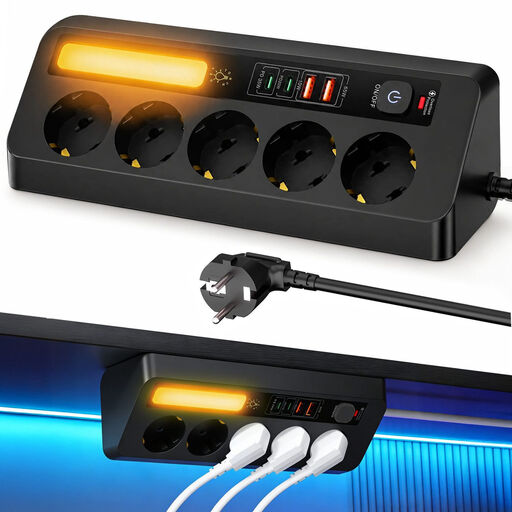
Corner power strip with 5 sockets and 4 USB ports
An option if you want to combine mains sockets for a dedicated adapter with USB ports in one charging spot.
The product description lists five sockets, two USB-C ports, two USB-A ports and a 2 m cable. It states that the sockets have a maximum load of 2500 W.
View at Joybuy
 No image available
Neomounts DS22-840BL6 desk socket
Suitable for keeping connections on your desk when you use the specified adapter and USB devices in the same place.
Three Schuko sockets, two 20 W USB-C ports and one 18 W USB-A port. The cable is 1.4 m long; the product is designed to be fitted to the edge of a table with a clamp.
View at Joybuy
 No image available
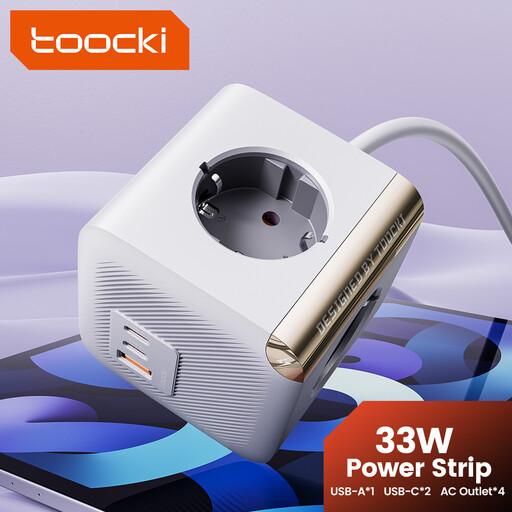
toocki PD33W power strip with USB-C
An option if you want to connect a dedicated mains adapter and USB devices in the same place.
Four AC sockets and two USB-C ports; the product description lists USB-C outputs of 20 W and 18 W. The stated cable length is 4.9 ft and the maximum load is 2500 W. Don’t connect this power strip to another power strip.
View at Joybuy
Frequently asked questions
Can I plug any rechargeable fan straight into a USB charging station?
No, you can’t tell from the word ‘rechargeable’ alone. Check the connection and power supply instructions for your exact fan model, and use a dedicated adapter if the manual specifies one.
How can you set up a charging spot safely?
Follow the fan’s manual, don’t use damaged cables and leave the charger unobstructed so heat can escape. The Netherlands Fire Service advises charging battery-powered devices in a room with a working smoke alarm.
What should you check about servicing or returns?
Check the terms and conditions that apply to your purchase. For online purchases in the Netherlands, there is often a 14-day cooling-off period; the Government of the Netherlands also explains the exceptions.
Is CE marking mandatory for an electrical charging station in the Netherlands?
CE marking is mandatory for electrical products covered by the requirement, according to the Netherlands Food and Consumer Product Safety Authority. The mark alone doesn’t mean that a specific item has been independently tested.


