
Writer who does a lot of editing
You work on chapters and references, and want a familiar layout with editing keys close to hand. Choose a physical key layout that suits the way you write.


For this guide, start with a keyboard that has a familiar physical layout and easily accessible navigation keys. Then consider noise, desk space and connectivity. A compact model can free up desk space, while a full-size model retains the number pad. RTINGS.com explains that more compact keyboards take up less desk space; for each model, also check the exact key layout and connection type.
You work on chapters and references, and want a familiar layout with editing keys close to hand. Choose a physical key layout that suits the way you write.
You type within earshot of others, so keyboard noise matters. Assess the sound of the exact version you plan to buy, rather than relying on the switch type alone.
You keep reference materials next to your screen and need room for your mouse. A model without a separate number pad is worth considering if you rarely use one.
For this writing task, each consumer has one main purchasing concern. Start with a layout that suits your editing and number-entry work, then consider noise, available desk space and connectivity.
| What to consider | What should you look for? | Who might care most about this? |
|---|---|---|
| Layout for writing and editing | Check the key labels and shape on the exact version, including Enter, Shift and the navigation keys you use most often. | If I often switch between chapters and references, I want to find my usual keys quickly. Around 36% of consumers prioritise a familiar layout and editing. |
| Keyboard noise in a shared space | If possible, try the exact version and don’t treat a label such as ‘quiet’ as a comparative noise measurement. | When I type within earshot of others, the actual sound of the version matters. Around 29% of consumers prioritise keyboard noise. |
| Space for reference materials and a mouse | Measure your available desk space and weigh up how much room you need against how often you use the number pad. | At a crowded reception desk, I want room for reference materials and a mouse alongside the keyboard. Around 21% of consumers prioritise space for these items. |
| Connectivity and setup | Check which USB ports or wireless connections are available on your work computer, and whether the features you want require software. | If my computer stays at the reception desk, I want a connection that suits that workspace. Around 14% of consumers prioritise straightforward connectivity and setup. |
A model may be available in different country-specific versions. The physical layout determines where the keys are and which punctuation marks they display.
Before buying, check the country code, photos of the exact version and the punctuation marks you use most often.
A different layout may take extra time to get used to or mean you need to return the keyboard.
A description such as ‘quiet’ doesn’t tell you how that version sounds next to other keyboards; the models mentioned haven’t been compared using the same testing method.
Where possible, try the exact version in a similar space and check the returns policy if noise is a deciding factor.
A compact model such as the BakkerElkhuizen UltraBoard 950 V2 doesn’t have a traditional separate number pad. If you regularly enter numbers, a full-size layout may be more practical, but it takes up more desk space.
Think about how many numbers you’ll enter for the manual, then measure how much room you’ll have left for your mouse and reference materials.
BakkerElkhuizen describes the UltraBoard 950 V2 as a compact, wired keyboard for a workspace that also needs room for a mouse and reference materials.
Trust describes the Primo 23880 as a full-size wired keyboard for anyone who wants a number pad and a straightforward connection.
CHERRY describes the KC 6000 SLIM as a full-size keyboard with scissor-switch keys.
Logitech describes the MX Keys S as a full-size wireless keyboard for anyone who wants to switch between devices.
This selection of Joybuy products includes compact and full-size keyboards, with wired and wireless connections. Compare the physical layout, your number-entry needs and the connections available with your workspace.
 No image available
A wired 75% layout may suit you if you share your workspace with a mouse and reference materials.
QWERTY US layout, 83 keys and hot-swappable linear switches.
 No image available
The compact layout and choice of connection options may suit you if you want to match the connection to your computer.
Wired, Bluetooth or 2.4G; with TFT display, hot-swappable keys and Flying Fish Switch Purple.
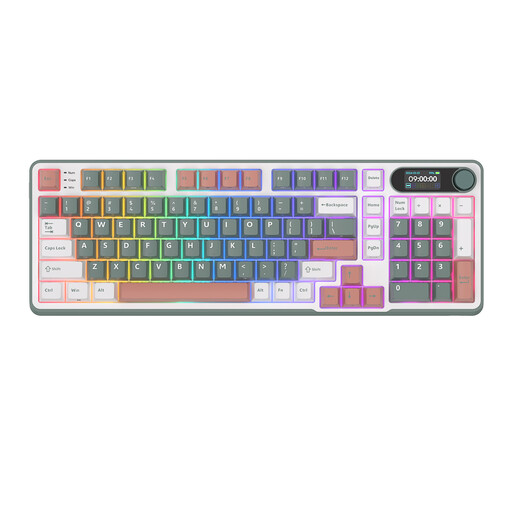 No image available
This model may suit you if you want a wireless keyboard with 98 keys and extra controls.
Bluetooth, 2.4G or USB-C; with rotary knob, smart display and Blue Switch.
 No image available
A wired 60% layout may suit a small workspace; bear in mind which keys you need for your writing.
QWERTY US layout, 61 keys and RGB backlighting. Without a separate number pad, it’s less suitable if you enter lots of numbers.
 No image available
This model may suit you if you want a full-size keyboard with a number pad and the flexibility to work wirelessly across devices.
Scissor-switch keys and QWERTY US layout.
According to Arboportaal, for an employee who works with a screen for more than two hours a day, the screen and keyboard must not be attached to each other. A separate screen or keyboard must therefore be available when using a laptop; whether this requirement applies to your workplace depends on your circumstances.
Position your keyboard, mouse and reference materials together, and make sure your sources are easy to read while you type. Arboportaal recommends a document holder as an aid for employees working with screens, and says that screen work should be alternated with other work or a break at regular intervals.
Check both the physical country layout of the version and the input language on your computer. Trust lists an incorrectly selected input language as a possible cause of incorrect letters or symbols.
Not for every feature mentioned: Trust says the wired Primo 23880 works without drivers. If you want to use the customisable backlighting or Smart Actions on the MX Keys S, Logitech says you’ll need Logi Options+; check your work computer’s policies first.
For a consumer purchase in the Netherlands, a product must perform as you could reasonably expect under normal use. According to ACM ConsuWijzer, the seller must fix a product that breaks down too soon free of charge, subject to the applicable conditions. For a distance purchase from a business, you generally have a 14-day cooling-off period according to the Dutch government, although exceptions may apply.