
Receipts on a small desk
You scan individual expense receipts and want to put the scanner away when you’re finished. Check the paper path and how much clear space is needed during scanning.


For individual receipts and a desk with limited space, a slim mobile sheet-fed scanner is an obvious choice. For regular batches, a compact scanner with an automatic document feeder (ADF) may be more suitable, provided there’s enough room while scanning and your receipts are within the supported paper sizes. The Dutch Tax and Customs Administration allows digital storage if the scan is an accurate and complete reproduction and authenticity features are retained.
You scan individual expense receipts and want to put the scanner away when you’re finished. Check the paper path and how much clear space is needed during scanning.
You collect receipts or invoices and want to feed in several sheets at once. Check the feeder capacity and whether your receipts are suitable for the feeder.
You also scan away from your usual workspace and want the power supply and connection to suit the devices you use.
Ideal for: individual receipts, limited desk space or scanning in different locations.
Bear in mind: check the paper size; a continuous scanning mode doesn’t automatically mean you can load a whole stack at once.
Ideal for: regularly processing several receipts or invoices in one go.
Bear in mind: a compact body doesn’t tell you how much room the input and output trays need during use.
| Consideration | What to look for | Who should prioritise this? |
|---|---|---|
| Space while scanning | Compare the dimensions with the input and output sections extended; also check the direction in which paper travels through the device. | If you need to put the scanner away after scanning an individual expense receipt, consider how much space it takes up during use. Around 36% of consumers put space at the top of their list of buying concerns. |
| Batch processing | Check whether the model has an ADF and whether your receipts can be fed through together. | When processing a batch of expenses, you won’t want to feed in every sheet separately. Around 29% of consumers say processing multiple sheets is their main buying concern. |
| Receipt size and legibility | Compare the minimum and maximum paper sizes with your receipts, and check scans for complete information and authenticity features. | If your receipts are short, narrow or crumpled, you’ll want to know whether the feeder can handle them in full. Around 21% of consumers prioritise receipt size and legibility above all else. |
| Scanning on the go | Check what power supply and connection the model uses, and whether they suit the device you work on. | If you scan in different locations, you won’t want to rely on a fixed scanning setup. Around 14% of consumers put portability first. |
The Canon imageFORMULA R10 takes up more space with the tray open than it does when closed. The scanner’s dimensions during use are therefore more relevant for a cramped desk; Canon Netherlands lists both sets of measurements.
Measure the available space while you’re scanning, and allow for the direction in which paper enters and exits.
An automatic mode for repeated scans isn’t the same as an ADF that lets you load several sheets at once. Epson describes this type of scanning mode for the WorkForce ES-60W; Canon and Brother list a 20-sheet ADF capacity for the R10 and ADS-1300.
If you’re scanning batches, look for a clearly stated ADF capacity and check which documents it can handle.
According to the Dutch Tax and Customs Administration, a digitally stored receipt must be an accurate and complete reproduction of the original, including its authenticity features.
Check the scan before disposing of the original, and make sure your digital records remain accessible for inspection.
The imageFORMULA R10 is a compact, USB-powered scanner with automatic feeding for batches of suitable documents.
The DS-940DW is designed for mobile scanning with a U-shaped paper path, while the ADS-1300 has an automatic feeder for multiple sheets.
The WorkForce ES-60W is designed for mobile scanning in different workplaces.
According to Ricoh, the ScanSnap iX1300 combines continuous feeding with a return path for items such as receipts.
These models include compact scanners with automatic feeding and mobile sheet-fed scanners for documents in small or changing workspaces. Check that each model’s paper path and feeder are suitable for your receipts.
 No image available
The U-shaped paper path is designed for a compact scanning setup; the product description also mentions a straight paper path for documents and booklets up to 5 mm thick.
600 x 600 DPI; A4; black.
 No image available
The automatic feeder and U-shaped paper path are well suited to anyone who wants to process several documents while keeping their scanning setup compact.
600 x 600 DPI; A4; black; the product description lists Wi-Fi.
 No image available
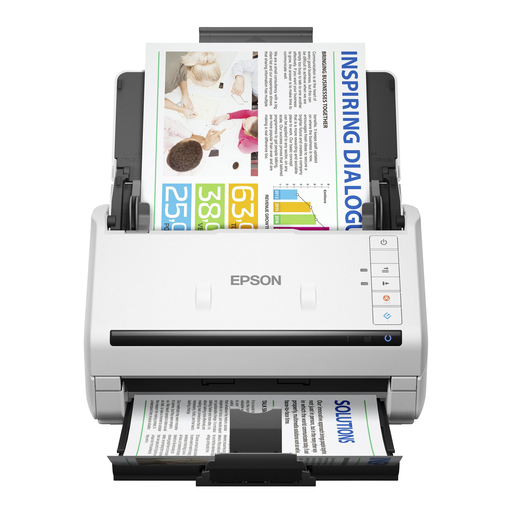
The 100-page automatic feeder is suited to processing larger batches; the product description lists double-sided scanning in a single pass.
600 x 600 DPI; A4; white.
 No image available
This portable scanner with a feed slot is a good fit if you want to scan documents using a compact, USB-powered setup.
600 x 600 DPI; A4; white. The product description lists paper weights from 35 g/m² to 270 g/m² and documents up to 1.8 m long.
 No image available
The battery and Wi-Fi make it well suited to scanning in different workplaces. Its automatic feed mode is designed for continuous scanning; check separately whether you can feed in several receipts at once.
600 x 600 DPI; A4; white.
Yes, provided the digital receipt is an accurate and complete reproduction of the original and its authenticity features have been retained. The Dutch Tax and Customs Administration sets these conditions for digital storage; make sure your digital records also remain accessible for inspection.
The Dutch Tax and Customs Administration generally gives a retention period of 7 years for business records. For information about immovable property and rights relating to it, the period is 10 years. The applicable period for a particular receipt depends on which records it belongs to.
No. First check the document size and the condition of the receipt. For standard documents, Canon lists a minimum length of 70 mm for the R10; Brother offers a carrier sheet for delicate or crumpled receipts for specific DSmobile models.
It varies by model. Epson lists a battery and Wi-Fi for the ES-60W, while the Canon R10 is powered via USB. Check that your chosen model works with the device and storage method you want to use.
Limit access to employees who need the information for their work. The Dutch Data Protection Authority notes that employee data must not be shared indiscriminately, so also consider how scans are stored and transferred.