If you regularly process piles of receipts and invoices, look for a scanner with an automatic document feeder. For individual receipts, a small workspace or changing locations, a compact paper path or portable connection may be more important. Check that the feeder suits your receipt sizes and that the connection works with your computer and workflow. The Dutch Tax and Customs Administration allows digital storage if the scan is an accurate and complete representation, including the authenticity features of the original.
Who is a receipt scanner suitable for?
Anyone processing piles of receipts
If you regularly process receipts alongside invoices, an automatic document feeder can reduce the number of times you need to feed documents individually. Check that the feeder is suitable for the sizes and condition of your receipts. Brother Netherlands and ScanSnap Netherlands describe models with automatic document feeders.
Home worker with limited desk space
If the scanner will stay on a small desk, consider how much room the paper path takes up while scanning, not just the dimensions of the device when stored away. Epson Netherlands describes the ES-C320W as having a U-turn paper path that keeps its footprint small during use.
Business owner who archives documents digitally
A scanner digitises documents, but it won’t automatically make your business archive complete or auditable. The Dutch Tax and Customs Administration allows digital storage if the scan is an accurate and complete representation, including the authenticity features of the original.
What should you look for when choosing one?
| What to consider |
What to look for |
Who is this important for? |
| Piles of receipts and invoices |
Check the automatic document feeder’s capacity, whether it supports duplex scanning and the permitted sizes of your receipts. |
If I regularly process piles of receipts and invoices, I want to feed fewer sheets one at a time. Among consumers who prioritise processing stacks, the figure is around 30%. |
| A small desk |
Check how much clear space the paper path needs during use, not just the dimensions of the scanner when stored away. |
At a small desk, I want to avoid the scanner taking up too much workspace while feeding documents. This is the main reason to buy for around 30% of consumers with limited desk space. |
| Digital archiving |
For digital storage, the Dutch Tax and Customs Administration requires an accurate and complete scan, including authenticity features. Also check that your files will remain accessible throughout the applicable retention period. |
I want to be able to find and check business scans, not just feed documents quickly. Archiving is the main reason around 20% of consumers choose a scanner. |
| Scanning in different places |
Check whether USB or Wi-Fi works with your computer, the available power supply and your preferred scan destination. |
If I scan in different workplaces, I want a connection and power supply that will work there. Mobile scanning is the top priority for around 20% of consumers. |
Common pitfalls
-
Assuming a scan automatically creates a tax-compliant archive
For digital storage, business scans must be an accurate and complete representation of the original, including its authenticity features, according to the Dutch Tax and Customs Administration. The scanner cannot assess this for you.
Check your scans and set up storage and retrieval before disposing of paper originals.
-
Assuming the ADF capacity guarantees it will handle every till receipt
A stated feed capacity applies under the model’s specified conditions. On its own, it does not tell you whether unusual, damaged or delicate receipts can be fed through reliably as a stack.
Compare the size and condition of your receipts with the feed requirements for the exact model.
-
Comparing only the scanner’s dimensions when stored away
The feed and output paths can affect how much room the device takes up while scanning. Epson describes the ES-C320W as having a U-turn paper path that keeps its footprint small during use.
Consider the paper path and available space in the setup where you intend to use the scanner.
Brands to compare
Brother
Brother Netherlands describes the ADS-1800W as a compact scanner for working from home or on the go, with wireless connectivity and USB-C power.
- Brother specifies a 20-sheet automatic document feeder and duplex scanning for this model.
- Check which accessories and connection options are right for your setup.
Epson
Epson’s product description positions the ES-C320W for small workspaces and a range of document types.
- Epson describes a U-turn paper path, straight-through feed and Wi-Fi.
- The right paper path depends on the document; the product description does not guarantee that every receipt will feed flawlessly.
Canon
Canon describes the imageFORMULA R10 as a portable, USB-powered document scanner.
- Canon specifies duplex scanning and a 20-sheet feeder under the stated paper conditions.
- The specified interface is USB 2.0. If you need Wi-Fi, compare models that offer this connection instead.
Ricoh ScanSnap
ScanSnap describes the iX1300 as a compact desktop scanner with Wi-Fi, two paper paths and software for organising scans.
- The manufacturer lists an automatic feeder for 20 A4 sheets and searchable PDF output.
- Searchable output does not mean the software will identify transactions correctly or automatically create a complete tax archive.
Joybuy products for receipts and documents
This Joybuy selection includes compact scanners with automatic feeders and portable models for scanning documents in different workplaces.
 No image available
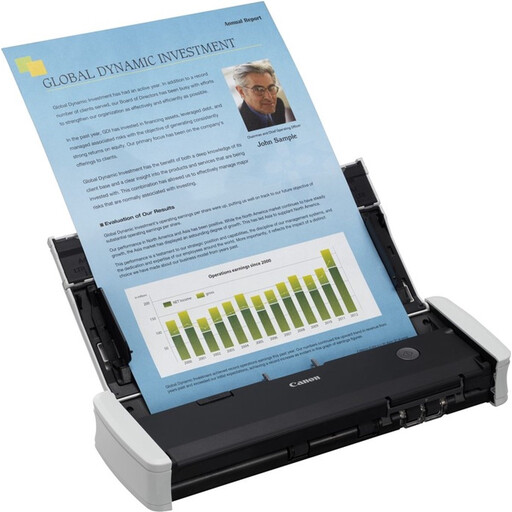
Canon imageFORMULA R10
A portable USB scanner for processing suitable documents in different workplaces.
20-sheet ADF and duplex scanning. USB 2.0 interface; feed capacity applies under the specified paper conditions.
View at Joybuy
 No image available
Epson DS-C330
A desktop scanner for anyone who wants to process different document types in a compact workspace.
Automatic duplex scanning, Wi-Fi, a U-turn path and a straight-through paper path. According to the product description, documents with staples, paper clips or wet ink are not suitable.
View at Joybuy
 No image available
Epson ES-C320W
A compact desktop scanner for receipts and documents in a workspace with limited room.
Wi-Fi, automatic duplex feeding, and both a U-turn and a straight-through paper path.
View at Joybuy
 No image available
Epson WorkForce DS-70
A portable scanner for anyone who wants to scan receipts with a computer in different locations.
USB connection, OCR and searchable PDF output. The specified paper weights are 35–270 g/m²; do not force thick or damaged documents through the feed slot.
View at Joybuy
 No image available
Epson WorkForce DS-80W
A portable scanner for digitising documents in different workplaces.
Wi-Fi, USB, a rechargeable battery and OCR for searchable PDF output. Do not put damaged, folded or stapled documents into the feed slot.
View at Joybuy
Frequently asked questions
Can I throw away business paper receipts after scanning them?
Not automatically: the Dutch Tax and Customs Administration allows digital storage if the scan is an accurate and complete representation and the authenticity features are also recorded. Check your scans and make sure your digital records remain accessible and auditable before disposing of paper originals.
How long do I need to keep scanned business receipts?
The Dutch Tax and Customs Administration generally specifies a retention period of 7 years for records and 10 years for information relating to immovable property. The applicable period depends on the type of records.
Can I scan every receipt in one go using the automatic feeder?
Don’t assume so: the stated capacity applies under the specifications of the chosen model. Check the size and condition of unusual receipts, and follow the feed instructions.
Does my scanner need Wi-Fi for a home office?
Only if Wi-Fi suits your setup and scanning workflow. Canon lists USB 2.0 for the imageFORMULA R10, while Epson lists Wi-Fi for the ES-C320W and Brother for the ADS-1800W. Also check that your computer and preferred storage location are supported.
What should I look for in accessories or additional service?
For each model, check which power supply and any accessories suit your setup, and whether additional service is relevant to you. Brother offers separate accessories for the ADS-1800W; Epson lists an optional extended warranty for the ES-C320W.


