
Vandaag of morgen in huis

Kwaliteit gegarandeerd

Welkomstaanbiedingen ontgrendelen: GRATIS bezorging | Tot 80% korting | Gratis 30 dagen JoyPlus-proefperiode
Download de app
If you're serious about competitive gaming, you know your gear can make all the difference. A high-end gaming mouse isn't a luxury; it's a necessity. Yet, the market is flooded with marketing claims that make it difficult to choose wisely. Before you invest in a new professional e-sports mouse, it's crucial to know what to look for to avoid buyer's remorse.
Many gamers fall into the same traps:
wireless gaming mouse is a stubborn relic of the past. Modern 2.4GHz technology is now so advanced that it's indistinguishable from a wired connection, though this doesn't apply to all cheaper models.This guide will help you cut through the marketing noise and focus on the specifications that truly matter for top-tier performance.
To make an informed decision, there are a few technical specifications you can't ignore. These determine the precision, speed, and comfort you'll experience during long gaming sessions.
The heart of any gaming mouse is its sensor. A top-tier sensor ensures a 1-to-1 translation of your hand movement to the screen, without unwanted acceleration or 'spin-outs'. The Razer Focus Pro 30K sensor is a prime example of modern sensor technology. It offers not just a high DPI, but above all, exceptional tracking accuracy on various surfaces. When comparing sensors, pay attention to the max tracking speed (IPS) and acceleration (G). High, stable values here indicate a sensor that can handle swift, explosive movements, which is essential in FPS games.
For competitive FPS players, a lightweight gaming mouse (ideally under 70 grams) is crucial. Lower weight means less resistance, allowing you to react faster and execute flicks without fatigue. The Razer DeathAdder V3 Pro White weighs just 63 grams without compromising the chassis's structural integrity. Equally important is the shape. An ergonomic FPS mouse is designed to support your hand naturally, preventing cramps and fatigue during marathon sessions. The shape should match your grip style (palm, claw, or fingertip).
A wireless gaming mouse offers ultimate freedom of movement. Always opt for a model with a stable 2.4GHz connection via a USB dongle. This technology provides low latency comparable to a wired mouse. Bluetooth is convenient for on-the-go use but is less suitable for serious gaming. Also, check the battery life. A gaming mouse with long battery life of 80 hours or more, like the DeathAdder V3 Pro, ensures you don't run out of power mid-match.
Not every gamer has the same needs. Below is a selection of mice suited for different profiles, based on objective specifications.
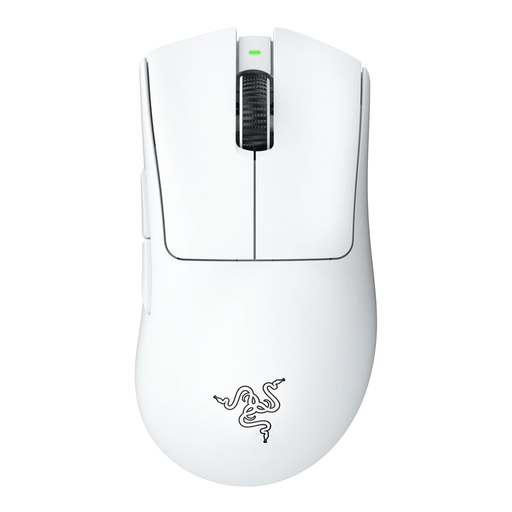
Why This Fits Their Persona: For the player who refuses to compromise. This mouse was designed with input from e-sports athletes and focuses purely on performance: an ultra-low weight, a top-tier sensor, and a proven ergonomic shape for right-handed players.
The mouse features a solid, closed chassis at just 63 grams, avoiding the pitfall of a fragile honeycomb design. The focus is on its flawless sensor, not an unusable DPI figure.
Razer Focus Pro 30K Optical Sensor for unmatched precision. Battery life of up to 90 hours for uninterrupted gaming.
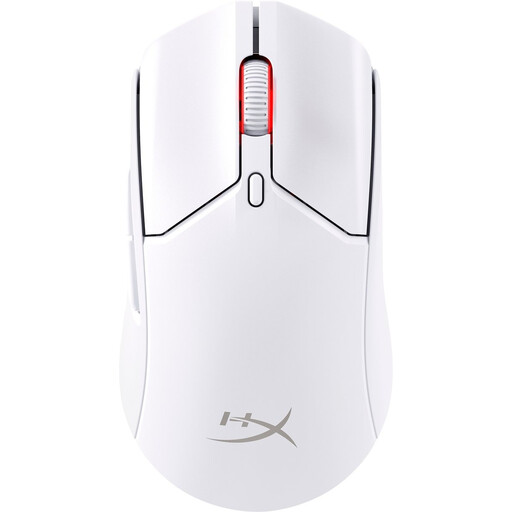
Why This Fits Their Persona: An excellent choice for gamers seeking an ultra-lightweight, wireless mouse with a more symmetrical shape. This `white gaming mouse` is suitable for various grip styles and offers top performance at a more accessible price point.
At 61 grams with a solid body, this mouse is both extremely light and durable. It offers dual wireless connectivity (2.4GHz and Bluetooth) and a battery life of up to 100 hours, eliminating fears of lag and a dead battery.
HyperX 26K sensor for high precision. Very long battery life and a symmetrical, ultra-lightweight design.
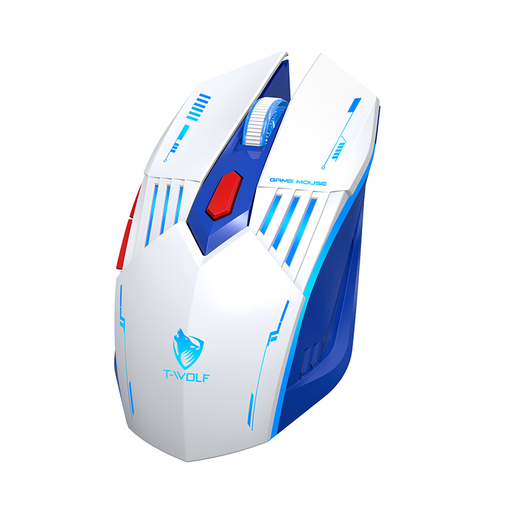
Why This Fits Their Persona: For gamers who want to switch to a wireless setup without breaking the bank. This mouse offers flexible connectivity (2.4G, Bluetooth, wired) and adjustable DPI at an entry-level price.
While its sensor and weight aren't at an e-sports level, its 2.4G mode provides a more stable connection than many other budget mice that rely solely on Bluetooth. It's a functional entry point into wireless gaming.
Tri-mode connectivity (2.4G, Bluetooth, wired). Adjustable DPI up to 3600 and a very accessible price.
We have compiled a complete, up-to-date list of products that meet these strict selection criteria and EU regulations.
Here are some common questions about the Razer DeathAdder V3 Pro and similar gaming mice.
Probably not. This model is specifically designed for competitive players who need every millisecond and every gram of advantage. A casual gamer is unlikely to get the full value out of the premium price for the top-tier sensor and ultra-lightweight design and would be better off with a more affordable model.
According to Razer, the battery lasts up to 90 hours on a full charge when using the HyperSpeed Wireless (2.4GHz) connection. This is more than enough for several days of intensive gaming without needing to charge mid-session.
For basic use, the mouse is plug-and-play, and you don't need any software. However, to unlock its full functionality, such as customising DPI steps, polling rate, lift-off distance, and programming the buttons, installing the Razer Synapse software is recommended.
