
Vandaag of morgen in huis

Kwaliteit gegarandeerd

Welkomstaanbiedingen ontgrendelen: GRATIS bezorging | Tot 80% korting | Gratis 30 dagen JoyPlus-proefperiode
Download de app
A gaming mouse may seem simple at first glance. Yet many buyers make the same mistakes: they choose based solely on a high DPI, overlook the mouse’s shape or pay for features they never use. For PC gamers looking for an affordable, wired gaming mouse, the Razer DeathAdder Essential gaming mouse could be a practical choice. But is this model also suitable for your hand, playing style and desk setup?
In this buying guide, we look at the most important specifications, common pitfalls and a few alternatives.
DPI indicates how sensitively the cursor responds to movement. A 6,400 DPI gaming mouse can move quickly across the screen, but a high maximum DPI does not automatically mean you will play more accurately. FPS players often use lower sensitivity with larger mouse movements instead.
So look for adjustable DPI, rather than focusing only on the highest figure. The Razer DeathAdder Essential has an optical sensor with a maximum of 6,400 DPI, and its sensitivity can be adjusted in the settings.
An ergonomic gaming mouse should fit your hand and grip. A right-handed shape is not automatically suitable for every user. Check the dimensions, weight and shape before ordering.
The DeathAdder Essential is designed for right-handed use and measures approximately 12.70 × 4.28 × 7.27 cm. Weighing 126.3 grams, it feels sturdier than ultra-light models. This can be useful for controlled movements, but less suitable if you specifically want a very lightweight mouse.
A wireless mouse keeps cables off your desk, but requires a battery or charging. A wired gaming mouse works immediately via USB and does not need a rechargeable battery or disposable batteries. On the other hand, you need to position the cable properly and make sure it is long enough.
The DeathAdder Essential uses a fixed USB connection with a 2.10-metre cable. That is sufficient for most PC setups, but if you have a large or deeper gaming setup, measure the distance to your computer beforehand.
An optical gaming mouse uses light to track movement across a surface. According to the product specifications, the DeathAdder Essential has an optical sensor and an adjustable resolution of up to 6,400 DPI. Use a suitable mouse mat for consistent tracking and keep the sensor on the underside free from dust.
For everyday PC use, MOBA games and FPS games, the combination of a suitable DPI setting, your mouse mat and your playing style is particularly important. Do not set the sensitivity higher than necessary.
The mouse has 5 buttons. These are the left and right mouse buttons, the scroll wheel and two additional thumb buttons. Razer Synapse allows you to adjust settings and functions, depending on the supported software features and your operating system.
A programmable mouse is useful for keyboard shortcuts, back and forward navigation or actions in games. However, check whether you will actually use the extra buttons. More buttons do not automatically make a mouse more practical.
The product information states a polling rate of 1,000 Hz. This means that, according to the specified setting, the mouse can report information to the computer up to 1,000 times per second. This provides a fast response for many PC games, but the noticeable effect also depends on your computer, game settings and display.
According to Razer’s product information, the five Hyperresponse buttons have been tested for up to 10 million clicks. This is a specification provided by the manufacturer and is not a guarantee that every mouse will last for exactly that number of clicks.
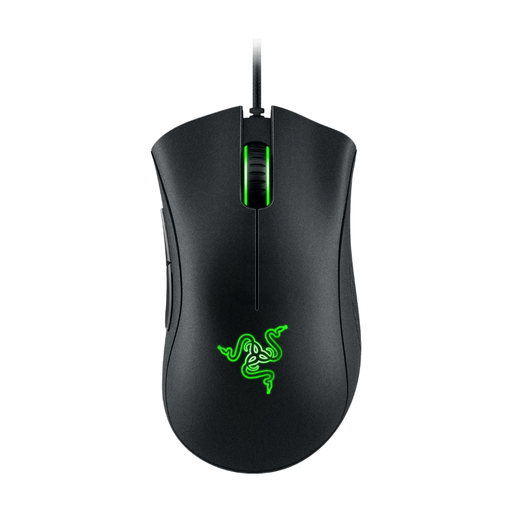
Why it suits this profile: This black gaming mouse combines a wired USB connection with five buttons, adjustable DPI and Razer Synapse support. This keeps the controls straightforward for anyone moving from a standard mouse to gaming.
You are not paying for a rechargeable battery or wireless receiver. Key details, such as 6,400 DPI, five buttons and 1,000 Hz polling, are clearly specified.
Optical sensor, adjustable 6,400 DPI, five buttons, 2.10-metre USB cable and green lighting.
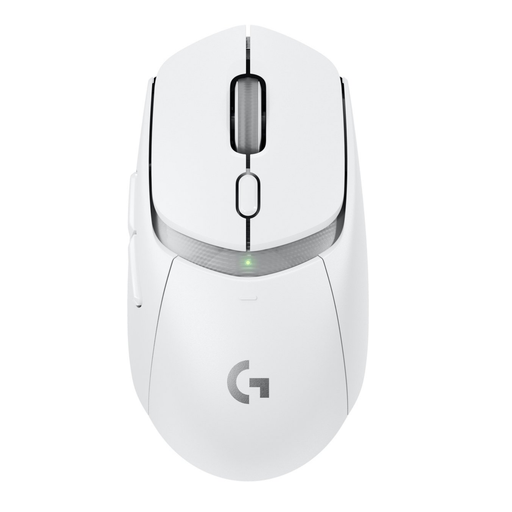
Why it suits this profile: For players who do not want a fixed cable, this model offers LIGHTSPEED wireless connectivity, Bluetooth and up to six programmable buttons.
The connection options and power supply are clearly separated: play wirelessly via LIGHTSPEED or Bluetooth, using the included AA battery.
Optical HERO 25K sensor according to the product information, six programmable buttons and a stated weight of 86 grams with battery.
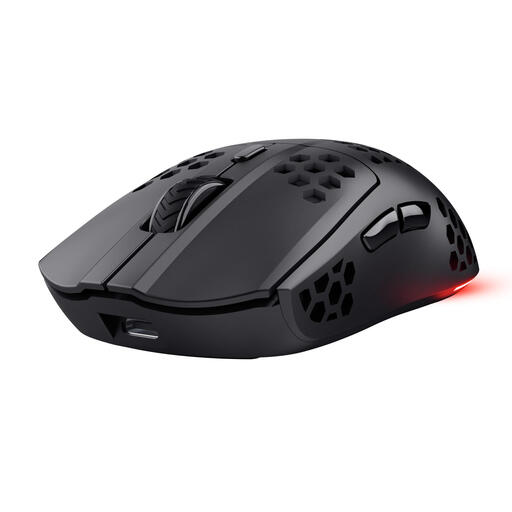
Why it suits this profile: This mouse is aimed at gamers who value low weight, wireless connectivity and additional programmable buttons.
Battery life, weight and polling rate are clearly stated. This allows you to weigh up wireless convenience against charging and the Razer’s fixed USB cable.
73 grams, adjustable optical sensor up to 4,800 DPI, six programmable buttons, RGB lighting and USB-C charging.
We have put together a complete, up-to-date list of products that fully meet these strict selection criteria and the applicable European safety regulations.
Also check that your desk provides enough room for the cable. A cable tray or bungee can prevent the cable from rubbing against the edge.
The optical sensor, adjustable DPI, five buttons and stated polling rate of 1,000 Hz are suitable for many PC and FPS gaming situations. Whether the mouse feels comfortable to use mainly depends on your grip, hand size and personal sensitivity settings.
For basic use, the USB mouse will generally work immediately after being connected. Razer Synapse is used to customise the buttons and settings. Check beforehand that the software is compatible with your operating system.
According to Razer’s product information, the five buttons have been tested for up to 10 million clicks. This is a manufacturer’s specification, not a fixed lifespan. Cable use, cleaning, moisture and the way you click also have an impact. In the Netherlands, this product is covered by at least the statutory conformity protection under the applicable consumer rules.
A wired mouse does not use batteries and does not need charging. This keeps ongoing energy costs to a minimum. However, you do give up the freedom of wireless movement and need to consider cable management.
