
Vandaag of morgen in huis

Kwaliteit gegarandeerd

Welkomstaanbiedingen ontgrendelen: GRATIS bezorging | Tot 80% korting | Gratis 30 dagen JoyPlus-proefperiode
Download de app
A gaming headset may seem simple at first glance: plug it in, adjust the volume and start playing. Yet many gamers end up disappointed with their choice after just a few weeks. The Razer BlackShark V2 X gaming headset is aimed at players looking for a lightweight, wired headset with a microphone and positional audio. Even with this model, however, it is important to check the specifications and your platform beforehand.
A 7.1 surround sound headset can provide virtual positional audio, but how well it works depends on the software, game settings and platform you use. With the Razer BlackShark V2 X, 7.1 surround is activated through Razer software and a code included in the packaging. So check whether you mainly play on PC and whether you can use the software.
On consoles, the headset can support audio and the microphone via the 3.5 mm connection, but the available surround functions may vary depending on the device and game.
A headset can be lightweight but still feel uncomfortable if the headband is too tight or the earcups do not provide enough space. Consider the weight, the shape of the ear cushions and how adjustable the headset is. According to the product details, the BlackShark V2 X weighs 240 grams and uses memory foam ear cushions.
Also consider heat build-up. Closed earcups can passively reduce ambient noise, but may feel warmer during prolonged use.
“Multi-platform” does not automatically mean that every function is available everywhere. Check the following:
The Razer BlackShark V2 X is designed for PC, Mac, PS4, Xbox One, Nintendo Switch and mobile devices via an analogue connection. For a PC with separate pink and green ports, you will need the splitter cable supplied.
The headset uses a 50 mm dynamic driver. This tells you something about the size of the speaker, but does not determine the final sound quality on its own. The specified frequency response ranges from 12 Hz to 28 kHz. In practice, tuning, in-game audio and fit are at least as important as the stated range.
The Razer HyperClear cardioid microphone is designed to pick up sound mainly from the front. Position the microphone approximately 1 to 2 inches from your mouth, as instructed in the manual, and point the marked side towards your face. The microphone can be muted using a physical button.
A clear gaming headset with a microphone does not eliminate every communication problem. A loud keyboard, fan or open window may still be picked up. So also check the microphone settings in Discord, Windows or your console.
The headset has an analogue 3.5 mm connection, a 1.3-metre cable and an impedance of 32 ohms at 1 kHz. A wired connection means there is no need to charge the headset and no Bluetooth pairing is required. On the other hand, you will need to manage the cable and have less freedom of movement than with a wireless headset.
The 3.5 mm connection is particularly practical for consoles and laptops with a combined headset port. For smartphones without a headphone socket, you will need a suitable adapter; this is not listed as part of the headset.

Why it suits this profile: The wired connection and plug-and-play setup are ideal for beginners who want to start gaming on a PC, console or laptop without a wireless connection.
The 3.5 mm audio and microphone connections keep the basic setup straightforward. However, according to the product information, the USB connection is intended for RGB lighting, not data.
Wired plug-and-play operation, flexible microphone, volume control and mute function.

Why it suits this profile: This Razer gaming headset combines a low stated weight with a 50 mm driver, cardioid microphone and support for multiple platforms.
The product information clearly lists the 3.5 mm connection, a splitter for PC ports and software for 7.1 surround. This allows you to check in advance which functions are available on your device.
240 grams, 50 mm TriForce drivers according to the product description, a 1.3 m cable and HyperClear cardioid microphone.
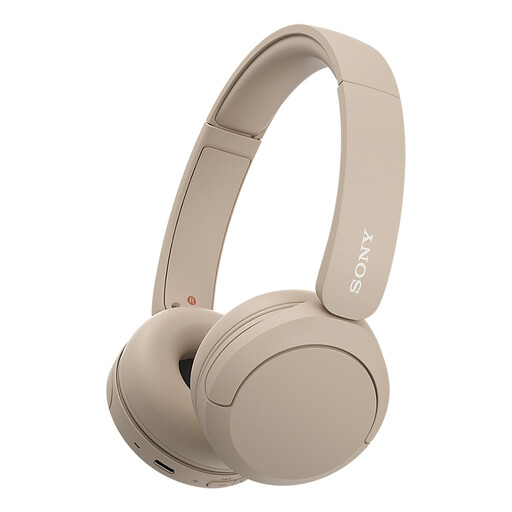
Why it suits this profile: For users who value music, phone calls and laptop use alongside casual gaming, these wireless on-ear headphones offer a different use profile from an esports headset.
If you do not want a cable, this is a conscious choice for Bluetooth. Bear in mind that this is not a wired gaming headset with a 3.5 mm connection, and wireless audio depends on the battery and connection.
Bluetooth, multipoint connection, microphone and a stated weight of 147 grams.
Use this quick checklist:
For products covered by EU consumer rules, the legal two-year conformity guarantee applies as a minimum. Always check the latest product information, seller terms and included accessories before completing your purchase.
We have put together a complete, up-to-date list of products that fully meet these strict selection criteria and the applicable European safety regulations.
According to the product description, the headset is compatible with PS4, Xbox One and Nintendo Switch via the 3.5 mm connection. Check where the headset port is located on your device and whether all functions, such as the microphone and volume control, are supported.
For 7.1 surround, the instructions supplied state that you need to download the Razer 7.1 Surround Sound software and use the activation code included in the packaging. This installation is mainly relevant for PC use. The availability of virtual surround functions may differ on consoles.
A wired headset does not need charging and has no battery that loses capacity over time. This means you avoid charging cables and battery maintenance. On the other hand, the cable may wear out or get in the way. So check the cable route and store the headset in a dry place when you are not using it.
