
Vandaag of morgen in huis

Kwaliteit gegarandeerd

Welkomstaanbiedingen ontgrendelen: GRATIS bezorging | Tot 80% korting | Gratis 30 dagen JoyPlus-proefperiode
Download de app
A Razer BlackShark gaming headset can be a practical choice for online multiplayer, streaming and long gaming sessions. However, the models vary considerably in terms of connectivity, platform support, weight and microphone. For example, a wireless headset that works well on PC is not automatically suitable for Xbox.
The biggest purchasing mistakes usually arise from three common pitfalls:
For a PlayStation gaming headset, it is important to make sure the model is suitable for PS4 or PS5 and that the supplied wireless adapter actually works with your console. A wired headset with a 3.5mm connection often works through the controller, making it widely compatible.
An Xbox gaming headset requires extra attention. Check whether the model was specifically designed or licensed for Xbox. According to the product information, the Razer BlackShark V3 X HyperSpeed for Xbox supports Xbox, PC and compatible mobile devices. The BlackShark V2 X models with a 3.5mm connection are also suitable for multiple platforms, but do not offer wireless connectivity.
For PC gamers, USB, 2.4 GHz and Bluetooth are interesting options. However, be aware of the difference between:
Many models use Razer TriForce 50mm drivers. This tells you something about the diameter, but not about the overall listening experience. You should therefore also check the frequency response, impedance and type of connection.
The BlackShark V2 X is listed with a frequency range of 12 Hz to 28 kHz and an impedance of 32 ohms. The BlackShark V3 Pro models use a newer variant, such as TriForce Titanium or TriForce Bio-Cellulose Gen-2, depending on the model. These names describe product specifications, but do not guarantee that every user will experience the same sound profile.
For competitive gaming, the positioning of sound is particularly important. 7.1 surround sound can help with directional audio, but the feature may require software, a compatible PC and specific settings. For example, software activation is mentioned for the BlackShark V2 X 7.1. According to the product information, THX Spatial Audio on the BlackShark V3 Pro is linked to compatible Windows systems.
A gaming headset with a microphone should not only sound clear, but also be easy to adjust in practice. The Razer HyperClear microphone is available in several versions, including cardioid, unidirectional and Super Wideband microphones. A cardioid pattern focuses more on sound coming from the front and can help reduce background noise. This is a technical feature; overall clarity also depends on the room, software and microphone positioning.
Weight plays a major role during long sessions. According to the product specifications, wired BlackShark V2 X models weigh approximately 240 grams. The V2 Pro and some V3 Pro versions weigh around 320 grams, while the V3 Pro White weighs approximately 367 grams. Memory foam ear cushions can help with comfort, but the fit remains a personal preference.
Also check whether the microphone is detachable. This is useful if you want to use the headset for music, travelling or mobile devices as well.

Why it suits this profile: The wired connection keeps installation simple and eliminates the need for charging. According to the product information, this model is suitable for PC, PlayStation 4, Xbox One and Nintendo Switch.
You do not pay for a wireless battery you do not need. The connection and compatibility are clearly stated.
TriForce 50mm drivers, HyperClear cardioid microphone, 1.3-metre 3.5mm cable and a weight of approximately 240 grams.
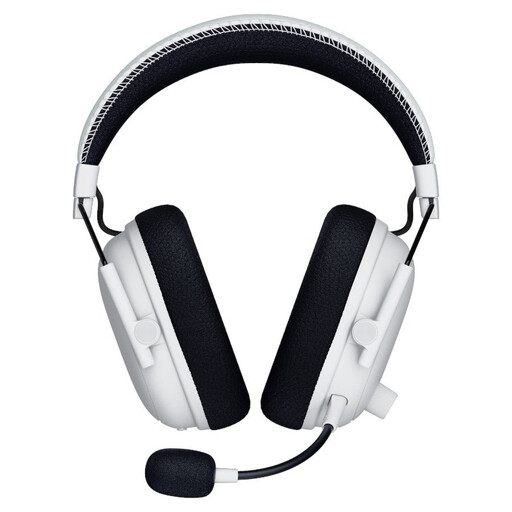
Why it suits this profile: This model is aimed at gamers who value multiple connection options, adjustable noise cancellation and spatial audio.
The product information distinguishes between 2.4 GHz, Bluetooth 5.3, USB and 3.5mm. This allows you to match the connection to your platform.
TriForce Bio-Cellulose 50mm Gen-2 drivers, detachable HyperClear Full Band microphone, hybrid ANC and up to 70 hours of battery life via 2.4 GHz.
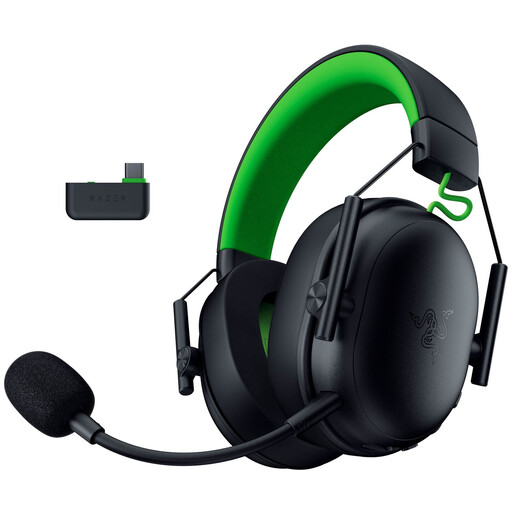
Why it suits this profile: Xbox players who want to game wirelessly and also use the headset with a PC get three connection modes in one model.
The product specification lists separate battery life figures for Xbox and PC. This prevents you from looking only at the highest figure.
2.4 GHz, Bluetooth 5.3 and USB, a weight of approximately 270 grams, TriForce 50mm Gen-2 drivers and up to 48 hours of battery life on Xbox.
A wired gaming headset makes sense if you value a low purchase price, simple setup and a consistent connection. You do not need to charge a battery and no wireless adapter is required. The drawback is the cable running to your controller or PC.
A wireless gaming headset gives you greater freedom of movement. Pay attention to the supplied dongle, supported platform and battery life. A model with Bluetooth is useful for multiple devices, but check that 2.4 GHz is available when low latency is important.
The microphone also matters to streamers. Do not just look for terms such as “crystal-clear”; check the microphone type, whether it is detachable and whether it has a mute button or sidetone function.
We have put together a complete, up-to-date list of products that fully meet these strict selection criteria and the applicable European safety regulations.
That depends on the version. Models with a 3.5mm connection are often widely compatible, while wireless models may be designed specifically for PlayStation or Xbox. Always check the platform list on the product page.
The stated battery life varies depending on the model and how it is used. The available models offer up to 70 hours, while according to the product specification, the BlackShark V3 X HyperSpeed provides up to 48 hours on Xbox and up to 70 hours on PC. Volume, connection and features such as noise cancellation can affect battery life.
Not always. Stereo may be sufficient, while virtual 7.1 surround sound presents directional audio differently. Check whether the feature works on your platform and whether additional software is required before paying extra for it.
