
Vandaag of morgen in huis

Kwaliteit gegarandeerd

Welkomstaanbiedingen ontgrendelen: GRATIS bezorging | Tot 80% korting | Gratis 30 dagen JoyPlus-proefperiode
Download de app
A gaming mouse with a high DPI rating might look appealing on paper, but that number doesn’t tell the whole story. With the Razer Basilisk V3 Pro 35K, the shape, connectivity, button layout and software matter too. Small differences in weight or grip can have a big impact on your experience, especially during long gaming sessions.
Look out for these common pitfalls:
The product information lists a Razer Focus Pro 35K Optical Sensor with a maximum resolution of 35,000 DPI. This makes the mouse an interesting option if you want to fine-tune your sensitivity. For everyday use, shooters and strategy games, being able to adjust the DPI settings to suit you is what matters most.
A high DPI rating is therefore mainly a sign of the range of settings available. Check which profiles, sensitivity levels and settings are available in the Razer software. That way, you won’t pay extra for a specification you’re unlikely to use.
According to the listed specifications, the Razer Basilisk V3 Pro 35K supports:
For a desktop gaming PC, 2.4GHz is usually the obvious choice if you want to play without a cable. Bluetooth can be handy if you use the mouse with a laptop or a second device. Wired use is practical if you want to keep using the mouse while it charges, depending on the cable supplied and the product contents at the time of purchase.
Before buying, also check whether the USB receiver, charging cable and any accessories are actually included in the box. Contents may vary by version or retailer.
The mouse has an ergonomic, right-handed shape and a listed weight of around 112 grams. That’s worth bearing in mind if you’re used to a lightweight mouse. A slightly heavier model can feel more stable, but it also takes more effort to move during long sessions.
The product description also lists 11 programmable buttons and a tactile scroll wheel. This makes the mouse suitable for players who want quick access to abilities, macros or media controls. Always use programmable functions in line with the rules of the game and platform in question; not every macro is permitted in competitive settings.
Razer Chroma RGB lighting is mainly a visual extra. You can match the lighting to your desk setup or other compatible equipment. It doesn’t affect the sensor’s performance.
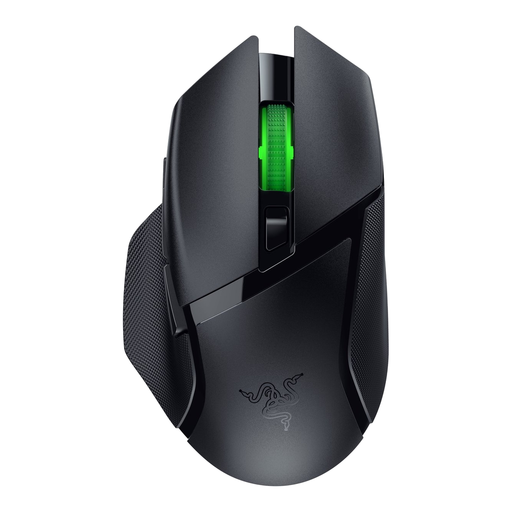
Why it suits this profile: This wireless gaming mouse offers the Basilisk shape and several connectivity options, without stepping straight up to the 35,000 DPI category.
The specifications make it clear that DPI isn’t the only thing to consider: there are 9 programmable buttons, Bluetooth and Razer HyperSpeed Wireless.
Up to 18,000 DPI, an ergonomic right-handed shape and, according to the product information, long battery life in Bluetooth mode.

Why it suits this profile: This version is designed for players who want to combine plenty of customisation options, a high sensor resolution and lighting in one mouse.
As well as 35,000 DPI, the product page lists 11 programmable buttons and three connection methods. You can therefore base your choice on several specifications you can check.
Focus Pro 35K Optical Sensor, 11 programmable buttons and Razer Chroma RGB, according to the listed product specifications.
Why it suits this profile: The combination of an ergonomic shape, multiple buttons and wireless or wired connectivity is well suited to long gaming sessions and changing play styles.
The right-handed shape and weight of around 112 grams are clear upfront. You can check whether they suit your grip and preference for lighter or heavier mice.
Support for 2.4GHz, Bluetooth and USB, plus 11 programmable buttons and a tactile scroll wheel.
We’ve put together a complete, up-to-date list of products that meet these strict selection criteria and the applicable European safety regulations.
Once you’ve connected the mouse, you can manage its settings in Razer Synapse, provided this model and the current software version support it. Start with a simple DPI setup, then add extra profiles or button functions. This makes it easier to work out which features you actually use.
For a wireless mouse for PC, the position of the USB receiver matters too. If possible, plug it directly into a USB port and avoid placing it too far from the mouse or putting obstacles between them. Keep the sensor and mouse surface clean, as dirt can affect tracking.
Not for every player. A gaming mouse with 35,000 DPI mainly gives you a wide range of settings to choose from. The sensitivity that works for you depends on your game, screen resolution, mouse mat and personal preference.
According to the listed specifications, the model supports wireless connectivity via 2.4GHz and Bluetooth, as well as a wired USB connection. Check the product page for details about the cable, charging and included accessories.
The product information describes the mouse as right-handed. Left-handed users may therefore prefer a model with a symmetrical shape, or should check in advance whether the grip feels comfortable in practice.
