
Vandaag of morgen in huis

Kwaliteit gegarandeerd

Welkomstaanbiedingen ontgrendelen: GRATIS bezorging | Tot 80% korting | Gratis 30 dagen JoyPlus-proefperiode
Download de app
If you game on multiple devices—from your PC and PlayStation to your Switch and mobile—you know the frustration: a drawer full of different headsets, cables, and adapters. The search for that one, perfect wireless gaming headset that works everywhere is often a difficult one. Manufacturers make big promises, but in reality, you often run into hidden issues.
Before you consider buying the Razer Barracuda X, it's crucial to understand the common pitfalls. Many gamers waste money on headsets that become unusable after a few months due to one of these three problems:
This guide helps you navigate around these problems by focusing on the specifications that truly matter.
To avoid buyer's remorse, ignore the marketing jargon and focus on these three concrete specifications. They determine whether a headset is genuinely right for your needs.
A true multi-platform headset offers flexible and stable connections. Look for the following two technologies:
A model like the Razer Barracuda X combines both with a "SmartSwitch" feature. This allows you to seamlessly switch between your game's 2.4GHz connection and a Bluetooth phone call without taking the headset off.
Hours-long gaming sessions demand a lightweight gaming headset. Every gram counts.
For a wireless headset, battery life is a firm requirement. A good benchmark is a battery life of at least 40 hours. This means you can use the headset intensively for several days without needing to recharge. The Razer Barracuda X offers up to 50 hours, according to the manufacturer. Also, check if the headset charges via USB-C, the modern standard you likely already use for your other devices.
Not every gamer needs the same thing. Below is a selection of headsets that fit different profiles, based on their objective specifications.
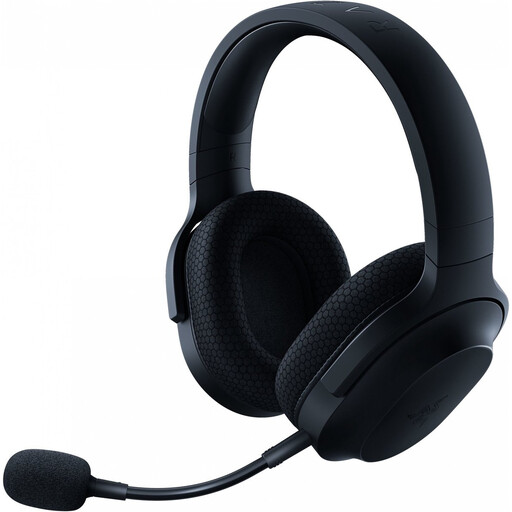
Why This Fits Their Persona: This gamer constantly switches between a session on the PS5, an online match on PC, and a game on their mobile while on the train. Convenience, long battery life, and a discreet design for on-the-go use are essential.
The SmartSwitch Dual Wireless technology tackles the "universal" compatibility lie by seamlessly switching between 2.4GHz and Bluetooth. Its light 250g weight and detachable microphone prevent comfort issues and make it practical for daily use.
The combination of up to 50 hours of battery life, a low weight, and dual wireless functionality offers a complete package for home and on the go.
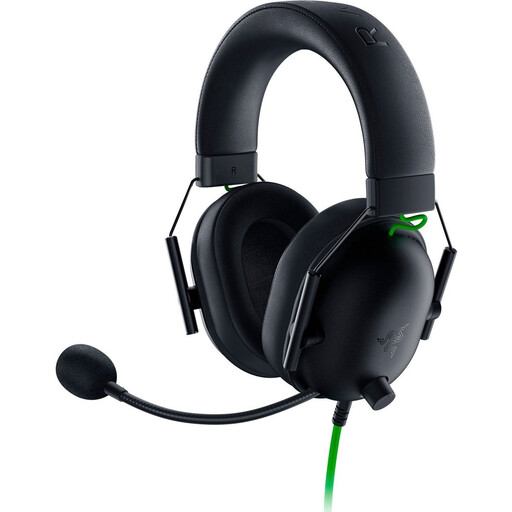
Why This Fits Their Persona: This gamer focuses on performance in competitive games. Wireless isn't a priority; a reliable connection, clear audio for hearing footsteps, and a crisp microphone are. Budget is a key factor.
By opting for a wired 3.5mm connection, this headset bypasses all issues with batteries and wireless instability. Its ultra-light 240g weight and focus on passive noise isolation make it comfortable and effective, without unnecessary features.
Offers excellent passive noise isolation, blocking out ambient sound. The HyperClear cardioid microphone is designed for clear team communication.
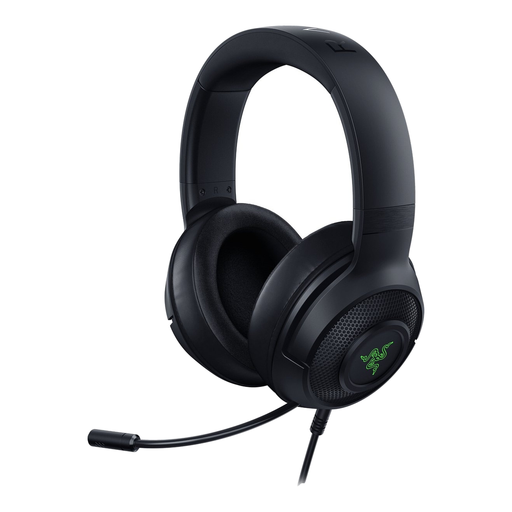
Why This Fits Their Persona: This gamer plays primarily on PC and is looking for a comfortable, wired headset with an immersive audio experience for single-player games. A touch of RGB lighting for atmosphere is a plus.
This headset doesn't try to be everything. It focuses on a stable USB connection for PC and PS4, avoiding the pitfalls of multi-platform connectivity. Its light 285g weight and comfortable ear cushions combat the comfort problem.
Offers 7.1 Surround Sound (exclusive to Windows) for an enhanced in-game audio experience. The Razer Chroma RGB lighting allows for personalization of your setup.
We have compiled a complete, up-to-date list of products that fully meet these strict selection criteria and local regulations.
Yes, the Razer Barracuda X is a popular choice as a Razer PS5 headset. It connects via the included USB-C dongle, which provides a low-latency wireless audio connection. You just plug the dongle into the USB-C port on the front of your PlayStation 5, and the headset works instantly.
Razer states a battery life of up to 50 hours. In practice, the actual duration depends on your usage, particularly the volume. However, you can expect several days of intensive gaming before you need to recharge. Charging is done via a standard USB-C cable.
Yes, the microphone on the Razer Barracuda X is a detachable 'HyperClear' cardioid model. You can easily disconnect it. This makes the headset much more practical for on-the-go use, such as listening to music on your phone without a microphone in front of your face.
