
Vandaag of morgen in huis

Kwaliteit gegarandeerd

Welkomstaanbiedingen ontgrendelen: GRATIS bezorging | Tot 80% korting | Gratis 30 dagen JoyPlus-proefperiode
Download de app
A wireless gaming mouse needs to offer more than a high DPI rating and eye-catching lighting. For FPS games, esports and everyday use, factors such as connectivity, weight, shape and battery life determine whether a mouse is genuinely right for you. The RAPOO VT9Pro 4K wireless gaming mouse is aimed at users looking for low latency, plenty of customisation options and a lightweight design.
Even so, it is sensible not to focus solely on the marketing on the box. Below, you will find the key points to check, along with three practical product choices for different user profiles.
A 4000Hz polling rate gaming mouse sends its position to the computer up to 4,000 times per second. This can refine movement tracking, but it also places greater demands on the processor. According to RAPOO's product information, a 4000Hz polling rate can increase CPU usage. If you experience frame drops, switching back to 1000Hz may be the wiser choice.
So check not only the mouse, but also your PC specifications and in-game settings.
A 26000 DPI gaming mouse can be set to a very high sensitivity. That does not automatically mean you will aim more accurately in every game. Many FPS players actually use a lower DPI combined with larger arm movements. So also consider the sensor, the surface you play on and the ability to save DPI profiles.
The VT9Pro features a PixArt PAW3398 sensor, with up to 26,000 DPI, 650 IPS and 50G acceleration according to the product specification. These figures can be verified, but your personal settings determine how the mouse feels in practice.
Advertised battery life depends on the polling rate, lighting, connection and intensity of use. The RAPOO VT9Pro lists a battery life of up to 180 hours. This is a manufacturer specification and not a guarantee for every usage scenario.
The mouse uses a built-in 800mAh Li-Po battery and can be charged using the supplied USB-C cable. According to the product information, a wireless charging mat requires a separate P3 Wireless Charging Module. Also note the warning not to connect the USB-C cable at the same time while charging wirelessly.
For competitive gaming, a stable 2.4GHz connection with low latency is generally more practical than Bluetooth alone. The VT9Pro is designed as a wireless 4K mouse. When buying, check whether the required receiver is included and whether your computer has enough USB ports.
A higher polling rate is mainly worthwhile when your monitor, game and PC can handle the additional data processing. For office work or casual gaming, 1000Hz is often sufficient.
An ultra-light gaming mouse reduces the amount of force needed to move the mouse across a large mouse mat. According to the product information, the VT9Pro weighs 68 grams. This may appeal to players who use low sensitivity and make fast movements in FPS games.
The shape is just as important. The VT9Pro is described as an ambidextrous gaming mouse, suitable for left- and right-handed users. Ambidextrous does not mean that both hands receive the same level of support. So check the position of the side buttons and consider which grip you use: palm, claw or fingertip.
If you want to assign macros, push-to-talk or abilities in MOBA games, a gaming mouse with 10 programmable buttons can be useful. According to the product description, the VT9Pro offers 10 programmable buttons and onboard memory. This allows settings to be saved on the mouse, which is handy when switching between devices.
Do check which functions are supported by the software and whether the configuration tool is compatible with your operating system. Programmable buttons are less important if you mainly play straightforward FPS games and prefer a minimalist layout.
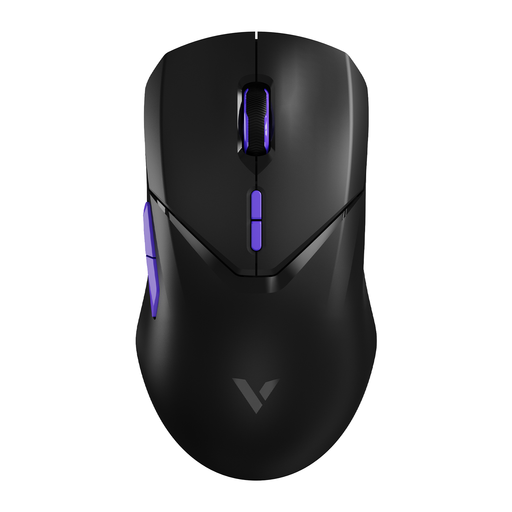
Why it suits this profile: This choice is aimed at gamers looking for a high polling rate, a PAW3398 sensor, low weight and plenty of customisation options in a single mouse.
The specifications list the 4000Hz polling rate, the CPU warning, the 26,000 DPI and the battery life separately. This lets you check the relevant conditions instead of focusing on just one marketing figure.
68 grams, PAW3398 sensor, 10 programmable buttons, onboard memory and an advertised battery life of up to 180 hours.
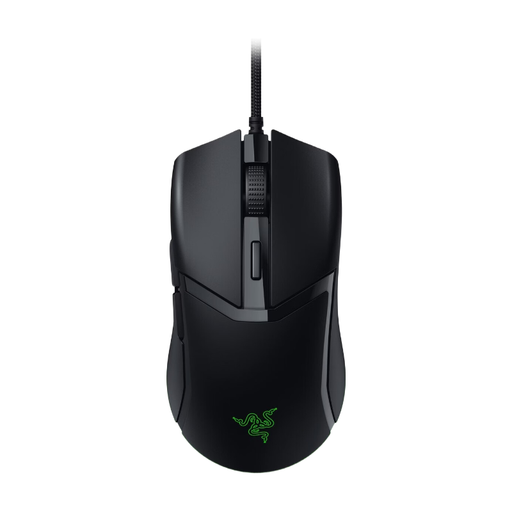
Why it suits this profile: A wired mouse eliminates battery management and does not require a wireless receiver. This makes setup simple for beginner PC gamers.
You do not pay for a high wireless polling rate that you may not need. The cable provides continuous power and makes charging unnecessary.
58 grams according to the product information, an optical sensor up to 8500 DPI, six buttons and a USB cable for direct connection.
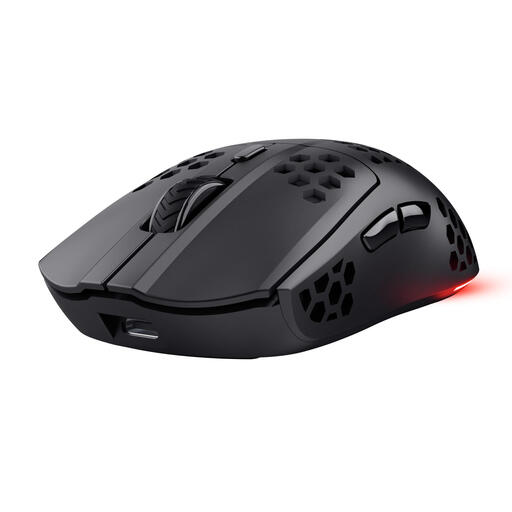
Why it suits this profile: Suitable for gamers who want to play wirelessly but do not need a 4K polling rate or 26,000 DPI for their games.
The product information specifically states 1000Hz, 4800 DPI and a battery life of up to 80 hours. This makes it easier to match the performance to normal gaming use.
Approximately 73 grams, 2.4GHz wireless connection, USB-C charging, six programmable buttons and an advertised battery life of up to 80 hours.
We have put together a complete, up-to-date list of products that fully meet these strict selection criteria and the applicable European safety regulations.
Use RAPOO's configuration software and select the desired polling rate, provided the firmware and connection support it. Then check that your game continues to run smoothly. If you experience frame drops, try 1000Hz. A higher polling rate is not visible or necessary in every game.
According to the product information, the battery life is up to 180 hours. Actual battery life depends on factors including the polling rate, lighting and intensity of use. Charge the mouse when the indicator flashes red and, where possible, avoid allowing the Li-Po battery to run completely flat.
According to the product description, the VT9Pro has a symmetrical shape for left- and right-handed use. Do check the position of the side buttons and choose the buttons you need in the software. The shape may be suitable for a left-handed user, while the button layout will still come down to personal preference.
