
Vandaag of morgen in huis

Kwaliteit gegarandeerd

Welkomstaanbiedingen ontgrendelen: GRATIS bezorging | Tot 80% korting | Gratis 30 dagen JoyPlus-proefperiode
Download de app
A wireless gaming mouse needs to offer more than a high DPI figure on the box. For FPS games, weight, shape, connection, software and battery life all matter too. The Rapoo VT3 wireless gaming mouse is aimed at players looking for low weight, a high polling rate and plenty of customisation options.
There are, however, a few potential pitfalls. For example, a high polling rate is only useful when your PC, monitor and game settings can take advantage of it. Likewise, a high DPI figure does not automatically mean that a mouse will suit your playing style better. Below, we set out the key points to check at a glance.
A gaming mouse with 26,000 DPI sounds impressive, but most players use a much lower sensitivity in games. DPI mainly determines the range of sensor settings. Also consider whether you can adjust the sensitivity precisely, for example independently for the X and Y axes.
The Rapoo VT3 product information lists a 26,000 DPI sensor, independent X/Y DPI adjustment and a stated resolution accuracy of 99.6%. These details come from Rapoo’s product description and should be viewed as product specifications, not a guarantee of better gaming performance.
An 8K polling rate means that the mouse can send up to 8,000 reports per second to the computer. This may be worthwhile for competitive players with a fast monitor and a system capable of handling the additional data processing. With older hardware or a lower screen refresh rate, you may notice little difference.
According to Rapoo’s product information, the VT3 supports a native wireless polling rate of up to 8,000 Hz, without requiring an additional wireless dongle. After purchase, check that the A HUB software, receiver and firmware are configured correctly.
Long battery life is often measured under optimal conditions. With higher polling rates, a lot of wireless activity and intensive use, actual battery life may differ.
According to the product information, the Rapoo VT3 offers up to 750 hours of battery life at 1000 Hz. This does not automatically mean 750 hours at 8,000 Hz. Always check which polling rate applies to the battery claim and confirm whether the battery is rechargeable internally.
An ultra-light gaming mouse can feel comfortable for quick changes of direction and large movements across a spacious mouse mat. According to the product specifications, the Rapoo VT3 weighs 53 grams. This makes it an appealing option for players looking for a 53-gram gaming mouse.
Weight is only one factor, however. Also check:
More buttons are not always better for FPS games. They can be useful for macros, MMOs and productivity, but in fast-paced shooters an overly busy layout can lead to mistakes.
An optical sensor with a high resolution gives you plenty of scope for personal settings. For most users, precise increments, stable tracking and a well-adjusted sensitivity matter more than the highest number.
According to Rapoo, the VT3 supports independent X/Y DPI profiles and DPI buttons for switching during play. This can be useful if, for example, you use a different sensitivity for aiming, vehicles or menus.
According to the product information, the Rapoo VT3 has 10 programmable buttons and supports macros. Functions can be assigned via the A HUB software for Windows and Mac. The same source states that the mouse uses mechanical switches with a claimed lifespan of 100 million clicks.
This is a claim made by Rapoo based on the product information. The stated lifespan is not a promise that every mouse will reach exactly that number of clicks. If you prefer a mechanical clicking feel, this model may be worth considering. Rapoo directs users who prefer optical switches towards the VT3 MAX Gen-2, but that is a different model.
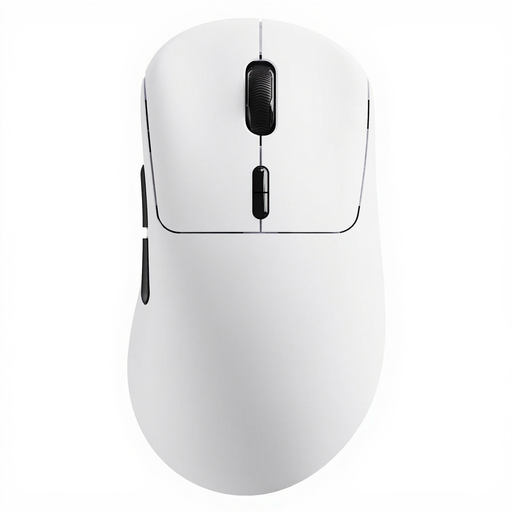
Why it suits this profile: A wireless gaming mouse with plenty of customisation options and a low weight, without needing to move straight to a model with a large selection of additional accessories.
The specifications list not only 26,000 DPI, but also independent X/Y adjustment, 10 programmable buttons and A HUB software.
53 grams, native wireless 8K polling according to Rapoo and a stated battery life of up to 750 hours at 1000 Hz.
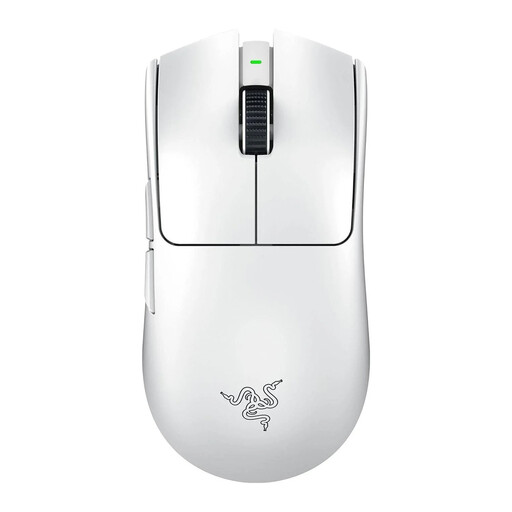
Why it suits this profile: For FPS players looking for a compact, lightweight shape and a wireless connection with a high polling rate.
The product information lists the weight, 8K polling rate, sensor model and battery life separately.
54 grams, up to 35,000 DPI according to the product specifications and programmable buttons.
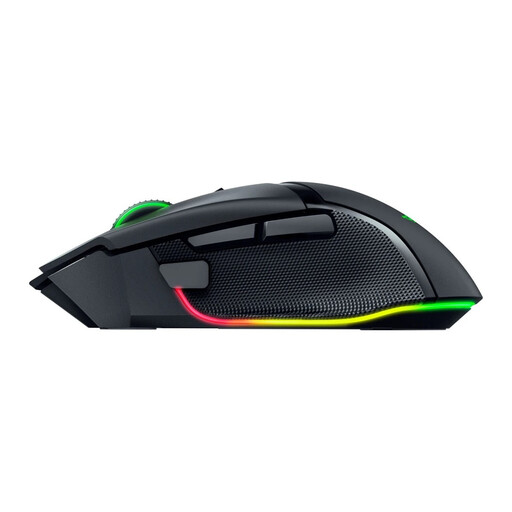
Why it suits this profile: For users who value extra features and an ergonomic right-handed shape more than ultra-low weight.
The product details specify 11 programmable buttons, making it possible to check the available functions in advance.
35,000 DPI according to the product information, 11 programmable buttons and both wireless and wired connectivity.
We have compiled a complete, up-to-date list of products that fully meet these strict selection criteria and the applicable European safety regulations.
After connecting the mouse, it is a good idea to position the wireless receiver close to it first. If possible, use the included cable or extension cable to reduce potential sources of interference. Then set up one familiar DPI profile before adding multiple profiles and macros.
When using macros, pay attention to the rules of the game or competition. Not every form of automation is permitted in online competitions. Only programme functions when they comply with the terms of use for the relevant software.
For the Rapoo VT3, use the A HUB software on Windows or Mac if you want to configure buttons, macros, DPI and onboard memory. Only charge the mouse with a suitable USB cable and 5V adapter. Stop using it if you notice unusual heat, swelling, smoke, odour or visible damage. Dispose of a faulty mouse in accordance with local electronic waste regulations.
The combination of 53 grams, wireless connectivity, adjustable DPI and a stated polling rate of up to 8,000 Hz makes this mouse appealing to FPS players. Whether you notice the difference depends on your monitor, PC, game settings and personal sensitivity.
According to Rapoo’s product information, the battery lasts for up to 750 hours at a polling rate of 1000 Hz. At higher polling rates or with different usage, actual battery life may vary. Regularly check the battery level in the software.
This varies by game and competition. According to the product description, the mouse supports macros, but the publisher’s or organiser’s rules determine whether you may use them. For competitive gaming, it is advisable to check the terms in advance.
