
Vandaag of morgen in huis

Kwaliteit gegarandeerd

Welkomstaanbiedingen ontgrendelen: GRATIS bezorging | Tot 80% korting | Gratis 30 dagen JoyPlus-proefperiode
Download de app
A lightweight wireless gaming mouse can help keep your desk tidy and is well suited to fast-paced FPS and MOBA games. However, high DPI, an 8K polling rate and long battery life do not tell the whole story. If you focus only on the most eye-catching figures, you could end up buying a mouse that does not suit your grip comfortably, has too few buttons or needs charging more often than expected in everyday use.
The Rapoo VT3 wireless gaming mouse combines low weight with a high polling rate, extensive customisation options and mechanical switches. But is that the right combination for your playing style? Below, we compare the key considerations and alternatives.
A sensor with 26K DPI can be adjusted very precisely, but most players use a much lower sensitivity when gaming. A high DPI value is mainly useful if you want to save multiple sensitivity levels or adjust the X and Y axes independently.
So do not focus solely on the maximum figure. Also check:
A gaming mouse with an 8K polling rate theoretically sends information to the computer more often per second than a mouse running at 1000 Hz. This can be interesting at high refresh rates, but the visible benefit depends on your monitor, game, processor and settings.
A higher polling rate can also use more system resources. Therefore, check whether:
According to the product description, the Rapoo VT3 offers a native wireless polling rate of up to 8000 Hz. This is a Rapoo product specification; the practical experience may vary from one system to another.
‘Up to 750 hours’ sounds appealing, but battery life depends on the polling rate, lighting, sleep mode and usage pattern. For the Rapoo VT3, the battery life is stated in the product information as up to 750 hours at 1000 Hz. When used at 8K, the runtime may be different.
Therefore, always compare:
According to the product information, the Rapoo VT3 is an ultralight gaming mouse weighing 53 grams. A low weight can be comfortable for players who make lots of small movements or regularly lift the mouse. However, weight alone does not determine whether a mouse is a good fit for you.
Also consider the length, width and height, as well as your grip:
The product description mentions an optimised grip and more easily accessible side buttons. This is a brand claim, so always check the dimensions and shape against your own hand size.
According to the specifications, the Rapoo VT3 has an optical sensor with 26,000 DPI and separate X/Y adjustment. This can be useful for FPS games if you want to configure horizontal and vertical movements differently. For MOBA games, multiple DPI profiles and programmable actions may offer more value than extremely high sensor sensitivity.
A wireless mouse for FPS should also remain stable during fast movements. Ideally, position the receiver close to the mouse and avoid obstacles between the receiver and the mouse.
According to the product information, the VT3 has 10 programmable buttons and macro support through Rapoo A HUB. This allows you to set up functions, shortcuts and profiles. Not every game allows macros in competitive environments. Always check the rules for the specific game or competition.
The mouse uses mechanical switches with a stated lifespan of 100 million clicks. According to Rapoo’s own information, the design is intended to reduce double-clicking issues. This is not a guarantee that double-clicking will never occur. If you prefer optical switches, you could consider the Rapoo VT3 MAX. This variant is stated to offer 120 million optical clicks, but has different features and a different click feel.
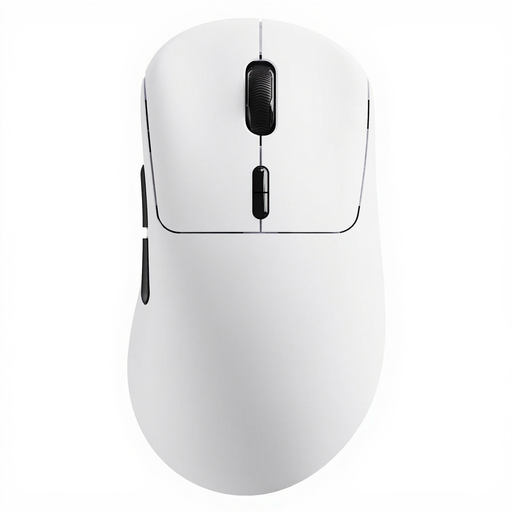
Why it suits this profile: A versatile choice for anyone looking for a lightweight wireless mouse with extensive customisation options, without immediately opting for a model with optical switches.
The product information lists independent X/Y DPI, 10 programmable buttons and A HUB for Windows and Mac OS. This means you are not limited to relying on a single high DPI setting.
53 grams, up to 26,000 DPI, native wireless 8K polling rate and a stated battery life of up to 750 hours at 1000 Hz.
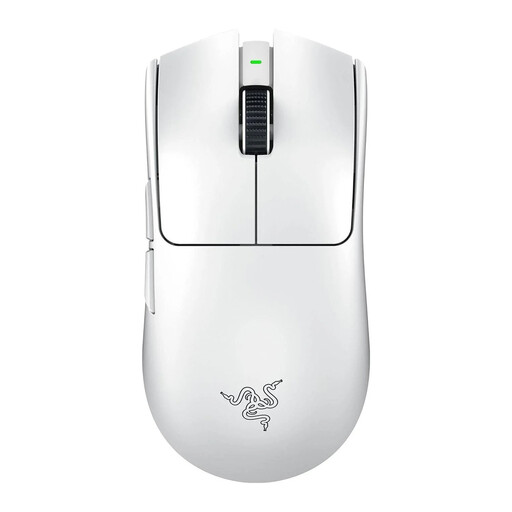
Why it suits this profile: Designed for FPS players looking for a lightweight right-handed shape, 8K polling and an optical sensor with a high maximum resolution.
The stated 8K polling rate and optical sensor are suited to users who want to fine-tune latency and tracking to match their PC configuration.
54 grams, optical sensor up to 35,000 DPI and, according to the product information, up to 95 hours of battery life.
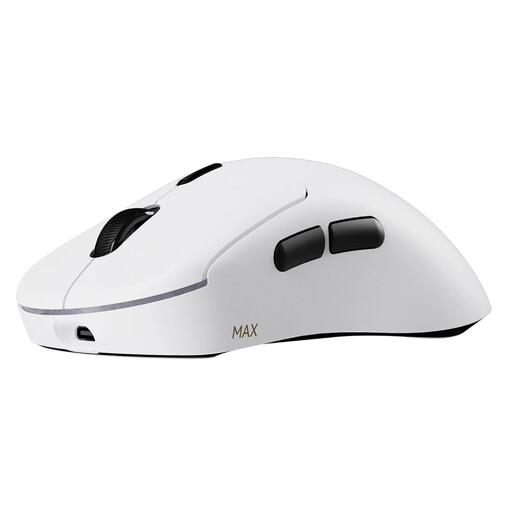
Why it suits this profile: Suitable for players who prefer to avoid mechanical click feedback and want an optical switch with a longer stated click lifespan.
The product information clearly distinguishes the optical switches from the mechanical switches in the VT3. This allows you to choose the switch type based on preference rather than simply the number of clicks.
53 grams, up to 30,000 DPI, independent X/Y adjustment and, according to Rapoo, a lifespan of 120 million clicks for the optical switches.
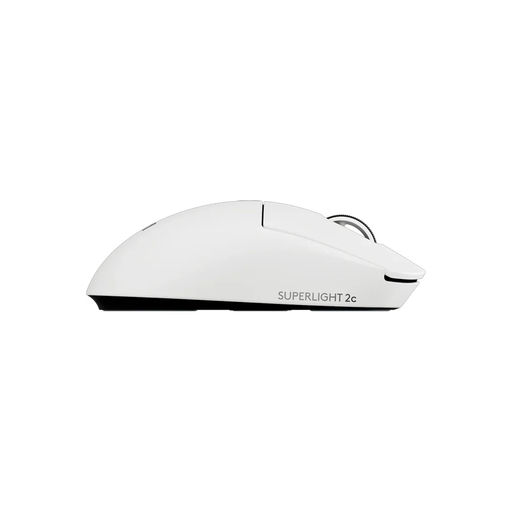
Why it suits this profile: A compact mouse for FPS players who need few buttons and value a weight of 53 grams.
The specifications mention a compact shape and five buttons. This means you are not paying for a large number of macro buttons that you will not use in an FPS game.
53 grams, HERO 2 optical sensor up to 44,000 DPI, adjustable buttons and wireless polling of up to 8 kHz according to the product information.
We have put together a complete, up-to-date list of products that fully meet these strict selection criteria and the applicable European safety regulations.
It can be, particularly when combined with a high-refresh-rate monitor and a PC capable of processing the additional reporting rate. The difference will not be clearly visible to every player. If necessary, start at 1000 Hz and then compare higher settings in your own games.
According to the product description, the battery lasts up to 750 hours at a polling rate of 1000 Hz. Actual battery life may vary depending on the polling rate, settings and usage. Also check whether the latest Rapoo A HUB driver is required for certain power-saving features.
Rapoo states a lifespan of 100 million clicks and says that the design aims to reduce double-clicking issues. This is information from the manufacturer and is not a guarantee of a specific lifespan. If you want to avoid mechanical feedback, compare a variant with optical switches.
