
Vandaag of morgen in huis

Kwaliteit gegarandeerd

Welkomstaanbiedingen ontgrendelen: GRATIS bezorging | Tot 80% korting | Gratis 30 dagen JoyPlus-proefperiode
Download de app
Do you work with a laptop, desktop computer, tablet and smartphone? A wireless keyboard and mouse can save a great deal of space on your desk. However, many sets look alike. A low price tells you little about connectivity options, noise levels or day-to-day usability.
The Rapoo 9010M wireless keyboard and mouse combo is designed for users who want to control multiple devices with one set. According to the product information, the combination works via 2.4GHz, Bluetooth 4.0 and Bluetooth 5.0, and supports up to four paired devices. Below, we explain what to look out for before placing your order.
Some sets use only a USB receiver. That is convenient for a desktop computer or laptop, but less suitable for a tablet or smartphone without a USB-A port. So check whether you need:
The Rapoo 9010M combines all three connection options. According to the product specifications, you can pair up to four devices and switch between them. Before buying, check that your own devices support Bluetooth and confirm which type of USB port is available.
Terms such as “silent” and “quiet click” usually describe a design with less audible key or click noise. The actual noise level also depends on your type of desk, the way you type and the surface on which the mouse moves.
According to the product description, the Rapoo 9010M features a low-profile scissor-switch keyboard and a mouse with a silent-click function. This can be practical in a shared home office, library or open-plan office. Do not expect completely silent operation: mechanical movement will still be audible.
The stated battery life depends on how frequently the device is used, the connection type and the type of battery. The Rapoo 9010M is listed as offering up to approximately 12 months of use, but this is a guideline from the product information. According to Rapoo’s own information, battery life may vary depending on usage.
The set runs on batteries. Before ordering, check which AA and AAA batteries are required for the keyboard and mouse. Remove the batteries if you will not be using the set for an extended period. This reduces the risk of leakage and corrosion.
A Bluetooth keyboard and mouse is suitable for devices without a traditional USB port. A 2.4GHz receiver is often practical for a fixed computer, as you only need to plug in the receiver.
The Rapoo 9010M supports:
If you are looking for a keyboard for 4 devices, it is worth checking whether both the keyboard and mouse can switch between devices. The Rapoo 9010M is described as offering multi-device support for both components.
A keyboard can be technically compatible with Windows and Mac while still displaying different shortcuts or symbols. So pay attention to:
The Rapoo set uses a slim chiclet design with a low profile. According to the product description, it has dual shortcut keys for Windows and Mac, including controls for volume and media playback. This makes the set appealing to people working from home and students who regularly switch between systems.
According to the product specifications, the Rapoo 9010M mouse offers adjustable resolutions of 800, 1000, 1200, 1600 and 2400 dpi. A lower setting can be comfortable for precise movements, while a higher setting requires less hand movement on a large screen.
Also consider the shape of the mouse, the amount of available space and the surface of your desk. A compact mouse works well in a flexible home office, but may be less suitable if you use a larger mouse for extended periods.
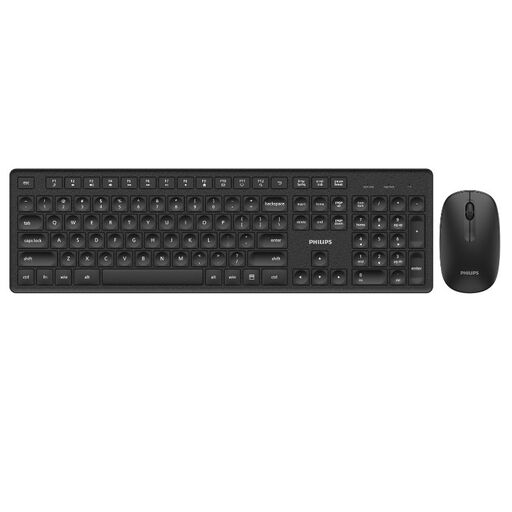
Why it suits this profile: A straightforward set for a laptop or desktop computer with a 2.4GHz USB connection, a full QWERTY layout and a mouse with a silent-click function.
The product name clearly states that it has a UK QWERTY layout and a 2.4GHz receiver. This makes it easier to assess in advance whether the layout suits your needs.
Full keyboard layout, slim design and silent-click function according to the product information.
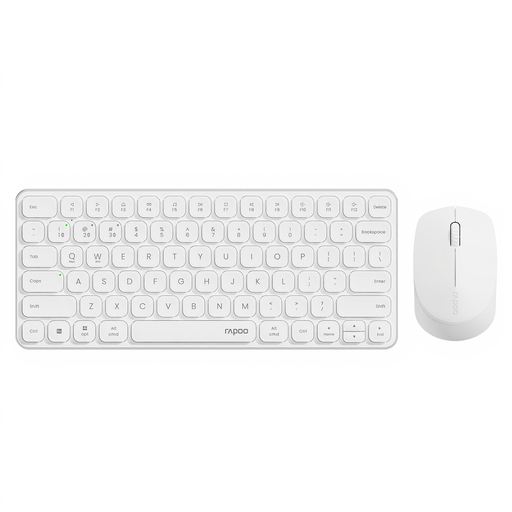
Why it suits this profile: For anyone who wants to combine a tidy, streamlined workspace with Bluetooth, USB connectivity and control of multiple devices.
The connections and support for up to four devices are listed in the product specifications. This means you do not have to rely solely on the general term “wireless”.
Bluetooth 4.0/5.0, 2.4GHz, adjustable mouse resolution and indicators for the device and Caps Lock.

Why it suits this profile: Suitable for people working from home, professionals and students who frequently switch between a computer, laptop, tablet and phone.
The set does not rely solely on Bluetooth or solely on a USB receiver. It offers both options and has keys for switching between devices.
Low-profile scissor keys, silent mouse click, support for four devices and compatibility with Windows, Mac, Linux and Chrome OS according to the product information.
We have put together a complete, up-to-date list of products that fully meet these strict selection criteria and the applicable European safety regulations.
Insert the batteries into the keyboard and mouse. Then use the USB receiver for a 2.4GHz connection, or pair a device via Bluetooth. Use the device button or the corresponding function keys to switch between paired devices. Consult the supplied manual if a device does not appear immediately.
According to the product information, the Rapoo 9010M works with Windows, Mac, Linux and Chrome OS. The shortcut keys may behave differently depending on the operating system. So check that the media keys and function keys you want to use correspond to your computer.
The manufacturer states a battery life of up to approximately 12 months, depending on usage. This is not a fixed period. Intensive typing, frequent mouse movements and certain connection modes can affect battery life. Use the recommended AA and AAA batteries, and remove them if storing the set for an extended period.
