First, match your choice to the frame rate your PC can achieve in your games, and decide what matters more to you: tracking moving opponents or seeing dark scenes clearly. A fast OLED combines high refresh rates with OLED blacks, while an esports-focused TN screen prioritises speed. An IPS LCD is an alternative if you’re concerned about displaying static images on an OLED for long periods. For the exact model, check independent motion tests, connections, and maintenance and warranty terms.
Who is this choice for?
Ranked player who prioritises movement
You want to track opponents during fast-paced action and match the screen’s refresh rate to your PC’s frame rate. RTINGS discusses how resolution and frame rate factor into choosing a high refresh rate; BenQ ZOWIE specifies 400 Hz for the XL2566X+.
Ranked player who also cares about dark images
You play in a dark room and want to assess not only speed, but also how black areas and bright details are displayed. RTINGS highlights black uniformity as something to consider in dark scenes.
Player who spends a lot of time with static images on screen
You often see the same HUD or other fixed elements and want to weigh OLED’s picture quality against the risk of displaying static images for long periods, the maintenance involved and an LCD alternative. RTINGS describes burn-in as a risk when the same elements are displayed for extended periods.
What should you look for when buying?
Fast OLED
A good fit if: you play ranked games as well as dark scenes, and OLED blacks matter to you.
Bear in mind: displaying static images for long periods calls for careful maintenance; ambient light can also make blacks look greyer.
Esports-focused Fast TN
A good fit if: fast motion is your clear priority and your PC can deliver very high frame rates.
Bear in mind: you’re opting for Full HD rather than QHD, and you won’t get OLED blacks. The benefits of 400 Hz depend on the frame rate your PC can achieve.
Fast IPS LCD
A good fit if: you’re looking for an LCD option and static elements on screen for long periods are a reason to avoid OLED.
Bear in mind: IPS backlighting doesn’t automatically deliver the same deep blacks as OLED. Consider response-time claims alongside independent tests.
Mini LED LCD
A good fit if: you want more contrast in dark scenes and want to factor the risk of OLED burn-in into your choice.
Bear in mind: bright objects can show halos; also check the specific model’s local dimming and motion performance.
| Consideration |
What should you check? |
Who is it most relevant to? |
| Tracking movement |
Compare independent motion tests at relevant settings, and consider response time and motion processing as well as Hz. |
When I play fast-paced encounters, I want to be able to track opponents clearly. Around 36% of consumers put motion clarity first. |
| Dark scenes |
Look at model-specific tests of black uniformity and local dimming; an HDR label alone doesn’t tell you how dark images look. |
In a dark room, I want to assess black areas and bright details clearly. Around 29% of consumers prioritise dark image quality. |
| PC and connection |
Check the frame rate your games achieve at your preferred resolution and settings, as well as the Hz supported by each input. |
I want to know which resolution and refresh rate my PC can actually make use of. This is the top priority for around 21% of consumers who want their system to match their monitor. |
| OLED and aftercare |
Read the maintenance instructions and model-specific burn-in terms; distinguish between commercial cover and your statutory rights. |
If the same HUD stays on screen for a long time, I want to know in advance what maintenance is needed and which terms apply. Around 14% of consumers prioritise maintenance and aftercare. |
Things to watch out for when buying
-
Comparing only the highest Hz figure
A high refresh rate won’t automatically give you an advantage if your PC can’t reach it in your games. Resolution and motion performance matter too.
Check the frame rate you get in your own games with the settings you want to use, and compare independent tests at relevant refresh rates.
-
Treating the quoted response time as a complete performance test
A manufacturer specification such as 1 ms GtG doesn’t, by itself, describe all motion artefacts or total input lag.
Use the figure as a starting point, then look for independent, model-specific measurements of motion and input lag.
-
Choosing OLED blacks without considering static game elements
Displaying the same HUD elements for long periods carries a risk of OLED burn-in; LCD is a different option in this respect.
Compare OLED with a fast LCD monitor, and read the maintenance instructions and warranty terms for the exact model before buying.
Brands to consider
Gigabyte
According to Gigabyte, the MO27Q2A is a 27-inch QHD QD-OLED monitor with a maximum refresh rate of 280 Hz.
- Tweakers discusses its response times and mentions USB-C and KVM on this model.
- Tweakers notes that blacks can look greyer in ambient light and that USB-C charging power is 18 W. This applies to the MO27Q2A, not all monitors from the brand.
BenQ ZOWIE
The XL2566X+ is an esports-focused Fast TN monitor; BenQ specifies Full HD and 400 Hz for this model.
- BenQ highlights DyAc 2, a shielding hood and settings for competitive games.
- BenQ’s claim about motion clarity is a manufacturer claim, not an independent comparison with OLED or other TN monitors.
ASUS ROG
The ROG Strix XG27ACS is a QHD IPS LCD model with a maximum refresh rate of 180 Hz stated by ASUS. The PG32UCDM Gen3 is a separate 32-inch 4K QD-OLED monitor with a refresh rate of 240 Hz.
- The two models offer different sizes, resolutions and panel types.
- The GtG response times and OLED protection features stated by ASUS are not independent measurements of performance or lifespan.
AOC AGON
AOC Netherlands describes the AG276QZD2, a 27-inch QHD QD-OLED model, as suitable for fast gaming and dark scenes.
- AOC Netherlands lists 280 Hz and a three-year commercial OLED warranty, subject to maintenance conditions.
- The Joybuy product listing for the AG276QZD2 states 240 Hz via DisplayPort and 144 Hz via HDMI. Check the exact version and connection before comparing refresh rates.
MSI
MSI specifies QHD and a maximum refresh rate of 500 Hz for the MAG 272QP QD-OLED X50.
- The maximum refresh rate is most relevant if your PC can achieve very high frame rates in your games.
- A product specification for the maximum refresh rate doesn’t tell you what frame rate your PC can achieve in your chosen game and settings.
Joybuy products
These Joybuy products include QHD OLED models for those who care about dark scenes, and fast LCD options for those who prioritise motion or want to factor the risk of OLED burn-in into their choice.
 No image available
AOC GAMING Q27G4ZDR 26.5-inch QHD QD-OLED
A QD-OLED option to consider if you play ranked games in a dark room. If you display static HUD elements for long periods, bear in mind the risk of OLED burn-in and follow the model’s maintenance instructions.
Specifications: 2560 × 1440, 240 Hz, 0,03 ms GtG, HDR10, G-SYNC Compatible and VESA Adaptive-Sync.
View at Joybuy
 No image available
MSI MAG 272QPW QD-OLED X28 27-inch, white
This model is suited to those looking for QHD and a high stated refresh rate for ranked games, while also valuing OLED images for dark scenes. Bear in mind the risk of displaying static images for long periods.
Specifications: QHD, 280 Hz and QD-OLED.
View at Joybuy
 No image available
LG UltraGear 27GX704A-B.AEU 27-inch OLED QHD
An OLED option for players who value QHD and dark scenes. If the same HUD stays on screen for long periods, maintenance remains an important consideration.
Specifications: 2560 × 1440, 240 Hz, DisplayHDR 400 True Black, G-SYNC Compatible and FreeSync Premium Pro.
View at Joybuy
 No image available
Samsung Odyssey G4 G40H 25-inch FHD
A Fast IPS LCD option if you want to weigh up high refresh rates against the risk of OLED burn-in. An IPS LCD doesn’t automatically deliver OLED blacks in dark scenes.
Specifications: 300 Hz via DisplayPort and 240 Hz via HDMI, Fast IPS and 1 ms.
View at Joybuy
 No image available
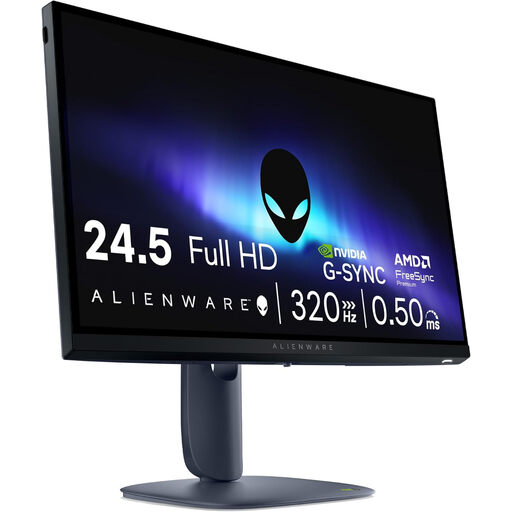
Alienware AW2525HM 24.5-inch Full HD
This LCD gaming monitor is worth considering if you value high refresh rates and want to factor the risk of OLED burn-in into your choice. Don’t expect LCD to deliver the same OLED blacks automatically.
Specifications: 1920 × 1080, Fast IPS, 320 Hz, G-SYNC and FreeSync.
View at Joybuy
Frequently asked questions
How do I set up a fast monitor for ranked matches?
Once connected, check which resolution and refresh rate your PC offers through the input you’re using. Match that setting to the frame rate your game achieves with your chosen settings. A maximum of, for example, 280 or 400 Hz doesn’t mean every PC can make use of that refresh rate in a match.
How should I maintain an OLED monitor that often displays the same HUD?
Follow the maintenance instructions for the exact model and read the relevant warranty terms. For example, AOC states that commercial cover for burn-in on the AG276QZD2 depends on maintaining the screen in accordance with AOC’s instructions. Protection features don’t eliminate the risk of displaying static images for long periods.
What warranty am I entitled to when buying in the Netherlands?
According to the Netherlands Authority for Consumers and Markets (ACM), the seller is responsible for the statutory guarantee if a product doesn’t meet what you could reasonably expect with normal use. A separate manufacturer’s or burn-in warranty has its own terms and doesn’t replace your statutory rights.
Can I return a monitor bought online, and what can I do with my old one?
According to ACM ConsuWijzer, online purchases usually come with a statutory cooling-off period of up to 14 days after delivery; check which exceptions and returns terms apply. According to Milieu Centraal, when you buy a similar new appliance, you can hand in an old electrical appliance free of charge, including when buying online, or take it to your local council recycling centre.


