
Using an existing USB-A cable
You want to connect your radio using the cable you already have. Check both the connector at the charger end and the radio’s input.


Choose a USB charger based on the charging input and power specifications in your radio’s manual, as well as the connector at the charger end of the cable. A second port is useful if you also want to connect another device. A higher maximum power rating alone doesn’t mean your radio will charge faster.
You want to connect your radio using the cable you already have. Check both the connector at the charger end and the radio’s input.
Your radio charges via USB-C and you want to know whether one USB-C port is enough or whether you also need USB-A. Check the connection on your radio model; Philips Netherlands’ product information gives an example of USB-C charging.
You want to connect your radio and, for example, a phone at the same time. In that case, consider the number and type of ports, as well as the stated power per port, as shown in Belkin’s product information.
| What to consider | What should you check? | Who is this important for? |
|---|---|---|
| Connection and cable | Check the radio’s charging input and both ends of the cable. A USB-A port on a radio may be an output for charging other devices. | I want to use my existing cable and make sure both connectors fit; around 36% of consumers give connection and cable compatibility their highest priority. |
| Power and safety | Compare the output of the charger port you’ll use with the power specifications in the radio’s manual. For a mains adapter, also check the product information and applicable CE marking. | I want to choose a power supply that meets my radio’s requirements, rather than judging it by its total wattage alone; around 29% of consumers prioritise a suitable and safe power supply. |
| Two devices at once | Count the devices you want to connect at the same time, then check the port types and specifications for simultaneous use. | I want to use my radio and a second device from the same socket; around 21% of consumers give shared ports their highest priority. |
| Interference while listening | If you hear interference while the radio is powered, first check that the power solution is suitable for your model. Roberts describes its own power plug, which the brand says is designed to reduce interference. | I want to listen without power-related issues affecting the sound; around 14% of consumers give interference-free listening while powering their radio their highest priority. |
Port functions vary by radio model. On the Philips TAR1659/00, USB-C is the charging input, while USB-A is intended for charging other devices from the radio.
Check the label by the port and your radio’s manual before choosing a cable or charger.
A multi-port charger may have different maximum outputs for each port. Its stated maximum alone doesn’t tell you whether the power supply is suitable for your radio or how quickly it will charge.
Compare the output of the port you’ll use with the radio’s manual. If you’re connecting a second device, also check the specifications for simultaneous charging.
The Apple product page reviewed lists model number MD3J4ZM/A, while a Joybuy product page lists MHJE3ZM/A. These model numbers are different.
Compare the full model number and relevant specifications before assuming a product is the same version.
The models mentioned offer either two USB-A ports or a combination of USB-A and USB-C.
According to the product information, model 00201991 has one USB-A port and one USB-C port for connecting two devices.
The Apple product information reviewed describes a 20 W USB-C mains adapter for use with one device.
These Joybuy products offer USB-A and USB-C connections for a radio in a home office. Before buying, check which port matches your cable and what power supply your radio requires.
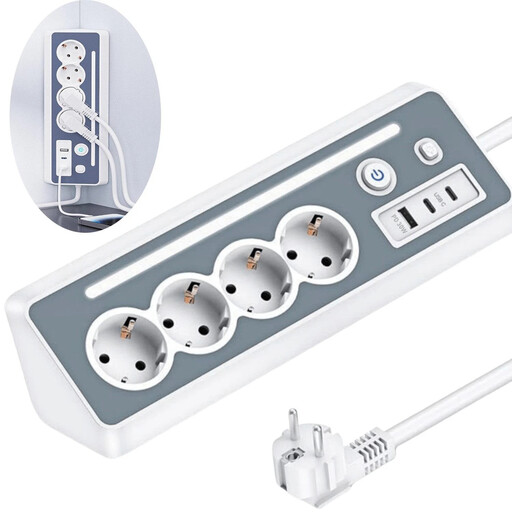 Image unavailable
An option if you want to connect other devices to your desk as well as your radio, and need the right USB port.
The product name lists four sockets, two USB-C ports, one USB-A port, an LED night light and surge protection. According to the product information, you can’t use both USB-C ports at the same time if you want to activate the fast-charging function.
 Image unavailable
Could suit a desk where you want to connect other devices as well as your radio, provided the port and power supply meet the radio’s requirements.
The product name lists 65 W, two USB-C ports and one USB-A port. The total wattage doesn’t tell you how much power the port you use will deliver to your radio. According to the product information, the charger is for indoor use.
 Image unavailable
A possible choice if you want one connection for your radio cable and a second port for another device, provided the power supply suits your radio.
The product name lists 30 W and USB-C and USB-A ports. According to the product information, the charger is for indoor use in a dry location.
 Image unavailable
Could be suitable if you want to connect your radio and a second device at the same time, provided the port you use meets the radio’s power specifications.
The product name lists 20 W and USB-C and USB-A ports. According to the product information, the charger is for indoor use in a dry location.
 Image unavailable
Could suit a workspace with several devices, as long as the port you use for your radio matches the cable and power requirements.
The product name lists ten ports, USB-A and USB-C. According to the product information, charging speed depends on the port used, the connected device and the total available power.
Check the label by the port and your model’s manual. On the Philips TAR1659/00, USB-C is the charging input, while USB-A is intended for charging other devices from the radio. Don’t assume other radios have the same layout.
It depends on the radio and the charger. Philips says a USB-C cable is included with the TAR1659/00; Apple says the cable is sold separately with the 20 W adapter reviewed. Check what’s included with both products and make sure the connectors at both ends fit.
No. A higher maximum power rating doesn’t prove that your radio will charge faster. Compare the output of the port you’ll use with the power specifications in your radio model’s manual.
First, check that the power supply is suitable for your radio. Roberts describes a USB power plug for its own product range, which the brand says is designed to reduce interference while listening. Check whether this solution is suitable for your radio model.
The Netherlands Food and Consumer Product Safety Authority states that products covered by the Commodities Act Decree on Electrical Equipment must carry a CE marking. The marking alone doesn’t prove that an adapter has been independently tested or is suitable for your radio.