
Charging a radio with one spare socket
You want to charge your radio and another device at the same time using one mains charger. The number and type of ports determine whether this is practical.


Choose a mains charger with enough suitable ports to connect your radio and a second device to one socket, but first check your radio model’s connection and power requirements. Then compare the specifications for simultaneous charging. If you listen while charging, also consider possible interference. Mains chargers covered by the applicable electrical equipment rules must carry CE marking, according to the Netherlands Food and Consumer Product Safety Authority (NVWA). This marking is not an independent test.
You want to charge your radio and another device at the same time using one mains charger. The number and type of ports determine whether this is practical.
You use the radio while it’s plugged in and want to consider possible audible interference. Also check what power supply your radio model requires.
You’re buying a new mains charger and want to check your radio’s requirements, the applicable product marking and the safe-use instructions first.
Start by checking your radio’s connection and power requirements. Then count how many devices you want to connect at once and check what output the charger provides for that setup.
| What to consider | What should you check? | Who is this important for? |
|---|---|---|
| Power supply and connection | Compare the recommended voltage and current in the manual with the output from the port you’ve chosen. Also check that the plug at the charger end of your cable fits. | I want to check first that the cable and power supply are right for my radio; around 33% of consumers give this compatibility the highest priority. |
| Two devices at once | Count the devices you want to charge simultaneously. Check the number of USB-A and USB-C ports, and how power is shared when multiple ports are in use. | With one spare socket, I want to connect my radio and a second device at the same time; around 27% of consumers prioritise simultaneous charging. |
| Listening while charging | Check the radio manual to see whether you can use the radio while it’s charging. If you hear interference, check the power supply and positioning. | If I listen while charging, I want to allow for possible audible interference; around 20% of consumers make listening with minimal interference their first consideration. |
| Marking and use | Check the product marking and follow the instructions for the radio and charger. Don’t use damaged charging equipment. | When replacing an adapter, I want to check the marking and instructions; around 20% of consumers give safe purchasing and use the highest priority. |
A high total power output or a fast-charging mode for other devices doesn’t confirm that the output is right for your radio. The manual for your exact radio model tells you what power supply to check.
Start with your radio model, cable and output per port. Only then compare the power available for a second device.
A two-port charger with USB-C ports only won’t directly connect a cable that has a USB-A plug at the charger end.
Check the plug at the charger end of your existing radio cable before choosing a multi-port model.
If the cable doesn’t fit the port you’ve chosen, you may need another suitable cable.
With the IKEA SJÖSS, charging a connected device may be briefly interrupted when you connect a second device. The stated power output also differs between using one and two ports.
Check the specifications for simultaneous use of the specific model if both devices need to stay connected.
According to the NVWA, CE marking is mandatory for electrical products covered by the Commodities Act Decree on Electrical Equipment. The marking is a condition of compliance, not proof that an individual item has been independently tested.
Check the marking and product details on the actual charger, and follow the instructions for use.
The features listed apply to the specific models below, not automatically to every charger from the same brand.
According to UGREEN, the UGREEN Nexode 35 W has one USB-C port and one USB-A port. This port layout is worth considering if your radio cable has a USB-A plug at the charger end.
According to Belkin, the Belkin BoostCharge WCB009vfWH has one USB-A port and one USB-C port for connecting two devices.
The IKEA SJÖSS 805.744.38 has two USB-C ports, for use with cables that fit those connections.
According to Hama, the flat charger 00201976 has two USB-C ports and one USB-A port.
This selection includes multi-port mains chargers with USB-A and/or USB-C ports for connecting a USB radio and, if needed, a second device. Check which port and power mode are suitable for your radio on each model.
 No image available
The two ports are designed to connect a radio and a second device through one adapter.
The product description lists a 10 W output mode (5 V, 2 A) as well as an 80W mode. Check which output mode and port are suitable for your radio’s power requirements.
 No image available
This model can connect a radio and a second device to one adapter if both cables use USB-C.
For simultaneous charging, the description states up to 45 W via USB-C1 and 18 W via USB-C2. The product name also mentions a 1.5 m USB-C charging cable.
 No image available
The three ports let you connect multiple devices when you want to charge them at the same time.
The description states that it’s for indoor use in dry conditions.
 No image available
You can use the USB-A and USB-C ports to connect two devices through the same adapter.
The description states a maximum combined output of 30 W when charging simultaneously. According to the description, this model is for indoor use in dry conditions.
 No image available
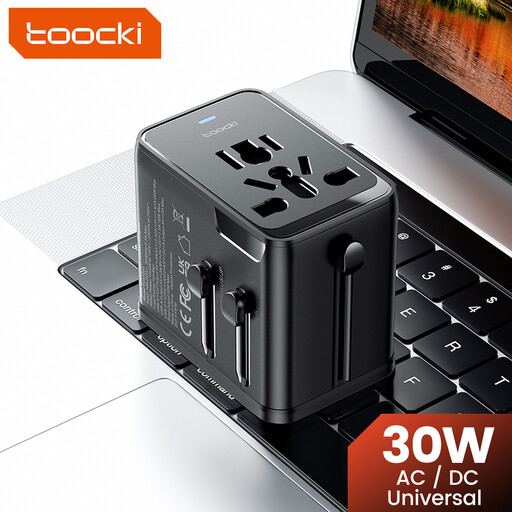
The three USB outputs are designed to connect multiple devices through one adapter.
The product description lists interchangeable plugs for EU, UK, US and Australian sockets, among others. Check that the plug and radio output are suitable for where you plan to use the adapter.
No. Check your radio model’s manual and the cable. For example, the Roberts Revival Petite 2 manual specifies DC 5 V and 1,000 mA. This is a model-specific requirement, not a general requirement for all radios.
It depends on the radio model. The Roberts Revival Petite 2 manual allows you to use the radio while it’s charging. Check this separately for your radio and follow the manufacturer’s instructions.
Follow the instructions for the radio and charger, and don’t use damaged charging equipment. IKEA says to unplug the SJÖSS charger before cleaning it and to wipe it with a dry cloth.
In the Netherlands, in addition to any manufacturer’s warranty, you have a legal guarantee: the product must meet what you can reasonably expect of it, according to ACM ConsuWijzer and the Dutch Government. There is no fixed statutory guarantee period. If there’s a fault, contact the seller.
CE marking is compulsory for electrical products covered by the Commodities Act Decree on Electrical Equipment, according to the Netherlands Food and Consumer Product Safety Authority. A separate inspection is not normally required for this product group. The marking is not proof that the specific item has been independently tested.