Choose a wheel and pedal set that works with your PC, simulator and mounting setup. When practising on a wet racing line, look for adjustable force feedback and a brake you can operate consistently. Direct drive is an option, not a requirement: you configure the monitor display on your PC and in the simulator. iRacing reports that traffic polishes the usual racing line, making it the slipperiest in the rain.
Who is this choice relevant to?
Practising on a wet racing line
You want to notice changes in grip and practise steering corrections when driving off the usual dry line. In iRacing, traffic can make the normal racing line more slippery; simulator settings and practice also play a part.
Practising braking points
You want to brake with repeatable pedal input and avoid locking up unintentionally. The type of brake pedal and its calibration in your simulator are therefore important considerations; iRacing describes different settings for load-cell and position-based pedals.
Driving with multiple monitors
You’re looking for a wheel and pedals that fit your PC setup, taking into account the space available and how your screens are positioned. iRacing covers triple-monitor configuration separately from wheel settings.
What should you look for when buying?
First, check compatibility with your PC and simulator, then decide whether you want a complete starter set or a direct-drive option. With a multi-monitor setup, configure the display separately from the wheel.
| What to consider |
What should you check? |
Who is this important for? |
| Wheel feedback as grip changes |
Check that your simulator supports it, that force feedback is adjustable and that the parts needed for mounting are included. |
When practising off the dry racing line, I want to interpret the wheel’s responses as I try different lines. Around 33% of consumers rank wheel feedback as their top buying priority. |
| Consistent braking |
Check whether pedals are included, what type of brake they have and what calibration your simulator recommends for them. |
When grip and braking points change, I want to be able to operate the brake in a consistent way each time. Around 27% of consumers prioritise brake control. |
| Multi-monitor setup |
Check the available space, wheel mounting and whether your PC and simulator support your preferred monitor display. |
With multiple monitors, I want the wheel to fit my setup physically and the screens to be configurable as needed. Around 20% of consumers prioritise compatibility with their existing setup. |
| Complete set or room to expand |
Check exactly what the bundle includes, as well as the platform version, pedals and mounting separately. |
If I want to get started with one purchase, I want to know whether the wheel, pedals and mounting are compatible, and which parts I can upgrade later. Around 20% of consumers give top priority to a complete set with room to expand. |
Common buying mistakes
-
Comparing only the stated Nm figures
Manufacturers don’t always use the same descriptions: Thrustmaster lists constant torque for the T598, while MOZA gives peak torque for the R5. These figures are therefore not directly comparable.
Also compare what’s included in the set, the mounting, pedals and compatibility. Don’t treat torque figures based on different measurements as a ranking.
-
Expecting a different wheel to fix a multi-monitor problem
In iRacing, you configure the display for three monitors in the simulator and on your PC, separately from the wheel calibration.
First check your PC’s connections, monitor configuration and wheel placement.
-
Assuming a wheelbase includes all the parts you want
A wheelbase and a complete set are different purchases. Brake calibration also varies by pedal type.
Check exactly what the version includes and what type of brake pedal comes with it.
You may need a separate pedal set or mounting parts if they’re not included in your chosen bundle.
Relevant brands to consider
Logitech G
The G923 is a wheel and pedal set available in versions for compatible PCs or consoles.
- Logitech G lists 2.3 Nm and TRUEFORCE for the G923.
- These are model specifications and manufacturer claims, not an independent comparison of performance on a wet racing line.
Thrustmaster
The T598 is a direct-drive set for PC and PlayStation, with a detachable wheel and pedals.
- Thrustmaster lists 5 Nm of constant torque and says the pedal set can be expanded from two pedals to three.
- Don’t directly compare constant torque with a peak figure. Manufacturer claims about feel and precision are not independent test results.
MOZA Racing
The R5 Racing Bundle is a PC set with an ES wheel, SR-P Lite pedals and a table clamp.
- MOZA lists 5.5 Nm of peak torque and includes iRacing in its compatibility list.
- Manufacturer claims about how accurately it conveys loss of grip are not based on independent measurements.
Fanatec
The CSL DD Ready2Race BMW Bundle combines a direct-drive wheelbase with a BMW wheel, CSL pedals and a table clamp.
- Fanatec lists 5 Nm for the CSL DD in this bundle.
- The standard CSL pedals included aren’t automatically load-cell pedals; check which upgrades are available for each part.
Racing wheels and sets at Joybuy
These Joybuy options include racing wheels and wheel and pedal sets for PC, with versions for different platforms and mounting options.
 No image available
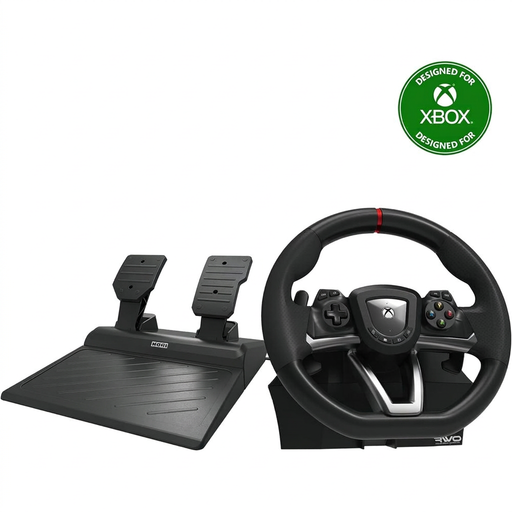
Hori Overdrive Racing Wheel, 270 degrees (PC/Xbox Series X|S/Xbox One)
An option to compare if you’re looking for a racing wheel with pedals for a PC or Xbox setup.
The product name specifies 270-degree wheel rotation and included pedals.
View at Joybuy
 No image available
Hori Racing Wheel Apex (PC/PS4/PS5)
This version is an option if you’re looking for a wheel with pedals for a PC, PS4 or PS5 setup.
The product name specifies that pedals are included.
View at Joybuy
 No image available
Logitech G G923, black (PC/Xbox One/Xbox Series S/Xbox Series X)
A complete force feedback starter set to compare if you’re looking for a wheel and pedals for PC or Xbox.
The product name specifies a wheel and pedals; check that the version you choose is compatible with your platform.
View at Joybuy
 No image available
Thrustmaster T98-X Ferrari 296 GTB
Compare this model if you’re looking for a Ferrari 296 GTB wheel. Before buying, check which platforms and parts are included with this version.
View at Joybuy
 No image available
Thrustmaster T598-P Direct Axial Drive (PS5/PS4/PC)
A direct-drive option to compare if you’re looking for this type of drive for a PC or PlayStation setup.
Joybuy lists two pedals with adjustable resistance for the T598-P. Check that it’s compatible with the simulator you use.
View at Joybuy
Frequently asked questions
Does a racing wheel make three monitors possible?
No. In iRacing, you configure the display for three monitors in the simulator and on your PC, not through the wheel. iRacing describes options including a window spanning the screens and an exclusive full-screen mode via the graphics card; check the settings in your simulator.
How do I start practising on a wet racing line in iRacing?
Choose a session with a rain-enabled car on a suitable tarmac circuit where rain is enabled. iRacing reports that the usual racing line, polished by traffic, is the slipperiest in the rain; the line with the most grip depends on the conditions.
Do I need to recalibrate the brake when using load-cell pedals?
Yes, recalibrate the controls for your type of pedal. iRacing recommends a different Brake Force Factor for load-cell pedals than for position-based pedals; use the setting that matches your pedal type.
What warranty and cooling-off period apply to an online purchase in the Netherlands?
If you buy from a business as a consumer, you’re entitled to a product that meets the required standards; in the Netherlands, there’s no fixed statutory warranty period. Online purchases from a business generally come with a 14-day cooling-off period.


