Start with a wheel that works with your PC and simulator, pedals that can be positioned securely and a mounting system that suits your desk or cockpit. Set up your monitors and seating position separately: according to iRacing Support, upgrading your wheel won’t fix incorrectly configured screen geometry. A complete direct-drive bundle and a G923 bundle are different options; compare the included pedals and mounting system, and don’t treat peak and constant torque figures as directly comparable.
Who is this advice for?
Driver with three screens
Wants to judge corner entry and reference points on a virtual street circuit accurately, and is looking for a wheel that works with their PC simulator. iRacing Support describes screen settings and seating position as part of the simulator setup.
Driver focused on repeatable braking
Practises the same braking points often and looks for pedals that stay securely in place, with options to adjust the brake feel later. Check which pedal set is included and what’s required for any upgrade.
Desk-based driver
Doesn’t have a permanent cockpit and is looking for a complete set that can be attached to a desk and put away after use. MOZA Racing and Fanatec list a table clamp with the bundles described here; check what’s included in the exact version.
What should you consider when choosing?
Complete direct-drive bundle
Best for: anyone who regularly practises the same corners and wants a wheel, base and pedals as a set.
Bear in mind: torque figures are measured on different bases; later brake upgrades may require extra components or firmware, depending on the combination.
Complete wheel and pedal set
Best for: anyone looking to get started with a PC set-up without choosing a direct-drive base straight away; the G923 is one example of this option.
Bear in mind: choose the right platform version and check that any later brake upgrade is compatible with your game and system.
| What to consider |
What should you check? |
Who should consider this? |
| Screen visibility and compatibility |
Check that your simulator is supported and configure the screen geometry in the sim. iRacing Support recommends taking your viewing position and screen angles into account. |
If I want to judge corners and reference points across multiple screens, I want the simulator and screen settings to suit my set-up. Around 31% of consumers prioritise screen visibility and simulator compatibility. |
| Repeatable braking |
Check which pedals are included, how to position them securely and what components or firmware are required for a planned brake upgrade. |
Anyone practising the same braking point wants pedals that stay in place during a session and a brake feel that suits the exercise. Around 25% of consumers prioritise brake control and pedal stability. |
| Wheel feedback |
Compare the drive type, how the stated torque is measured and the available settings; check whether the game supports specific feedback features. |
If I want to adjust my wheel responses while practising repeated corners, I look at the drive type and available settings, not just one torque figure. Around 25% of consumers put adjustable wheel feedback at the top of their list. |
| Mounting and what’s included |
Check whether the exact bundle includes a table clamp, wheel and pedals, and whether the mounting system suits your desk or cockpit. |
Without a permanent cockpit, I want to know in advance how to mount the wheel and whether the set includes everything I need to steer and brake. Around 19% of consumers see mounting and a complete set of components as their main concern. |
Common pitfalls
-
Assuming a wheel upgrade will fix poor screen visibility
Screen configuration and seating position are separate settings. A new wheel won’t change the geometry of your monitors.
First, configure the screens and viewing position in your simulator. iRacing Support describes separate settings for this; check the instructions for the sim you use.
This helps you avoid buying something that won’t solve the display problem.
-
Comparing peak and constant torque directly
MOZA Racing and Fanatec list peak torque for the sets mentioned; Thrustmaster gives a constant torque figure for the T598. These figures are measured on different bases.
Make a note of how each figure is measured, and also compare the drive type, settings, mounting and pedals included in the exact version.
-
Mistaking a standalone wheel base for a complete bundle
Fanatec distinguishes between the standalone CSL DD base and the Ready2Race bundle, which includes a wheel, pedals and table clamp.
Check what’s included in the exact version, component by component; don’t rely on the name of the wheel base alone.
Depending on the version, you may need to buy the wheel, pedals or mounting system separately.
-
Confusing an extended warranty with your statutory rights
The Dutch government says an extended warranty only offers something extra if it gives you more rights; if there’s a problem with a product, the seller is your point of contact.
Before adding a warranty product, compare its terms with your statutory rights.
A paid extended warranty may include terms that overlap with rights you already have.
Relevant brands to consider
MOZA Racing
MOZA Racing describes the R5 Racing Bundle as a PC-focused direct-drive set that includes a wheel, SR-P Lite pedals and a table clamp.
- According to MOZA Racing, this bundle delivers 5,5 Nm of peak torque and includes a desk mount.
- These features apply to the R5 Racing Bundle and not automatically to every MOZA base or bundle. Check the exact version.
Thrustmaster
Thrustmaster describes the T598 PlayStation/PC as a direct-drive set with a detachable wheel and Raceline Pedals LTE.
- Thrustmaster lists 5 Nm of constant torque for the T598 and describes adjustable modes.
- According to Thrustmaster, certain separately sold wheel add-ons and the Raceline LC pedal set require specific firmware updates. This applies to those combinations.
Fanatec
Fanatec describes the CSL DD QR2 Ready2Race Bundle (5 Nm) as a PC set with a P1 V2 wheel, CSL Pedals and a table clamp.
- Fanatec says the standalone CSL DD base can be upgraded to 8 Nm with a separately sold Boost Kit 180.
- The standalone base doesn’t automatically include the wheel and pedals from the bundle mentioned; check which version you’re looking at.
Logitech G
The Logitech G923 is a wheel and pedal system; choose the version that suits your PC and preferred platform.
- Logitech specifies 2,3 Nm for the G923.
- According to Logitech, some combinations with later brake upgrades may require a separate Racing Adapter, with restrictions for certain console and game combinations.
Racing wheels for PC
These Joybuy products are racing wheels for PC use with pedals included. Check platform and simulator compatibility for the version and game you choose; mounting and specifications vary by model.
 No image available
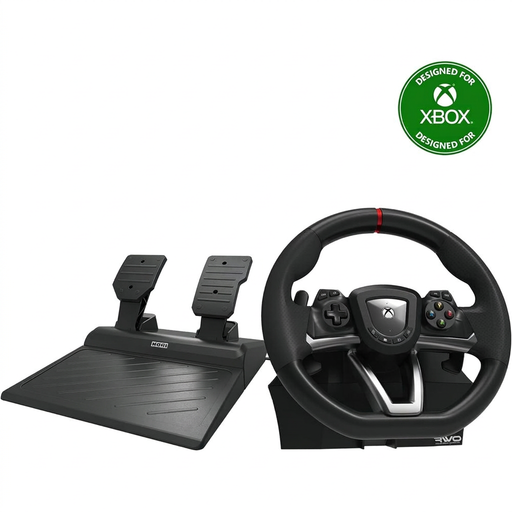
Hori Overdrive Racing Wheel PC/Xbox Series X|S/Xbox One, 270 degrees
A PC-compatible wheel and pedal set for anyone looking to practise at a desk; the product description lists a desktop clamp.
The title specifies a 270-degree wheel rotation. The set includes accelerator and brake pedals.
View at Joybuy
 No image available
Hori Racing Wheel Apex PC/PS4/PS5
A wheel with pedals included for anyone looking for a PC-compatible set; check support for your specific game.
The product description mentions vibration feedback and full-size pedals.
View at Joybuy
 No image available
Logitech G G923 Black
A wheel and pedal set for PC users considering the G923; check compatibility with your game and the platform version you need.
The product description mentions TRUEFORCE force feedback and a progressive brake pedal.
View at Joybuy
 No image available
Thrustmaster T98-X Ferrari 296 GTB
A PC-compatible racing wheel with a pedal set for anyone who also wants to check that the included desk clamp suits their set-up.
The product description lists a 240-degree wheel rotation and a quick-release clamp for tables and desks up to 4,5 cm thick. It also mentions three driving-assistance profiles.
View at Joybuy
 No image available
Thrustmaster T598-P (PS5/PS4/PC)
A direct-drive set for PC users looking for a wheel with pedals included; check compatibility with your simulator and the exact platform mode.
The product description mentions direct-drive force feedback and pedals with adjustable resistance.
View at Joybuy
Frequently asked questions
Does my racing wheel need three monitor outputs?
No. For the set-up described by iRacing, connect the monitors to your graphics card and configure the display in the simulator. Check that your PC and simulator support the screen set-up you want.
How do I set up the screens to judge corners?
For iRacing, measure the distance from your usual seating position to the centre screen, the screen widths and the angles between the screens, then enter those values in the monitor settings. The steps may vary between simulators.
Can I fit a different brake pedal later?
It depends on the exact combination of wheel, pedals and platform. Logitech describes a Racing Adapter for certain G923 and PRO/RS combinations; Thrustmaster states that the separately sold Raceline LC pedal set requires a firmware update when used with the T598.
What are my rights when buying online in the Netherlands?
When you buy remotely from a business, you generally have 14 days to change your mind, subject to legal exceptions, according to the Dutch government. Regardless of any manufacturer’s warranty or extended warranty, you’re entitled to a product that works as it should; if there’s a fault, contact the seller. Check the terms of any extended warranty you’re considering.


