Start by choosing a wheel that works with your platform and racing game, can be securely clamped to your desk and can be put away after practice. A set with force feedback and pedals is a good starting point; direct drive offers a different type of feedback, but that doesn’t mean the setup will be quieter. Also consider noise and vibrations from the pedals and furniture, and check that the wheel can be secured to your desk.
Who is a racing wheel suitable for?
Sharing a room and using a desk
You want your desk back after racing, and you’re mindful of possible vibrations and pedal knocks. Thrustmaster and MOZA describe desk mounts for certain versions; SimXPro points out that vibrations can also travel through furniture and floors.
Racing on a dedicated console
You want to practise racing lines on a specific PlayStation, Xbox or PC. Logitech G and Thrustmaster offer different versions for different platforms; also check that your racing game supports the wheel.
Practising braking points
You want to repeat steering, braking and acceleration, so it’s worth looking beyond the wheel itself to its feedback and the pedals included. Logitech G describes sets with three pedals; other bundles may have a different pedal configuration.
What should you look for when choosing one?
First check compatibility with your platform and game. Then decide where you’ll store the wheel and pedals, and only after that compare the feedback and pedal set.
| What to consider |
What should you check? |
Who should pay extra attention? |
| Setting up and storing away |
Check whether a clamp is included and fits your desk, and where you can place the pedals. |
If I want to use my desk again after practising, I also consider whether it might disturb my roommate; around 30% of consumers put storage and disruption in the room first. |
| Platform and game |
Check the full model version, console and support for your racing game. |
If I play on a specific console, I want to be sure the version and game work together; around 30% of consumers make compatibility their top priority. |
| Wheel feedback |
Compare the feedback offered by the exact set and check whether your game supports the feedback you want. |
If I practise corners repeatedly, I want to feel the feedback without assuming that a particular drive type will improve my lap times or make the room quieter; around 20% of consumers prioritise wheel feedback. |
| Pedals and braking |
Check how many pedals are included and whether they can be positioned securely. |
If I want to practise braking points, I consider the pedal controls and available floor space; around 20% of consumers make pedals and braking their first consideration. |
Common buying mistakes
-
Choosing a model without checking the console version
The G29 and G920 are designed for different consoles; the T128 and R3 ranges also have separate versions.
Before buying, compare the full model name with your console and racing game.
-
Assuming direct drive is automatically quiet
Pedals and connections with furniture or the floor can also transmit vibrations. SimXPro points out that pedal knocks can be audible too.
Assess the whole setup and check that all the components are secure; also consider where the pedals touch the floor.
You may need to take extra care to limit vibrations and find a stable place for the pedals.
-
Assuming every bundle includes three pedals
The Thrustmaster T128 comes with two pedals; Logitech describes the G29 and G920 as having three pedal functions, including a clutch.
Check what’s included in the specific bundle, and don’t buy a pedal add-on based on the brand name alone.
Brands to compare
Thrustmaster
According to Thrustmaster, the T128 range reviewed here is a hybrid force feedback set with two pedals and a desk clamp.
- The clamp is designed for temporary use on a desk or table.
- The PlayStation/PC and Xbox/PC versions differ. The specifications don’t state a measured noise level for use in a shared bedroom.
Logitech G
Logitech describes the G29 and G920 as force feedback sets with three pedals.
- The three pedal functions are useful if you also want to use a clutch.
- According to Logitech, the G29 is designed for PlayStation/PC and the G920 for Xbox/PC. Check the mount and available space on your own desk.
MOZA Racing
The MOZA R3 bundles reviewed here use direct drive and are available in separate PC and Xbox/PC versions.
- MOZA specifies 3,9 Nm and lists a desk clamp with the PC bundle.
- MOZA’s description of detailed feedback is a manufacturer claim, not an independent measurement of lap times or noise.
Fanatec
Fanatec describes the CSL DD QR2 Ready2Race bundle reviewed here as a PC bundle with direct drive.
- According to Fanatec, the bundle includes a wheel, pedals and a desk clamp; the stated torque is 5 Nm.
- Don’t assume it supports consoles or offers a noise advantage. A stable desk and attention to vibrations are still important.
Racing wheels on Joybuy
These models are designed for different platforms and setups. For each specific model, check the CE marking for that version and make sure the clamp, pedals and connections suit your desk and game.
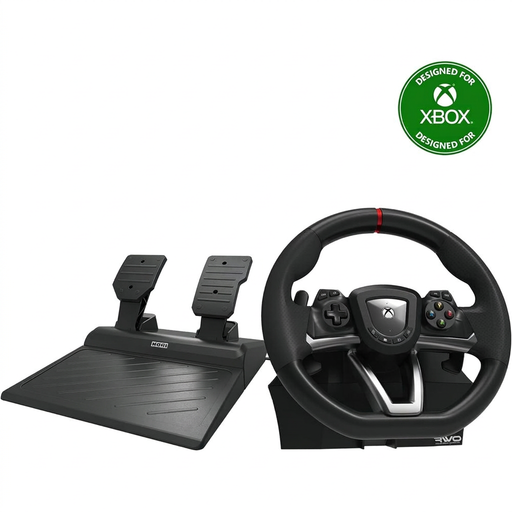 Image unavailable
Hori Overdrive Racing Wheel, PC/Xbox
An option for practising on Xbox or Windows; the product name lists pedals and 270° steering.
Check that the stated desk clamp fits your desktop.
Joybuy
 Image unavailable
Hori Racing Wheel Apex, PC/PS4/PS5
The listed platforms and included pedals make this set worth considering if you race on PC, PS4 or PS5.
Check that your desk and pedal position are stable enough for the setup.
Joybuy
 Image unavailable
Logitech G G923, PC/Xbox
If you want to practise steering and braking repeatedly on Xbox or PC, the listed force feedback and progressive brake pedal are worth considering.
The product name lists USB 2.0; also check that the wheel is supported by the game you play.
Joybuy
 Image unavailable
Thrustmaster T98-X Ferrari 296 GTB
This wheel and pedal set is designed for use with Xbox or PC; check that it’s compatible with your racing game.
Before buying, check that the included clamp fits your desk.
Joybuy
 Image unavailable
Thrustmaster T598-P Direct Axial Drive, PS5/PS4/PC
A direct drive force feedback set for the listed platforms; worth considering if you also want to practise using the pedals.
Check the pedal setup and mounting options for your shared workspace.
Joybuy
Frequently asked questions
Do I need a dedicated cockpit to get started?
Not with every set: Thrustmaster lists a desk clamp for the T128, and MOZA does the same for the R3 PC bundle reviewed here. Do check that your desk and pedal position are stable, though; a clamp doesn’t guarantee a quiet setup.
What should I do if my racing wheel isn’t recognised properly by my PC?
Follow the installation instructions for the exact model. Thrustmaster provides driver and firmware information for the T128 PlayStation/PC version; the installation instructions say to connect the wheel only when prompted.
Who is responsible if a product develops a fault after an online purchase in the Netherlands?
According to ACM ConsuWijzer, the seller is responsible for the legal guarantee if a product is faulty. Online purchases generally also come with a cooling-off period that ends 14 days after delivery; check the applicable terms and exceptions.
Is a CE marking relevant for an electronic racing wheel sold in the Netherlands?
Yes. The Dutch government states that electronic devices in the EU must have a CE marking. Check the marking on the specific version; a general product description doesn’t confirm it for every model.


