
Mario Kart player with Joy-Con
You want to steer while seated using motion controls, without a fixed wheel-and-pedal setup. The right accessory depends on your Joy-Con generation. Nintendo Netherlands describes motion controls for Mario Kart World.


Start by choosing a wheel that suits your game and platform. For Mario Kart with motion controls, a compatible Joy-Con wheel may be all you need. If you want to accelerate and brake with your feet while seated, choose a fixed wheel-and-pedal set. A PC racing wheel is another option for supported PC games; check game compatibility and make sure the mounting and pedals suit your seating area.
You want to steer while seated using motion controls, without a fixed wheel-and-pedal setup. The right accessory depends on your Joy-Con generation. Nintendo Netherlands describes motion controls for Mario Kart World.
You want to use a fixed wheel and accelerator and brake pedals from your seat. Make sure you have a suitable table and enough room for the pedals.
You play a PC game that supports a wheel and want to consider whether a wheel with force feedback suits your game and setup. MOZA lists KartKraft as a supported game for the R5 bundle.
Start with your game and platform. Then decide whether you want motion controls with a Joy-Con accessory, need pedals or are looking for a PC wheel.
Suitable for: playing Mario Kart with motion controls, without separate pedals.
Bear in mind: your Joy-Con generation. Official wheel accessories are sold without controllers. Nintendo states that the Joy-Con 2 wheel only works with Joy-Con 2.
Suitable for: steering while seated, with separate accelerator and brake pedals.
Bear in mind: the mounting, cables and floor space required. HORI notes that pedal mapping may need adjusting in some Switch racing games.
Suitable for: anyone who wants to use motion controls with a wheel mounted on a table.
Bear in mind: the game must support gyroscope controls. The Subsonic set mentioned does not include controllers or a pedal set.
Suitable for: supported PC racing or kart games, such as KartKraft, which MOZA lists for the R5 bundle.
Bear in mind: this is a PC option, not a solution shown to work with Mario Kart on Switch. Check game support and where you can mount it.
| What to consider | What should you check? | Who is this important for? |
|---|---|---|
| Game and controller compatibility | Check your Joy-Con generation and whether the game supports the motion controls you want to use. Nintendo states that the Joy-Con 2 wheel only works with Joy-Con 2. | When choosing a wheel for my game and controller, I want to know in advance whether they’re compatible. Around 36% of consumers say compatibility is their top priority. |
| Using pedals from your seat | Check whether the set includes pedals and whether the accelerator and brake are mapped correctly in your game. HORI notes that some Switch racing games may require adjustments. | Anyone who wants to accelerate and brake with their feet while seated should focus on a fixed wheel-and-pedal set. Around 29% of consumers prioritise this type of control. |
| Space and mounting | Measure the space on your table and the room for the pedals. Check whether the model uses suction cups, a clamp or another type of mounting. | If I have a shared or small gaming area, the wheel needs to fit and be easy to put away after use. Around 21% of consumers are most concerned about the available space and setup. |
| Force feedback on PC | Check whether the manufacturer supports your exact PC game and whether the table mount suits your setup. | Anyone who wants to play a supported PC racing game with force feedback should compare this option with a simpler controller accessory. Around 14% of consumers specifically look for a PC wheel with force feedback. |
Nintendo says that the official Joy-Con 2 wheel only works with Joy-Con 2. The wheel accessories mentioned are sold without controllers.
Before buying, check which Joy-Con you use and exactly what’s included in the box.
HORI notes that the default controls may differ in some Switch racing games, so you may need to remap the pedal functions.
Check compatibility for the exact wheel model and make sure the game supports button remapping.
MOZA describes the R5 bundle as a PC setup and lists PC games such as KartKraft. This does not demonstrate compatibility with Mario Kart on Switch.
Choose your game and platform first, then compare the different wheel technologies.
The HORI models mentioned use different mounting methods: the Mini has suction cups, while the Deluxe also has a clamp. Both models include pedals.
Check the table surface, the mounting method and where the pedals will go.
Standalone wheel accessories for Joy-Con and Joy-Con 2 are worth considering if you want to use motion controls with a compatible controller.
The Mario Kart Racing Wheel Pro Mini and Deluxe models mentioned are wheel-and-pedal sets for a fixed Switch setup.
According to the manufacturer, Subsonic offers a foldable Pro Kart Racer set for Joy-Con or Joy-Con 2, as well as a separate SV250-S wheel set.
The R5 Racing Bundle is a PC-focused wheel-and-pedal set for games that support the wheel.
These Joybuy products range from a Joy-Con wheel accessory to wheel sets for PC and consoles. Check whether your game and platform are supported for each model.
 Image unavailable
A wheel-and-pedal set to compare if you’re looking for a wheel for PC, PS4 or PS5. Check that it’s supported by the game you plan to play.
The product name mentions pedals and compatibility with PC, PS4 and PS5.
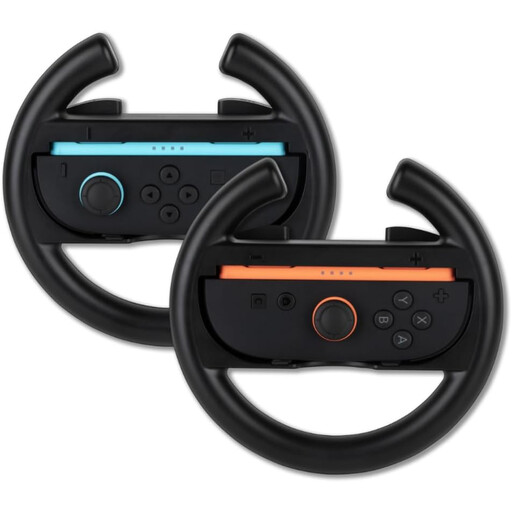 Image unavailable
A wheel accessory to consider if you’re looking for a wheel for Nintendo Switch 2 Joy-Con controllers. Check that it suits your game and how you plan to use it.
The product name describes a pair of wheel accessories for Nintendo Switch 2 Joy-Con controllers.
 Image unavailable
A wheel with pedals to compare if you’re looking for a compatible PC or Xbox racing setup.
The product name mentions pedals, USB 2.0 and compatibility with PC, Xbox One, Xbox Series S and Xbox Series X.
 Image unavailable
A PC wheel to compare if you’re looking for separate accelerator and brake pedals. Check that your game supports this model.
The product name mentions pedals, vibration feedback and 270-degree wheel rotation. Vibration feedback is not motorised force feedback.
 Image unavailable
A wheel model to consider for a seated racing setup. Before buying, check compatibility with your game and platform, and whether this version includes pedals.
Switch on motion controls under Settings and Controls. Nintendo recommends this setting when you use a Joy-Con 2 in a Joy-Con 2 wheel. Steering assist and automatic acceleration are separate options.
Each player needs a compatible controller; the number of wheel accessories depends on how the players want to steer. The Joy-Con and Joy-Con 2 wheel accessories mentioned are sold in pairs, but Nintendo does not include the controllers.
Check the mounting, the space for the pedals and whether the game uses the accelerator and brake controls you want. HORI notes that pedal mapping may need to be adjusted for certain Switch games.
For an online purchase of a physical product, you generally have a 14-day cooling-off period after delivery, subject to statutory exceptions. This is separate from your statutory rights if a product is faulty: if it does not meet what you can reasonably expect during normal use, the seller is responsible for providing an appropriate solution. ACM ConsuWijzer lists repair, replacement or a refund as possible solutions.