
Practising pit entries
You want to brake consistently, judge your speed in the pit lane and operate a limiter yourself if your car has one. iRacing Support stresses that a pit limiter won’t brake for you.


First, choose a wheel that works with your game and platform, with pedals you can calibrate and an easy-to-reach pit limiter button if your car has that function. In iRacing, you configure multiple monitors through your PC and the sim; the pit limiter won’t slow the car down for you. A complete set includes a wheel and pedals, while direct drive offers a different route for feedback and upgrades. Check what’s included and how it mounts with each version.
You want to brake consistently, judge your speed in the pit lane and operate a limiter yourself if your car has one. iRacing Support stresses that a pit limiter won’t brake for you.
You want to avoid choosing a wheel for a feature controlled by your PC and the sim. iRacing Support explains that screen configuration is separate from your choice of wheel.
You want to know before buying whether pedals and mounting hardware are included, or whether you’ll need to choose these separately. The contents listed vary by version, as described by Logitech G, MOZA Racing and Fanatec.
When practising pit entries in iRacing, braking control and accessibility still matter: the limiter won’t brake for you. The PC and sim handle the multi-monitor setup, according to iRacing Support.
| What to consider | What to look for when buying | Who should prioritise this? |
|---|---|---|
| Braking at pit entry | Check the brake pedals, in-game calibration and whether the pedals can be positioned securely. | When I practise pit entries, I want to repeat my braking point and use my pedals with confidence. That’s why around 36% of consumers put braking control first. |
| Multiple monitors | Check your PC and game’s screen configuration, and whether you can position the wheel, screens and pedals comfortably. | I want to use my existing screen setup without choosing a wheel for a feature controlled by the PC and sim. Around 29% of consumers give the practical fit with their screen setup top priority. |
| Pit controls and game compatibility | Check whether your car has a pit limiter, whether you can assign a button to it and whether the wheel works with your platform. | If I want to operate a manual pit limiter, my car needs to have that function and I need to be able to reach the button. Around 21% of consumers put pit controls and game compatibility first. |
| What’s included and how it mounts | Check whether pedals and mounting hardware are included with your chosen version and whether they fit your desk or rig. | I want to know in advance which parts I’ll get and whether I can mount the wheel on my setup. Around 14% of consumers give what’s included and mounting top priority. |
In iRacing, the limiter won’t slow the car down to below the speed limit before the pit line. You’ll need to brake in time yourself.
Calibrate your pedals and practise your braking point. Also check which pit functions are available for your car and session.
In iRacing, the three-screen setup is handled through the graphics configuration; the number of monitors doesn’t, in itself, require a particular wheel.
Check screen configuration and wheel compatibility as separate buying considerations.
What’s included can vary by version. For example, the name T300 RS alone doesn’t tell you whether it’s the GT Edition with three pedals; modular systems may also include different parts from a complete bundle.
Compare the full model name and the contents of your chosen version before placing your order.
A commercial warranty doesn’t replace your statutory rights in the Netherlands.
First, check your statutory rights, then read the details of any additional cover separately.
Compare the product ranges listed here, particularly complete sets versus modular parts, stated compatibility and exactly what each version includes.
The G29 and G923 are options if you want to start with a wheel and pedals; the RS50 offers a modular direct-drive route.
The T300RS GT Edition is a belt-driven set for PC or supported PlayStation platforms, with a detachable wheel.
The R5 Racing Bundle is a direct-drive bundle for anyone looking for a wheel, pedals and mounting hardware in one package.
The CSL DD QR2 Ready2Race bundle is a direct-drive option for PC with a stated upgrade path.
The RS Pure Complete Kit is a modular PC option for anyone looking to compare specific components and software.
This Joybuy selection includes racing wheels and sets with different platform listings. For each model, check that it supports your game and platform, which pedals are included and how the wheel is mounted.
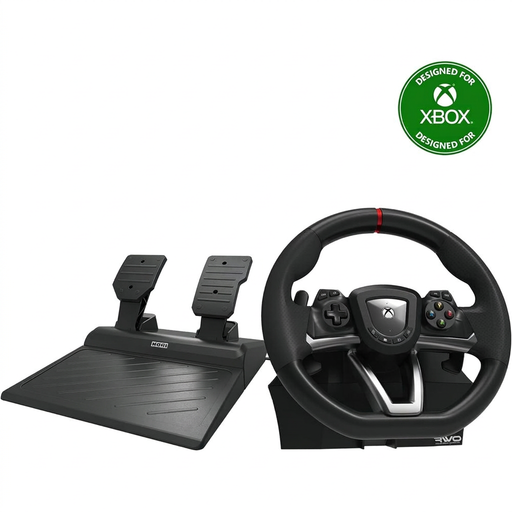 Image unavailable
A wheel with pedals for practising on PC or Xbox; check that your racing game works with the version you choose.
The stated rotation angle is 270°. Check that the controls and the described desk clamp suit your setup.
 Image unavailable
A wheel and pedal set for racing on PC or Xbox; check compatibility with your game and the platform version you choose.
Calibrate the wheel and brake inputs in iRacing before practising pit entries.
 Image unavailable
A PC wheel with pedals for anyone who wants to use programmable buttons; check whether your car in the game has a pit limiter.
The product listing mentions vibration feedback, not motorised force feedback, and a rotation angle of 270°. Bear this distinction in mind when choosing.
 Image unavailable
A wheel with pedals for anyone considering a desk setup; check that your platform and game are supported before buying.
The stated desk clamp is designed for desks up to 4,5 cm thick. Measure your desk and check that the clamp will fit.
 Image unavailable
This version is for anyone comparing direct-drive wheels; the product title lists PS5, PS4 and PC as supported platforms.
The product information recommends secure mounting. Check that your desk or rig is suitable, and see which parts, including pedals, are included in the bundle you choose.
No, not just because of the number of screens. iRacing Support describes the three-monitor setup as a graphics configuration; you should also check that your wheel works with your PC and game.
No. According to iRacing Support, the pit limiter won’t slow the car down; you need to enter the pit lane below the speed limit yourself. Assigning a button manually is only relevant for cars that have a limiter.
Calibrate the controls in iRacing and check that the wheel and brake respond correctly. iRacing Support recommends calibrating them the first time you start the game and after connecting new controllers; where applicable, assign the pit limiter too.
Check whether pedals and mounting hardware are actually included with each version. A bundle may include these parts, while Logitech says the RS50 System consists of a base, hub and wheel; check separately whether pedals are included.
According to ACM ConsuWijzer, when you buy a product online you generally have up to 14 days after delivery to change your mind; check the applicable terms and exceptions. You also have a statutory guarantee if a product doesn’t perform as you could reasonably expect under normal use. The retailer is your point of contact.