
Livraison le jour même et le lendemain

Qualité garantie

Débloquez vos offres de bienvenue: Livraison GRATUITE | Jusqu'à -80 % | 30 jours d'essai gratuits à JoyPlus
Téléchargez l'application
A racing wheel with pedals for PC makes racing games feel more immersive than a standard controller. Even so, many players buy a wheel based on terms such as “realistic”, “feedback” or “simulator” without checking exactly what is included. The result can be a wheel that does not fit the desk properly, pedals that slide around or a system that does not provide the expected level of resistance.
This buying guide will help you assess the most important differences. We’ll look at rotation angle, feedback, mounting, connection and whether you need a complete entry-level product or an expandable sim-racing system.
A racing wheel with vibration feedback can provide vibrations when cornering, during collisions or on different surfaces. This feels more lively than using a controller, but it is not the same as force feedback. With force feedback, a motor provides active resistance and counterforce through the wheel.
So always check the product description carefully. The Trust GXT 289 Movi has vibration feedback, but according to the product specifications, it does not have motorised resistance. That may be sufficient for casual racing games and beginners getting into sim racing. If you expect the steering force of a professional simulator, you will need a different type of system.
A 270-degree racing wheel turns through a smaller angle than many advanced sim-racing systems. This makes it compact and accessible, but the steering behaviour differs from that of a real car or a system with a wider rotation angle.
For arcade racing games, rally games and relaxed driving, 270 degrees is often practical. For highly accurate simulation, lorries or long corners, a larger rotation angle may feel more comfortable. So consider the games you actually play, rather than focusing only on the word “simulator”.
A racing wheel with accelerator and brake pedals is only useful if the pedals stay firmly in place. Consider the surface, cable position and the amount of space available beneath your desk. A set that is not positioned securely can become uncomfortable, even if the wheel itself works perfectly well.
Also check whether you are buying a complete package. Some advanced products consist only of a wheelbase, steering wheel or shifter. You will need to purchase the other components separately.
The rotation angle determines how far you need to turn the wheel to make a particular change of direction. A compact PC racing wheel set with 270 degrees is designed for quick and straightforward control. A direct-drive wheelbase works differently: it is generally combined with a separate steering wheel and pedals, and is intended for users who want to expand their system later.
Pay close attention to the exact distinction:
According to the stated product specifications, the Trust GXT 289 Movi uses vibration feedback rather than force feedback. This is not a hidden drawback, provided you choose the product for the right type of use.
A USB racing wheel uses a wired connection and does not require an internal battery. However, check that your PC recognises the wheel and that your racing game supports separate accelerator and brake axes. According to the product information, the Trust GXT 289 Movi is suitable for PC and has a 2-metre cable.
Also pay attention to the platform information. Some product specifications mention multiple gaming platforms, while the description for a specific version highlights PC use only. Therefore, read the current compatibility information on the product page before placing your order.
A racing wheel with desk clamps is convenient for a desk or table where you play temporarily. Measure the thickness beforehand and check that there is enough clear space at the edge. Place the pedals on a non-slip mat or against a solid surface if they move while you brake.
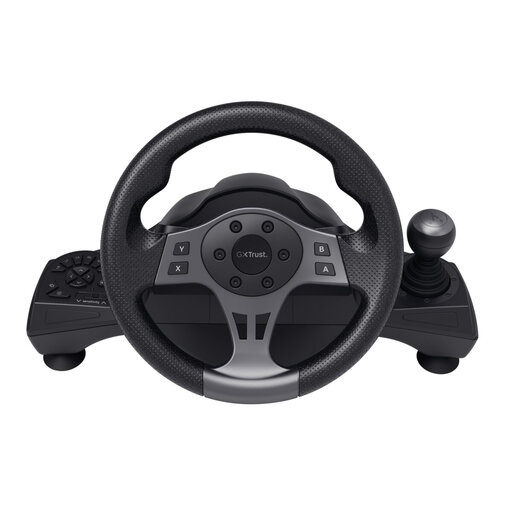
Why it suits this profile: This complete set combines a wheel, separate accelerator and brake pedals, USB connection and desk clamps. This means you do not need to buy several separate components when choosing your first racing wheel for PC.
The specifications clearly state a 270-degree rotation angle and vibration feedback, but no force feedback. You therefore know in advance what type of steering feel to expect.
Complete set with 25 buttons, programmable controls, 270° rotation angle and a wired USB connection.
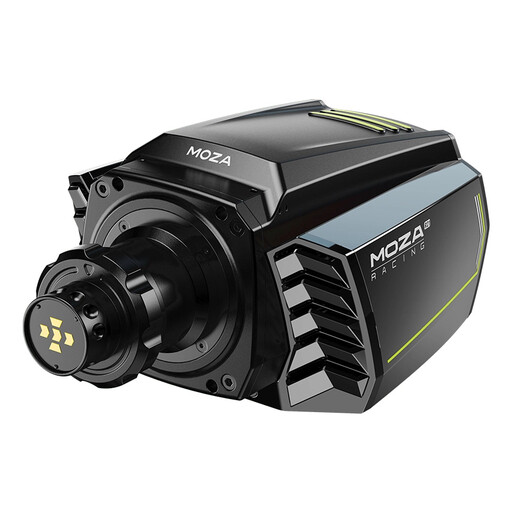
Why it suits this profile: This is a separate direct-drive base for PC users who want to build an expandable sim-racing system. It is not a complete racing wheel with pedals.
The product name and description make it clear that this is a wheelbase without a steering wheel. You can therefore factor in the cost of a compatible wheel and pedals in advance.
21 Nm direct-drive torque according to the product specifications, plus support for the MOZA ecosystem.
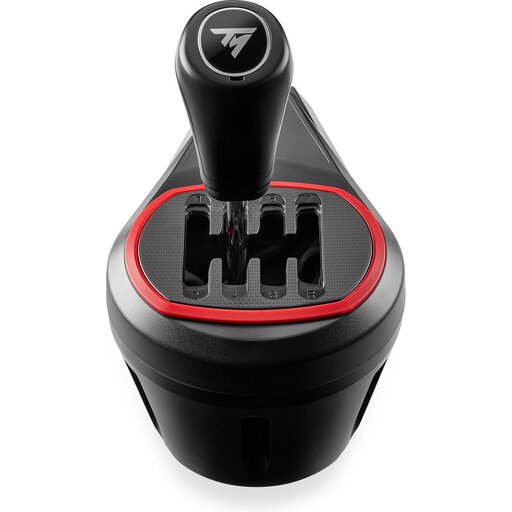
Why it suits this profile: For those who already have a compatible wheel and mainly want to add manual gear shifting. This is an accessory, not a standalone racing wheel with pedals.
The compatibility list and add-on design make it clear that you first need a suitable Thrustmaster wheel.
H-pattern with seven gears plus reverse, and an integrated clamp for mounting to a table or desk.
We’ve put together a complete, up-to-date list of products that fully meet these strict selection criteria and the applicable European safety regulations.
A straightforward installation can prevent a lot of frustration:
Not every game uses the same button layout. Therefore, check the controls for each title and save customised settings where possible.
Not automatically. Check the required Windows version, USB connection and compatibility with the game. According to the information provided, the Trust GXT 289 Movi is intended for PC and connects via USB with a wired connection.
No. Vibration feedback provides vibrations. Force feedback uses motorised resistance to make steering force or countersteering, for example, feel more realistic. A racing wheel with vibration feedback may be suitable for beginners, but it does not provide the same mechanical steering feel as a force-feedback system.
A USB racing wheel draws power from the PC while you play and does not require a separate battery. Ongoing costs are generally limited. However, bear in mind possible additional expenses for a sturdier chair, non-slip mat, shifter or, later on, a more advanced wheel and pedal system.
