
Newcomer practising cornering
Wants to practise steering and braking with a suitable set, without putting together a more advanced system straight away. iRacing lists a force-feedback wheel with pedals as a control system.


Start by choosing a wheel-and-pedal set that works with your game and platform and can be securely attached to your desk or cockpit. Then decide how much force feedback and pedal adjustment you need. Multi-monitor display settings are configured separately from the wheel.
Wants to practise steering and braking with a suitable set, without putting together a more advanced system straight away. iRacing lists a force-feedback wheel with pedals as a control system.
Wants to know which pedals come with the set, how securely they can be positioned and whether a brake upgrade can be added later. Fanatec and MOZA, for example, describe specific pedal sets included in their bundles.
Wants to position the wheel, pedals and multiple monitors to suit their setup, while allowing for future changes. iRacing provides separate guidance on monitor and seating positions.
Start with game and platform compatibility, the pedals you need and how the set is mounted. Then consider whether extra feedback or the option to expand the setup would be useful.
Choose this option if: you want to practise steering and braking without putting together a more advanced system straight away.
Bear in mind: the exact platform version and whether your game supports additional feedback features. Logitech specifies 2.3 Nm and TRUEFORCE for the G923.
Choose this option if: you’re looking for a set with three pedals and may want to use other compatible components later.
Bear in mind: interchangeable wheels for the Thrustmaster T300RS GT are sold separately, so check which accessories are included with the version you choose.
Choose this option if: you race on PC and want to check in advance which base, pedals and mounting hardware are included in the bundle.
Bear in mind: Fanatec specifies 5 Nm for the CSL DD bundle reviewed, while MOZA specifies 5.5 Nm peak torque for the R5. These are manufacturer figures, not results from a direct performance comparison.
| What to consider | What to look for | Who is this most important to? |
|---|---|---|
| Wheel feedback and game compatibility | Check that it supports your game and platform; additional feedback features may vary from game to game. | If I want to practise cornering, I need feedback that my game actually supports and that works with my PC or console. Around 31% of consumers prioritise suitable wheel feedback and game compatibility. |
| Brake feel and pedals | Check which pedals are included with the version and whether any brake upgrade you want is compatible. | If I’m practising braking points, I want to know exactly which pedals I’ll get and whether they suit the way I practise. Around 25% of consumers prioritise braking and the pedals included. |
| Multiple monitors | Check your simulator’s display settings and whether your computer or console supports them. | If I want to race across multiple screens, I need to be able to set up the display properly without needing a special wheel. Around 25% of consumers focus mainly on getting a multi-monitor setup working. |
| Mounting and upgrades | Check the included mounting hardware, the space available and what any upgrades include. | If I’m building a permanent setup, I want to know in advance how the set is mounted and which components I might need to buy separately later. Around 19% of consumers focus mainly on mounting and upgrade costs. |
The wheel doesn’t control what appears on your screens. Display support and settings depend on your simulator and computer.
Before choosing a wheel for a multi-screen setup, check your game’s settings and what your computer can handle.
Manufacturers describe different drive systems and don’t always use the same terms, such as peak torque. A figure on its own doesn’t tell you how the complete set will work in your game.
Alongside the stated feedback specifications, compare game compatibility, pedals, mounting and what’s included in the exact bundle.
An interchangeable wheel or a different pedal set may be sold separately. A compatible ecosystem doesn’t mean those components come with the base set.
Check what’s included with the version you’ve chosen and make sure any upgrades are compatible before buying them.
The Dutch government states that there is no fixed statutory warranty period in the Netherlands. This doesn’t affect your right to receive a product that is of satisfactory quality.
Be sure to distinguish between your statutory rights and the terms of any manufacturer’s or extended warranty.
The G923 reviewed is a wheel-and-pedal system for anyone looking for a set with force feedback.
The T300RS GT reviewed combines a belt-driven wheel with three pedals.
The CSL DD QR2 Ready2Race bundle reviewed is a PC set with a direct-drive base.
The R5 Racing Bundle is a PC bundle with direct drive, an ES wheel and SR-P Lite pedals.
The VelocityOne Race is a PC or Xbox set with direct drive and adjustable pedals.
These Joybuy products are wheel-and-pedal sets for practising steering and braking. Check that each model’s platform version works with your game and setup.
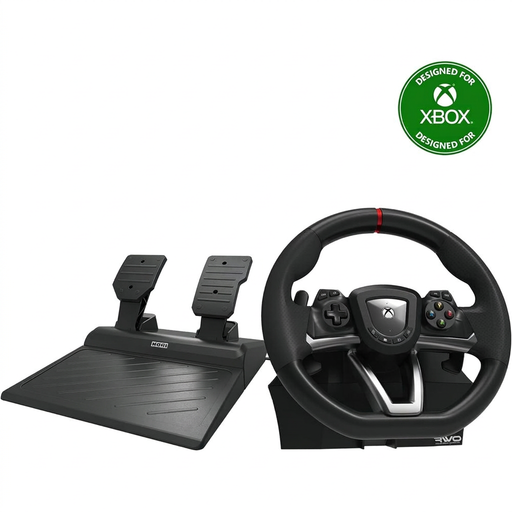 No image available
This set provides steering, accelerator and brake controls for practice sessions on the listed platforms.
The product description lists Windows 10 and Xbox compatibility, a 270° steering angle and a desk clamp.
 No image available
This set is designed for anyone who wants to use wheel feedback and a progressive brake pedal while practising.
Logitech specifies 2.3 Nm and TRUEFORCE for the G923. The product title lists PC, Xbox One and Xbox Series X|S; check whether your game supports additional feedback features.
 No image available
This set provides steering and pedal controls for the listed PC and Xbox platforms.
The product description lists a 240° steering angle, automatic centring and a desk clamp for desks up to 4.5 cm thick.
 No image available
This set is designed for anyone looking for wheel feedback and included pedals on PC, PS4 or PS5.
The product description lists 5 Nm of constant torque, a 30 cm wheel and adjustable pedal resistance. Check that the platform version listed is right for your system.
 No image available
This set provides steering, accelerator and brake controls for PC and can be attached to a desk or table.
The product description lists a 270° steering angle and vibration feedback. Motorised force feedback isn’t mentioned, so bear that in mind if that’s the feature you’re looking for.
No, the screens themselves don’t require a special racing wheel. For iRacing, the provider describes a separate setup for three monitors, such as displaying a window across the screens or combining the display through the graphics card. Check what your game and computer support.
In iRacing, you enter details such as the distance from your eyes to the centre screen, the screen width and the angle between the screens. Use the simulator’s monitor settings; these instructions are specific to iRacing and aren’t a universal menu for all racing games.
Check what’s included in the exact bundle and whether the mounting hardware will fit your desk or cockpit. The Fanatec CSL DD and MOZA R5 bundles reviewed list a desk clamp, but that doesn’t mean every version includes the same mounting hardware.
According to the Dutch government, there’s no fixed statutory warranty period in the Netherlands, but when you buy as a consumer, you’re entitled to a product that is of satisfactory quality. For online purchases from a business, you’ll often have a 14-day cooling-off period, with some exceptions. If a product is faulty, the seller must provide a solution.