
Mario Kart player with Joy-Con
Wants to steer by moving a handheld wheel while racing. Nintendo describes separate steering wheel accessories for Joy-Con controllers; check that the accessory fits your controller version and game.


For Mario Kart with motion controls, a Joy-Con steering wheel accessory is the simplest option. If you want a fixed setup with pedals, consider a compatible HORI wheel. A force feedback wheel is mainly worth considering if you also play racing games that support the specific wheel and platform. Before buying, check the game, console, controller, connection and available space.
Wants to steer by moving a handheld wheel while racing. Nintendo describes separate steering wheel accessories for Joy-Con controllers; check that the accessory fits your controller version and game.
Wants a wheel with pedals set up on a fixed table. For the HORI models mentioned, HORI specifies connection via the Switch dock; also consider the space available and how the pedals are assigned.
Is considering force feedback for other racing games as well as kart games. Logitech and Thrustmaster list support for specific platforms, but that doesn’t automatically confirm support for a particular game.
Best for: Mario Kart with motion controls and a handy wheel without pedals.
Bear in mind: the wheel holder isn’t a complete wheel with pedals, and the controller isn’t included.
Best for: Mario Kart 8 Deluxe with a suitable Switch setup and a dedicated space for the wheel.
Bear in mind: HORI specifies connection via the Switch dock; in Mario Kart 8 Deluxe, you’ll need to assign buttons for pedal control.
Best for: a gaming room where you also play racing games that support your chosen wheel and platform.
Bear in mind: platform support alone doesn’t prove that the wheel works with Mario Kart.
| What to consider | What to look for | Who it matters to |
|---|---|---|
| Game and platform compatibility | Check the exact game, console and controller version for the complete model. | If I’m buying a wheel for a specific kart game, I want to be sure the game and my console support it. Around 40% of consumers prioritise compatibility with their game, console and controller. |
| Fixed setup and pedals | Check the dock connection, mounting, space for the pedals and whether button assignment is needed. | If I want a dedicated space for my wheel, it needs to fit on my table and the pedals need to work with my game. Around 23% of consumers give top priority to positioning and pedal control. |
| Playing together | Count the controllers and steering wheel accessories you’ll need for the number of players. | If we want to race together, I want to know how many steering wheel accessories and controllers we need, and what we already have at home. Around 23% of consumers prioritise an easy setup for multiple players. |
| Feedback in other racing games | Check the exact wheel variant, platform and support for each game. | If I also want to use the wheel for other racing games, force feedback is only relevant if my games and platform support it. Around 14% of consumers prioritise feedback in other racing games. |
The Nintendo steering wheel accessories mentioned are holders for Joy-Con controllers, not wheel sets with pedals. The controllers aren’t included.
Check that you have the right Joy-Con, how many holders are included in the pack and how many players will be racing.
A mention of PC or console compatibility doesn’t confirm that a wheel works with a specific Nintendo game.
Check support for the exact game and wheel variant before making your choice.
For the HORI models mentioned, HORI specifies connection via the Switch dock. According to HORI, you need to assign pedal controls using ASSIGN in Mario Kart 8 Deluxe.
Check that you can use the dock, have a suitable space for the wheel and pedals, and access the right settings.
Joy-Con steering wheel accessories for specific Mario Kart and Joy-Con setups.
Mario Kart Racing Wheel Pro Mini and Deluxe for anyone looking for a fixed wheel with pedals.
The T128 PlayStation/PC is designed for supported racing games on the platforms listed.
The G29 and G920 are separate platform variants for racing games that support steering wheels.
The GXT 289 Movi is a PC steering wheel with pedals and vibration feedback.
This selection of Joybuy products includes handheld wheels for Joy-Con 2 and fixed wheel-and-pedal setups for selected PC, Xbox and PlayStation games. Check support for your exact game and platform before ordering.
 No image available
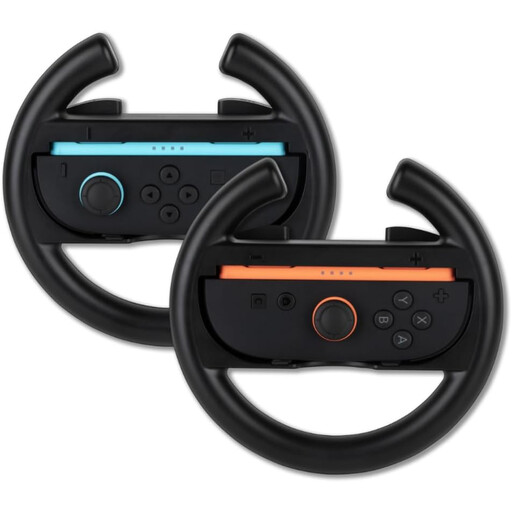
A pair of handheld wheels to consider if you want to race with Joy-Con 2; check that your specific game and console are supported.
Requires Joy-Con 2 controllers, which aren’t listed as part of these wheel holders.
 No image available
A wheel with pedals for racing games on the Xbox and PC platforms listed; check that the model is supported by each game.
The product name lists a USB 2.0 connection and pedals. Xbox One, Xbox Series S, Xbox Series X and PC are listed as platforms.
 No image available
A PC wheel with separate pedals for a fixed racing setup; check that your racing game supports the model.
The product name lists pedals, vibration feedback and a rotation range of 270°. Vibration feedback isn’t the same as motorised force feedback.
 No image available
A wheel with pedals for a fixed setup on Xbox or PC; check support for your specific game and platform before buying.
 No image available
A force feedback wheel with pedals for racing games on the listed PlayStation platforms and PC. Check support for the exact game; the platform listing doesn’t confirm compatibility with Mario Kart.
The product name lists Direct Axial Drive force feedback.
When choosing a vehicle, open the stats with plus or minus and switch on tilt controls there. Nintendo also describes a setting you can change during a race.
Not with the Pro Mini and Deluxe models mentioned: HORI specifies connection via USB to the Nintendo Switch dock. Also check support for your console version and game.
No. According to HORI, you need to assign pedal controls using ASSIGN in Mario Kart 8 Deluxe, as the default controls use different buttons.
For a faulty product, the seller must provide a solution according to the Dutch Government; there is no fixed statutory warranty period in the Netherlands. For online purchases from a business, you generally have 14 days to change your mind, subject to applicable conditions and exceptions.