
Mario Kart player with headphones
Looking for a wheel that suits their Switch, Joy-Con version and kart game, without overlooking how they’ll listen to audio.


First, choose a wheel that matches your exact game, console and controller. A Joy-Con wheel attachment is designed for motion controls, while a fixed wheel and pedal set requires a different setup. Nintendo says Bluetooth audio cuts out on Switch during local wireless communication; choosing a different wheel won’t overcome this limitation. A PC wheel with force feedback is only an alternative if both your platform and chosen kart game support it.
Looking for a wheel that suits their Switch, Joy-Con version and kart game, without overlooking how they’ll listen to audio.
Wants to use a fixed wheel and pedals with a compatible Switch game, and has room for the set-up.
Looking for a wheel for kart and other racing games on PC, and checks whether each game supports wheel controls and force feedback.
First, note the exact game, console and controller. Then check your audio connection before choosing between a wheel attachment for handheld motion controls and a fixed set-up with pedals.
| What to consider | What should you check? | Who should consider this? |
|---|---|---|
| Game, platform and controller | Check the full wheel variant and whether the game supports that combination. Note the difference between Joy-Con and Joy-Con 2. | I want to avoid buying a wheel that doesn’t suit my game or controller; around 36% of consumers prioritise having the right game, platform and controller version. |
| Headphone audio | Check whether you listen via Bluetooth and whether your play mode uses local wireless communication. Check separately whether you need voice chat. | I want to listen through my headphones in my chosen play mode; around 29% of consumers prioritise audio while racing. |
| Handheld or fixed set-up | Check what’s included, how it attaches and how much space you’ll need. If you’re playing with others, check how many attachments and controllers you need. | I want to know whether a wheel attachment will do or whether I want pedals and a dedicated set-up; around 21% of consumers prioritise their set-up and playing with others. |
| Force feedback on PC | Check that both the game and platform support the exact wheel. Also check the pedal set and mounting system. | I want to use the wheel for compatible PC racing games with feedback too; around 14% of consumers prioritise force feedback for additional PC racing. |
The Joy-Con and Joy-Con 2 wheel attachments mentioned are supplied without the corresponding controllers; an attachment is not a set with pedals either.
Check the controller generation, what’s included and how many players will be using it before you choose.
You may need extra attachments or controllers to play with others, so check what you already have and what you still need beforehand.
Nintendo says Bluetooth audio cuts out on Switch during local wireless communication. Bluetooth microphones aren’t supported through this audio feature.
Choose your audio connection to suit your play mode, and check listening and voice chat separately.
The Thrustmaster T128 PlayStation/PC is listed for PC, PS4 and PS5. This alone doesn’t confirm that it works with a particular kart game.
Check the full model variant, platform and in-game support before choosing a PC wheel for a specific kart game.
HORI specifies suction cups for the Pro Mini and suction cups or a clamp for the Pro Deluxe. Thrustmaster says the T128 fits table tops up to 5.5 cm thick.
Measure your table top and available space, and check the mounting specifications for the exact version.
Nintendo describes Joy-Con wheel attachments for the corresponding controller families, designed for motion controls in kart games.
HORI describes Mario Kart Racing Wheel Pro Mini and Pro Deluxe versions with pedals for the specified Switch systems.
The T128 PlayStation/PC is a wheel and pedal set for compatible PC and PlayStation racing games.
Logitech G’s range includes various types of wheels, bases and pedals for PC, PlayStation and Xbox.
This selection includes a wheel attachment for Joy-Con 2 and fixed wheel and pedal sets for the PC and console platforms listed in the product details. Before you buy, check that your game supports the exact combination.
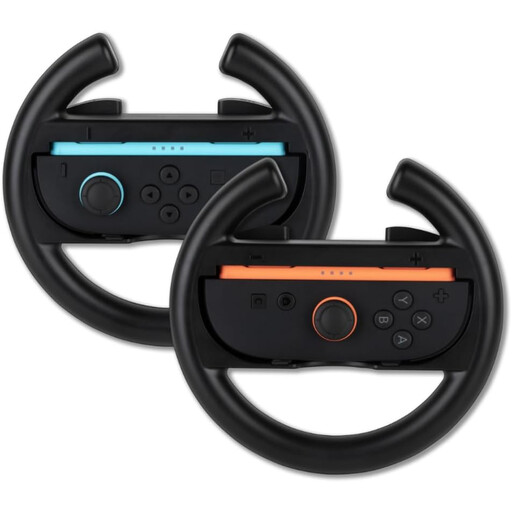 Image unavailable
A good fit if you’re looking for Joy-Con 2 wheel attachments to use motion controls in compatible racing games.
A pair of wheel attachments for Nintendo Switch 2 Joy-Con controllers; compatible controllers are required.
 Image unavailable
A good fit if you’re looking for a wheel with pedals for PC games that support this set.
The product description lists separate accelerator and brake pedals, USB connection for PC, vibration feedback and 270-degree wheel rotation. This model doesn’t have motorised force feedback.
 Image unavailable
A good fit if you’re looking for force feedback and pedals for a compatible game on one of the listed platforms.
The product details list Direct Axial Drive, 5 Nm of constant torque and two pedals. Platforms listed: PS5, PS4 and PC; support for Nintendo Switch isn’t mentioned.
 Image unavailable
A good fit if you’re looking for a wheel with force feedback and pedals for a compatible racing game on PC or Xbox.
The product details list TRUEFORCE, 900-degree rotation and a pedal set with a progressive brake pedal. The platforms listed are PC, Xbox One, Xbox Series S and Xbox Series X; support for Nintendo Switch isn’t mentioned.
 Image unavailable
A good fit if you’re looking for a wheel with pedals for a compatible PC or PlayStation racing game.
The product details list 270-degree wheel rotation, vibration feedback and pedals. This model doesn’t have motorised force feedback; support for Nintendo Switch isn’t mentioned.
Turn on motion controls if you want to steer by tilting the controller. Nintendo provides separate instructions for Mario Kart 8 Deluxe and Mario Kart World; for the latter, Nintendo specifies Joy-Con 2 in a Joy-Con 2 wheel attachment.
Not when Switch is using local wireless communication: Nintendo says Bluetooth audio is disconnected in this situation. This matters for Mario Kart Live: Home Circuit, as the game requires local communication with the kart. Bluetooth microphones aren’t supported through this audio feature.
No. A PC listing doesn’t confirm that the wheel works with a specific kart game. Check that the exact wheel variant is supported by both the game and platform; a PC wheel isn’t automatically compatible with Nintendo Switch.
According to ACM ConsuWijzer, online purchases generally come with a statutory cooling-off period of up to 14 days after delivery, subject to legal exceptions. If a product used normally doesn’t meet what you could reasonably expect, the seller is responsible for providing an appropriate solution; a manufacturer’s warranty doesn’t replace these statutory rights.