What should you look for when choosing?
First, check that your game, platform and preferred screen setup work together. Then compare the wheel, pedals and mounting options included with the complete set.
| Buying consideration |
What should you check? |
Who is this more important to? |
| Display, platform and game |
Check that your exact wheel version is supported and look at your game’s multi-monitor settings. |
If I race across multiple screens, I want to know first whether my game, display setup and wheel will work together. Around 28% of consumers prioritise screen and game compatibility. |
| Steering inputs |
Compare the drive type, stated peak torque where listed, and the settings available for the exact model. |
For repeatable steering corrections, I want to be able to adjust feedback and settings, rather than just compare torque figures. Around 22% of consumers prioritise steering response. |
| Brake pedals |
Check the number and type of pedals included in the set, and which upgrades are sold separately. |
If I’m practising braking points, I want to know which pedal controls I’ll get straight away and whether they suit my needs. Around 22% of consumers consider braking controls first. |
| Mounting |
Measure your desk and check the clamp, how sturdy the desk is, and how much room you have for the pedals. |
With a multi-screen setup, I want to position the wheel and pedals securely without losing sight of the space available. Around 17% of consumers give mounting top priority. |
| What’s included and upgrades |
Compare the included parts with what you need for the wheel, pedals, clamp and any upgrades. |
Before buying, I want to know whether the set is complete for my setup, so I don’t count on parts being included when I’ll need to source them separately. Around 11% of consumers prioritise what’s included and upgrades. |
Racing wheels at Joybuy
This selection of Joybuy products includes wheel sets for PC, Xbox or PlayStation, with a range of pedal sets and mounting options. Before buying, check that the exact version works with your game and platform.
 No image available
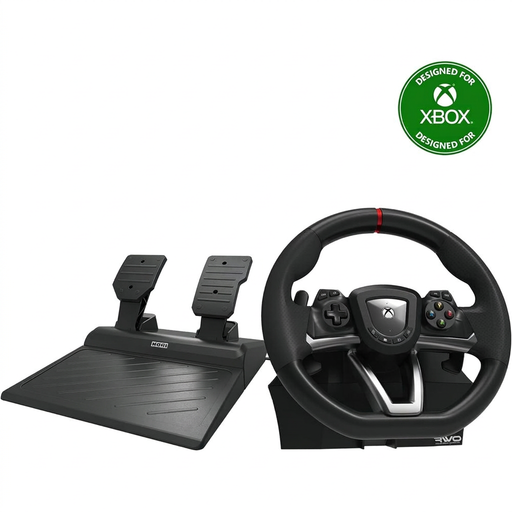
Hori Overdrive racing wheel with pedals, 270 degrees, black
A wheel and pedal set for Xbox or Windows 10, with a desk clamp also listed in the product description.
The stated steering angle is 270 degrees. Check that this version is supported by your game and platform.
Joybuy
 No image available
Logitech G923 wheel with pedals, black, PC and Xbox
A wheel and pedal set for PC or Xbox. The product description mentions force feedback and a progressive brake pedal.
Logitech says TRUEFORCE depends on integration in the game. Check whether it’s supported by the hill-climb game you play.
Joybuy
 No image available
Thrustmaster T98-X Ferrari 296 GTB
The product description lists a wheel and pedal set for PC and Xbox, with a desk clamp.
The stated steering angle is 240 degrees. According to the product description, the clamp is designed for desk tops up to 4,5 cm thick. Measure your desk and check the stability of your complete setup.
Joybuy
 No image available
Thrustmaster T598-P Direct Axial Drive
A wheel with Direct Axial Drive force feedback for PC, PS5 or PS4; according to the product description, the set includes two pedals.
The product description lists a constant torque of 5 Nm and pedals with adjustable resistance. Check that your game and platform are supported.
Joybuy
 No image available
Hori Racing Wheel Apex for PC, PS4 and PS5
A wheel and pedal set for PC or PlayStation, with programmable settings.
The stated steering angle is 270 degrees. The product description mentions vibration feedback, which isn’t the same as force feedback.
Joybuy
Frequently asked questions
Will a new wheel configure the display across my multiple monitors?
No. In iRacing, you set up the display across multiple monitors separately, for example as a window spanning three screens or using a graphics card’s display group. These instructions apply to iRacing and don’t confirm that every other game offers the same options.
Do three screens need to be the same size for iRacing?
For use with AMD Eyefinity, iRacing specifies three screens with the same resolution. Using the same make or model is recommended, but not required. iRacing advises against using three screens of different sizes, as they can be difficult to align.
How do I mount the MOZA R5 on a desk?
MOZA says the clamp included with the R5 bundle fits desk tops up to 50 mm thick. Measure your desk and follow the mounting instructions. That thickness limit alone doesn’t tell you whether your desk will be stable with the wheel, pedals and screens in place.
What should I check if my Thrustmaster wheel doesn’t respond properly after installation?
Check the connection, game settings and manual for your exact model. Thrustmaster, for example, publishes separate PC instructions for the T300 series; don’t apply them to other wheels without checking first.
Can I return a wheel bought online in the Netherlands within 14 days?
According to the Dutch Government, in many cases you have a 14-day cooling-off period when buying from a business at a distance. The example given doesn’t cover purchases from private sellers; check the terms of your specific purchase.


