
Drivers tackling long stints
If you practise for longer virtual race sessions, look for comfortable controls, a secure mounting solution and a pedal set-up that stays usable throughout your session.


First, choose a racing wheel that’s compatible with your PC or console and can be securely attached to your desk or rig. Then check the brake controls and exactly what’s included in the box. A direct-drive bundle and a gear-driven bundle use different drive systems, but neither will fix a poorly positioned monitor or pedals that move around. Set up your monitor from your usual seating position; iRacing bases its single-monitor settings on your viewing distance and screen width.
If you practise for longer virtual race sessions, look for comfortable controls, a secure mounting solution and a pedal set-up that stays usable throughout your session.
If brake control is your main consideration, compare the pedals included with the upgrade you’re considering. A load cell brake isn’t included as standard in every bundle.
If you play on a console or want to mount your wheel to a desk, check the full model variant, platform compatibility and the mounting hardware included.
First, check that the wheel suits your platform and set-up. Then compare the pedal controls and what’s included in the bundle, and adjust your single-monitor view independently of your wheel choice.
| What to consider | What should you check? | Who should pay particular attention? |
|---|---|---|
| A stable, practical set-up | Check whether a desk clamp is included or a rig is required, and consider where the pedals will sit. With a single monitor, also set the viewing distance and screen width. | If you spend a long time racing at one desk, you’ll want the mounting and controls to suit your seating position. Around 31% of consumers prioritise a stable set-up for long stints. |
| Brake controls | Check whether the brake measures pedal position or pressure, and whether any load cell upgrade is compatible with your exact pedal set. | If repeated braking is your main consideration, compare the included pedal with the brake control you’re looking for. Around 25% of consumers prioritise brake controls. |
| Platform and game compatibility | Check the full model variant and whether it supports your console, PC and specific game. | If you use a console, you’ll want to make sure you choose the right version for that platform. Around 25% of consumers put compatibility first. |
| Bundle contents and future upgrades | Compare what’s in the box and check whether any brake upgrade or other component you want is compatible. | If you want to start with a compact set-up and upgrade components later, it helps to consider the bundle and potential upgrades together. Around 19% of consumers prioritise bundle contents and upgrade options. |
For the Fanatec CSL Pedals, the separate CSL Pedals Load Cell Kit replaces the standard brake. MOZA describes the SR-P Lite pedals included with the R5 bundle as using Hall sensors; this isn’t a load cell specification.
Check the exact pedal model and what’s in the box, and make sure any upgrade you want is compatible.
A load cell kit may be a separate upgrade. Fanatec’s kit is only compatible with CSL Pedals.
Thrustmaster lists separate T598 versions for PlayStation and PC, and for Xbox and PC. The model name alone doesn’t make these variants interchangeable.
Before buying, compare the full platform designation with your console and check compatibility with your game.
An inadequately secure mount can cause problems during use. Simucube specifically warns about installations that aren’t rigid enough for the Simucube 2.
Follow the mounting and safety instructions for your model, and check the mount before a long session. If your set-up comes loose, stop and secure it before carrying on.
If your existing mount isn’t sturdy enough, you may need a different mounting solution or a rig.
For a single monitor, iRacing bases its monitor settings on screen width and the distance from your eyes to the screen. A different wheel won’t change those measurements.
First, adjust the screen from your usual seating position. Then decide which wheel and pedals suit the way you play.
Fanatec describes its 5 Nm CSL DD QR2 Ready2Race bundle as a PC set with a base, wheel, CSL Pedals and desk clamp.
MOZA describes its R5 Racing Bundle as a PC set combining a base, wheel, SR-P Lite pedals and desk clamp.
The T598 is available in separately specified PlayStation/PC and Xbox/PC versions.
The G923 is a wheel and pedal set available in different platform versions. Logitech also offers separate PRO Racing Pedals.
This selection includes wheel and pedal sets for PC, Xbox and PlayStation. Check which variant suits your platform for each model, and whether the pedal controls described meet your needs.
 No image available
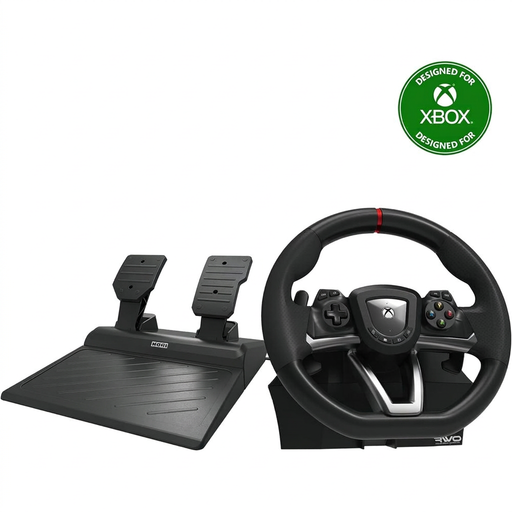
An option for a desk set-up with Xbox or PC games; the description mentions an included clamp and pedals.
The stated steering angle is 270 degrees. Supported platforms listed are Xbox Series X|S, Xbox One and Windows 10.
 No image available
A complete wheel and pedal set for PC or Xbox drivers. Check that the version is compatible with your specific platform.
The product description lists a maximum steering angle of 900 degrees, TRUEFORCE and a pressure-sensitive braking system.
 No image available
The description lists compatibility with Xbox and PC, plus a quick-release clamp for tables and desks up to 4.5 cm thick.
The stated steering angle is 240 degrees.
 No image available
A direct-drive set for PlayStation 5, PlayStation 4 and PC, with two pedals included.
The stated specifications list 5 Nm of constant torque and pedals with adjustable resistance.
 No image available
A PC set with a wheel, separate accelerator and brake pedals, and desk clamps. Check that the type of steering feedback suits your simulator.
The product description lists vibration feedback, but not motorised force feedback. The stated steering angle is 270 degrees.
No. Steering force won’t adjust your monitor. For a single monitor, iRacing asks you to measure the distance from your eyes to the screen and the screen width; the setting is designed for use with iRacing.
That depends on the pedal set. Fanatec describes a CSL Pedals Load Cell Kit that replaces the standard brake and is only compatible with CSL Pedals. So, check the exact pedal model before choosing an upgrade.
Stop driving and secure the mount before carrying on. For its Simucube 2, Simucube advises using the Safe Torque Off button if the installation isn’t secure enough. For other models, follow their specific safety instructions.
According to ACM ConsuWijzer, online purchases generally come with a statutory cooling-off period of up to 14 days after delivery, with some exceptions. You’re also entitled to a product that meets what you could reasonably expect; if a product is faulty, the retailer is your point of contact. An additional guarantee doesn’t replace this statutory right.