Who is this choice for?

Practising consistent braking points

You want to practise brake pressure and timing repeatedly, so you’re paying attention to pedal type, calibration and a secure mounting setup. iRacing Support explains how to calibrate connected controls, while Fanatec specifies a load-cell upgrade for certain CSL pedals.

Racing across multiple monitors

You want to see and position track references clearly. iRacing Support treats display settings and wheel choice as separate settings and decisions.

Putting together a complete setup

You’re looking for a set that works with your gaming platform and want to know in advance which pedals, clamp and upgrades are included. Product information from Fanatec, Thrustmaster and MOZA describes different bundle contents and upgrade options.

What should you look for when buying?

Complete set for PC or Xbox

A good fit if: you want to buy the wheel and pedals together and choose the right platform version.

Keep in mind: check the brake pedal and whether your game supports any feedback features.

Direct drive for PC

A good fit if: you want to compare PC bundles and may want to add a compatible brake upgrade later.

Keep in mind: a load-cell upgrade isn’t included with the Fanatec bundle described and is only compatible with CSL pedals.

Direct drive for PS5, PS4 or PC

A good fit if: you’re looking for a complete T598 set with two pedals for one of the platforms listed.

Keep in mind: a separate upgrade is available to add a load-cell brake to the Raceline Pedals LTE.

PC bundle with SR-P Lite pedals

A good fit if: you want to compare a MOZA R5 bundle with a desk clamp and SR-P Lite pedals.

Keep in mind: MOZA lists a peak torque of 5.5 Nm; accessories for SR-P and SR-P Lite aren’t necessarily interchangeable.

What to consider What to look for Who should consider this?
Repeatable braking Check whether the pedal has a load cell or is only available as a separate upgrade, then calibrate it in your simulator. If I want to practise braking at the same point lap after lap, I focus on pedal type and calibration; around 31% of consumers prioritise repeatable braking.
References across multiple screens Check the multi-monitor mode, screen geometry and viewing distance in the simulator you use. If I want braking markers to stay clearly visible across my multi-monitor setup, I look at the display settings separately from the wheel; around 25% of consumers prioritise screen references.
Platform and what’s included Compare the exact version with your PC or console, and check whether the wheel and pedals are included. If I’m looking for a complete setup that works with my gaming platform, I want to know what’s in the box beforehand; around 25% of consumers prioritise platform compatibility and a complete set.
Mounting and upgrades Check how to secure both the wheel and pedals, and which upgrades are sold separately. If I want to attach my setup to a desk or upgrade it later, I want to know which parts I’ll need; around 19% of consumers focus on mounting and upgrades.

Common mistakes

  • Assuming a T598 servo base on its own is a complete set

    A servo base isn’t the same as the complete T598 version with a wheel and Raceline Pedals LTE pedals.

    Compare the exact product title and the listed contents before weighing up different versions.

    With a standalone base, you’ll need to check separately which wheel and pedal components you need.

  • Assuming every brake pedal is a load-cell brake

    A standard or adjustable brake pedal isn’t automatically the same as a pressure-sensing load-cell brake.

    Check the sensor type of the pedals included and whether an upgrade is compatible with that exact pedal set.

    A compatible load-cell upgrade may be a separate purchase.

  • Buying a new wheel to correct screen references

    iRacing Support treats the three-screen setup and viewing angle as display settings that are separate from your wheel choice.

    Adjust your simulator’s display first, then decide which wheel and brake pedal are right for you.

  • Assuming the manufacturer’s warranty covers all your legal rights

    ACM ConsuWijzer distinguishes between a manufacturer’s or seller’s warranty and your statutory rights if a product is faulty.

    Keep your purchase and product details, and contact the seller if there’s a fault.

Brands to compare

Fanatec

The CSL DD QR2 Ready2Race bundle is a PC set with direct drive and a separate upgrade option for certain CSL pedals.

  • Fanatec lists a 5 Nm base, a wheel, CSL pedals and a desk clamp as part of the bundle.
  • According to Fanatec, the CSL Load Cell Kit is a separate upgrade and is only compatible with CSL pedals. The CSL DD base isn’t PlayStation-compatible.

Thrustmaster

The complete T598 version is designed for PS5, PS4 and PC, and includes a Raceline Pedals LTE set.

  • For this version, Thrustmaster specifies 5 Nm of constant torque and two included pedals.
  • A load-cell brake requires the separate Raceline upgrade; the standalone T598 servo base isn’t the same as the complete set.

Logitech G

The G923 is a wheel and pedal set, available in versions for PC/PlayStation or PC/Xbox.

  • Logitech lists a pressure-sensitive braking system and TRUEFORCE.
  • A pressure-sensitive brake isn’t the same as an included load-cell brake. TRUEFORCE requires integration with the game you’re playing.

MOZA Racing

The R5 Racing Bundle combines a direct-drive base with a wheel, SR-P Lite pedals and a desk clamp for PC.

  • MOZA lists a peak torque of 5.5 Nm for the R5.
  • Check whether accessories are designed for SR-P or SR-P Lite; these versions aren’t necessarily interchangeable.

Racing wheels on Joybuy

This selection includes wheel and pedal sets for PC, Xbox and PlayStation, with a range of mounting and pedal options. Before buying, check the platform compatibility, contents and limitations of the specific model.
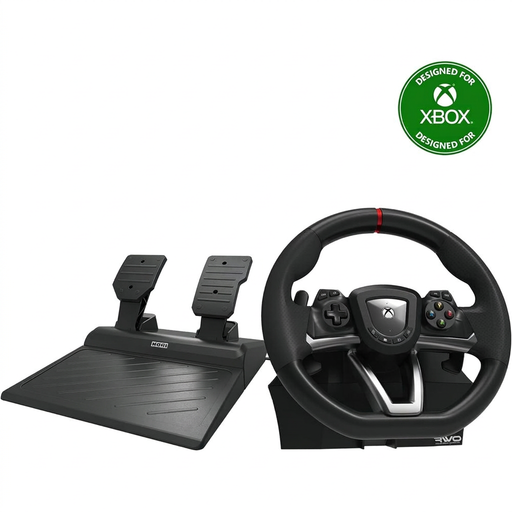
Hori Overdrive racing wheel with pedals for PC and Xbox, 270 degrees

Hori Overdrive Racing Wheel PC/Xbox Series X|S/Xbox One

A wheel and pedal set for Windows 10 and Xbox Series X|S or Xbox One, with a desktop clamp for mounting on a flat surface.

The product description lists accelerator and brake pedals, and a 270-degree steering angle.

View at Joybuy

Logitech G G923 wheel with pedals for PC and Xbox

Logitech G G923 Black, PC/Xbox version

A wheel and pedal set for PC and Xbox. The product description lists a progressive brake pedal and adjustable pedal sensitivity via G HUB on PC.

The product description states a maximum steering angle of 900 degrees. TRUEFORCE effects depend on integration with the game you’re playing.

View at Joybuy

Trust GXT 289 Movi Racing Wheel with pedals for PC

Trust GXT 289 Movi Racing Wheel with pedals for PC

A PC set with separate accelerator and brake pedals and desk clamps; the product description lists a USB connection.

The steering angle is 270 degrees. The description mentions vibration feedback, not motorised force feedback.

View at Joybuy

Thrustmaster T98-X Ferrari 296 GTB wheel with pedals

Thrustmaster T98-X Ferrari 296 GTB

A wheel and pedal set for Xbox Series, Xbox One and PC. The product description lists three driving-assist profiles and a quick clamp for desks up to 4.5 cm thick.

Check that the stated desk or table thickness is suitable for your setup.

View at Joybuy

Thrustmaster T598-P Direct Axial Drive wheel with pedals for PS5, PS4 and PC

Thrustmaster T598-P Direct Axial Drive, PS5/PS4/PC

A wheel and pedal set for PS5, PS4 and PC, with two sensor pedals whose resistance can be adjusted according to the product description.

The product description lists 5 Nm of constant torque. The load-cell upgrade for the Raceline Pedals LTE is described separately.

View at Joybuy

Frequently asked questions

Will a direct-drive wheel automatically make braking points easier to see across three monitors?

No, a direct-drive wheel won’t change the image geometry of your monitors. iRacing Support covers three-screen configuration separately from wheel choice, so check the display settings and viewing distance in the simulator you use.

How should I set up the brake pedal before practising braking points?

Calibrate the connected pedal in your simulator. iRacing Support recommends different Brake Force Factor settings for load-cell pedals and standard pedals; follow the settings for the pedal type and simulator you use.

Do the direct-drive bundles described include a load-cell brake as standard?

No, the standard Fanatec CSL DD Ready2Race and Thrustmaster T598 versions described here don’t include the load-cell upgrades mentioned. Fanatec and Thrustmaster list separate upgrades for specific models, so check what’s included in the version you’re considering.

What can I do if a wheel set I bought online doesn’t suit my setup?

According to ACM ConsuWijzer, online consumer purchases generally come with a cooling-off period of up to 14 days after delivery, subject to statutory exceptions. Your statutory rights if a product is faulty are separate from any manufacturer’s warranty; contact the seller if there’s a fault.
