
Practising consistent braking points
You want to learn to apply the same braking input lap after lap, and are looking for a brake type you can adjust to suit you.


First, choose pedals that are securely mounted to your rig and work with your PC or console. A load cell brake measures the force you apply rather than just the pedal position. You’ll still need to set up and calibrate the resistance and simulation properly, though; the sensor type alone won’t guarantee faster lap times.
You want to learn to apply the same braking input lap after lap, and are looking for a brake type you can adjust to suit you.
You want the brake resistance, pedal position and mounting to suit your seating position and remain stable throughout a long session.
You want to know in advance whether the pedals work independently with your PC or need to connect through a compatible wheel base, and which brake upgrade is included in the set you’ve chosen.
First, check how your setup is mounted and connected. Then decide which brake type and settings suit the braking input you want to practise during long sessions.
| What to consider | What should you check? | Who is this important for? |
|---|---|---|
| Repeatable braking input | Check the brake sensor type, adjustable resistance and calibration settings in your simulation. | If I want to practise braking points, I want to learn to control my braking input deliberately. Around 33% of consumers prioritise repeatable braking input. |
| Controls and mounting | Check the pedal angle, spacing and mounting points; make sure your cockpit, wheel stand or floor remains stable with the brake resistance you choose. | During long sessions, I want a comfortable pedal position and a stable setup. Around 27% of consumers prioritise controls and mounting. |
| Connectivity with your setup | Check the exact model, your PC or console, the wheel base and the connection required. | If I want to use my existing PC or console, I want to know in advance how the pedals connect. Around 20% of consumers prioritise connectivity. |
| Bundle and upgrades | Compare what’s included in the exact version and check which brake upgrade or other components come with it. | I want to know whether the brake and components I need are included in the set I’ve chosen. Around 20% of consumers consider the complete bundle contents the most important factor. |
Fanatec distinguishes between the standalone CSL Pedals and the CSL Pedals LC bundle. The standalone pedals don’t offer the same braking and connectivity options.
Check the full version and bundle contents. Fanatec says the CSL Pedals LC can connect independently to a PC via USB; on consoles, they connect through a compatible Fanatec wheel base.
Heusinkveld lists a 120 kg load cell sensor for the Sprint and a maximum actual braking force of 65 kg. These are different specifications.
Compare the stated sensor capacity and braking force separately, and take the stability of your setup into account.
Heusinkveld specifies that the Sprint should be mounted to a full frame. For cockpits from other brands, Sim-Lab recommends checking the mounting points and available space.
Before choosing, compare the mounting pattern and available space for the exact pedal set with your cockpit or wheel stand.
The CSL Pedals LC is a three-pedal set for anyone looking for a CSL load cell brake; the standalone CSL Pedals offer different braking and connectivity options.
The T-LCM Pedals combine a load cell brake with adjustable springs and pedal positions.
PRO Racing Pedals are designed for buyers who want to adjust the brake and the position of all three pedals.
Sprint is an adjustable load cell set designed for mounting to a fixed cockpit frame and use with a supported Windows PC.
The XP1 is available as a set with an accelerator and brake pedal, or with an additional clutch pedal.
This selection from Joybuy features racing wheels and pedal sets you can use to practise braking points. Check which pedals and connections are included with each version.
 No image available
A good option if you want to practise braking points with the included pedals; calibrate the wheel and pedals according to the instructions.
Platforms listed in the product name: PC, PS4 and PS5.
 No image available
A complete wheel and pedal set for anyone who wants to practise braking points using pedals from the same set.
The product name lists PC, Xbox One, Xbox Series S and Xbox Series X.
 No image available
A good option if you’re looking for a racing wheel with separate accelerator and brake pedals for use on a PC.
The product name specifies a 270-degree rotation range.
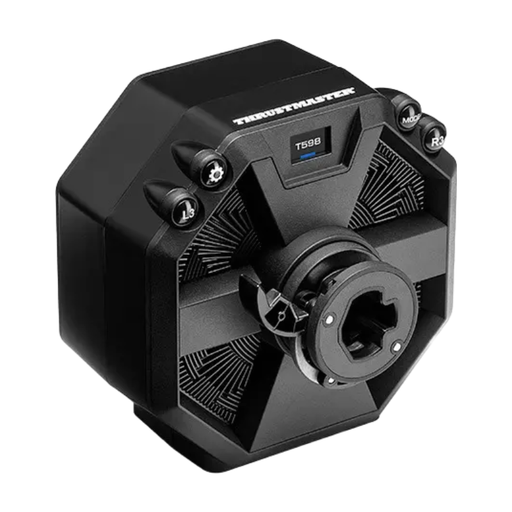 No image available
Check what’s included before choosing this version for braking practice; the product name identifies it as a servo base.
The product name lists PS5, PS4 and PC.
First, calibrate the connected pedals in iRacing. For the load cell pedals mentioned, iRacing recommends a Brake Force Factor of 0,00; for the position-based pedals mentioned, it recommends 1,60–2,00. Follow the instructions for other simulations.
Yes. After changing the brake resistance, the Thrustmaster manual instructs you to carry out the calibration procedure. This involves connecting the set to a PC via USB and disconnecting the RJ12 cable during the procedure.
According to Fanatec, the standalone CSL Pedals don’t have a USB connection of their own. To connect them to a PC, you’ll need either the CSL Pedals Load Cell Kit or a ClubSport USB Adapter; the CSL Pedals LC bundle includes the load cell kit.
The Dutch government states that a 14-day cooling-off period applies in many cases to distance purchases, with some exceptions. Products that don’t meet the terms of the agreement are covered by statutory consumer protection; the Netherlands has no fixed statutory warranty period, and the seller must offer an appropriate solution.