
Players without reliable internet on the go
If you want to race offline during parts of your journey, install the specific game in advance and test your preferred game mode without a network connection.


First, choose a tablet that supports your racing game, then test before you leave whether you can use your preferred game mode without an internet connection. A compact model is easier to hold while you play; a larger screen gives you more room to see the action, but may be less comfortable to hold. Manufacturer figures for screen refresh rate or battery life don’t automatically tell you how your racing game will perform or how long you’ll be able to play.
If you want to race offline during parts of your journey, install the specific game in advance and test your preferred game mode without a network connection.
If you want to play for longer, test your game in advance and check what charging options will be available during the journey.
If you’ll be holding the tablet while you play, you may want to prioritise a comfortable size over the largest possible screen.
Start by checking that your game is available and works offline. Then compare the size and power options with the way you want to play as a passenger on the go.
Best for: passengers who hold the tablet themselves and prioritise a comfortable size.
Trade-off: a more compact screen gives you less room to see the action; also check whether your game is available on iPadOS or Android.
Best for: passengers who value more screen space over a small, easy-to-hold size.
Trade-off: OnePlus says the OnePlus Pad 3 has a 13,2-inch screen and weighs 675 g; consider whether that size suits your seat and playing position.
| What to consider | What to look for | Which consumers? |
|---|---|---|
| Playing without internet | Check that the game is available for the operating system, download any required content and launch your preferred game mode without a network connection in advance. | I want to be able to start my racing game without a connection too; around 36% of consumers make offline play their top priority. |
| Playing time and charging | Test the game at your preferred brightness and check that the available charger, cable and connection are compatible with the model you choose. | I don’t want to have to stop unexpectedly to recharge on a long journey; around 29% of consumers prioritise playing time and charging. |
| Size and handling | Compare the dimensions and weight of the exact variant. Apple lists the iPad mini at 8,3 inches; Lenovo lists the Legion Tab Gen 3 at 8,8 inches. | If I’m holding the tablet myself, ease of handling matters more to me than a large screen; around 21% of consumers prioritise a compact size. |
| Display and game performance | Where possible, look for a test of the exact model with your game. Lenovo lists 165 Hz and OnePlus up to 144 Hz as screen specifications; these figures don’t guarantee the same number of frames per second in a game. | I want to know first whether my game is a good fit for the screen and tablet; around 14% of consumers make display and performance their top priority. |
A screen’s refresh rate isn’t the same as the number of frames per second displayed by a specific racing game.
Think of 165 Hz on the Lenovo Legion Tab Gen 3 and up to 144 Hz on the OnePlus Pad 3 as screen specifications. Where possible, look for tests using the exact model and game.
Electronic Arts lists 20 March 2026 as the end date for Real Racing 3’s online service. This doesn’t, by itself, tell you which other games or game modes are available offline.
Check whether the game is currently available and test the game mode you want to use before you leave.
A maximum video playback figure isn’t a measure of how long you can play your racing game with your settings.
Test the game at your intended brightness and check in advance what charging options you can use during the journey.
If your test shows that the playing time isn’t long enough, you may need a suitable charger and cable; check which charging accessories you already have.
The Legion Tab Gen 3 is a compact Android option to compare if you mainly play while holding the tablet.
The iPad mini (A17 Pro) is the more compact iPadOS option; the 11-inch iPad Air (M4) offers a larger screen within the same ecosystem.
The Pad 3 is a larger Android model for anyone who values extra screen space over a compact size that’s easy to hold.
The Galaxy Tab S11 is an Android option with an 11-inch screen, sitting between compact and very large tablets.
These Android tablets from Joybuy have screens ranging from 11 to 14 inches, giving passengers who want a larger screen for racing games a selection to compare. Check for yourself that your game is available for the model you choose and works without an internet connection.
 No image available
The 14-inch screen may suit passengers who want more room to see the action; check that your racing game is available on this Android model.
The product name lists a 2.2K screen with 2240×1400 resolution, an MTK Helio G100, 128 GB ROM, 10.000 mAh and Android 15. The listed RAM is 20 GB, of which 12 GB is virtual.
 No image available
The 13,4-inch screen gives you a larger size to compare if you want more room to see the action on the go; first check that your racing game is available.
The product name lists a 120 Hz screen, an MTK G99, 256 GB ROM and Android 15.
 No image available
The 11-inch screen is a mid-sized option to consider if you don’t want one of the larger models; check that your racing game is available.
The product name lists Android 16, a 90 Hz IPS screen, 8.000 mAh and 4G LTE.
 No image available
The 12-inch screen may suit passengers who want more room for racing visuals; check game compatibility before you buy.
The product name lists an FHD+ screen, a Helio G100, an 8.800 mAh battery and Android 15.
 No image available
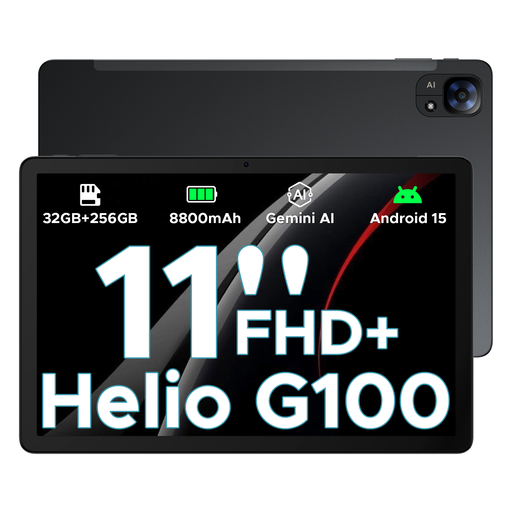
This 11-inch model has a smaller screen than the 12-inch Tab E3+; check that your racing game is available and test your preferred game mode in advance.
The product name lists a 90 Hz FHD+ screen, a Helio G100, an 8.800 mAh battery and Android 15.
Install the specific game and any additional content before you leave, then test your preferred game mode without a network connection. Electronic Arts lists 20 March 2026 as the end date for Real Racing 3’s online service, so also check whether the game is currently available and don’t assume other titles will work offline.
No. A stated battery capacity or maximum video playback figure isn’t a measurement taken while playing your racing game. Test the game with your preferred settings and check in advance what charging options will be available.
A compact model is easier to hold if you’ll be holding the tablet yourself; a larger screen is a better fit if extra room to see the action matters more. Compare the dimensions of the exact variant with your seating and playing position, and check that your game is available for the operating system you choose.
Not if the driver is holding the tablet. The Dutch government lists tablets among the mobile devices that drivers must not hold while driving, so this buying advice is aimed at passengers.